# The screen display of paraview is strange.
**URL:** https://discourse.paraview.org/t/the-screen-display-of-paraview-is-strange/4818
**Category:** ParaView Support
**Created:** [July 11, 2020, 10:06pm UTC](https://discourse.paraview.org/t/the-screen-display-of-paraview-is-strange/4818 "2020-07-11T22:06:51Z")
**Posts on this page:** 5
**Page:** 1
### Author:  [@otyakenn](https://discourse.paraview.org/u/otyakenn)
#### Post date: [July 11, 2020, 10:06pm UTC](https://discourse.paraview.org/t/the-screen-display-of-paraview-is-strange/4818/1 "2020-07-11T22:06:52Z")
Hello, Everyone.
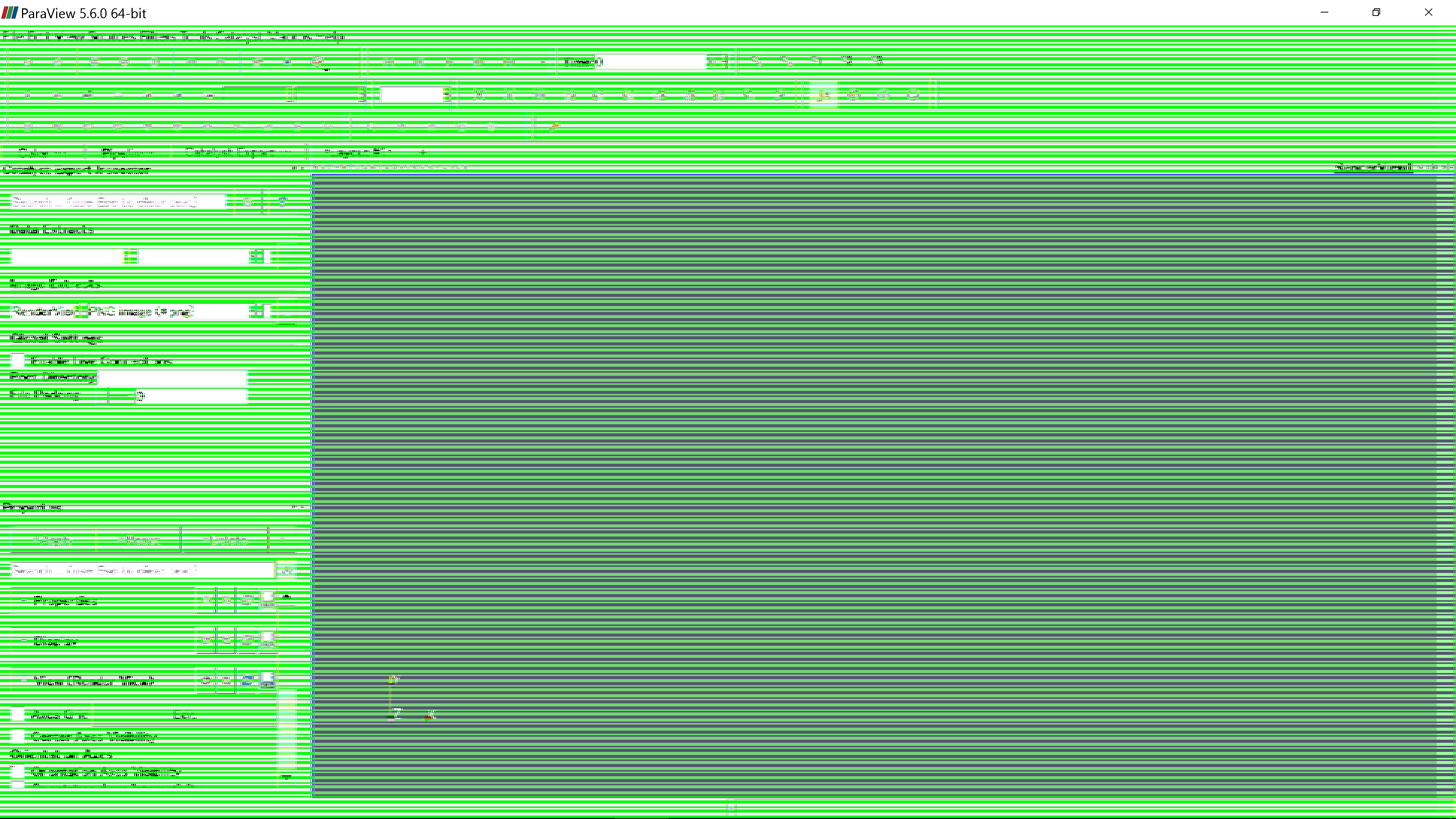
I have used paraview 5.6.0 for about one year. The other day, paraview was suddnly crashed. After that, the screen display green line like picture.
This problem doesn’t occur in other software on my PC. This problem occurs when I use paraview.
Paraview function such as opening file and filter works correctly, but only display doesn’t work well.
I tried reinstall paraview, but problem is not solved.
I also tried the other version of paraview, 5.8.0 and 5.6.1. In version 5.6.1, same problem occur. In version 5.8.0, problem doesn’t occur.
But I want to use version 5.6, because my PC freezes in version 5.8 when I try to get data via pvserver.
Could you help me to solve the problem?
---
### Author:  [@mwestphal](https://discourse.paraview.org/u/mwestphal)
#### Post date: [July 13, 2020, 8:28am UTC](https://discourse.paraview.org/t/the-screen-display-of-paraview-is-strange/4818/2 "2020-07-13T08:28:32Z")
That’s a new one.
Please share :
OS
GPU
GPU driver version
Any other oddities like VM, special windows managers…
---
### Author:  [@otyakenn](https://discourse.paraview.org/u/otyakenn)
#### Post date: [July 13, 2020, 2:57pm UTC](https://discourse.paraview.org/t/the-screen-display-of-paraview-is-strange/4818/3 "2020-07-13T14:57:05Z")
Thank you for replying.
OS: windows10 Home(version 1903)
GPU: Intel® UHD Graphics 620
GPU driver: version 27.20.100.8280
I done’t think that I use special environment.
Thank you
---
### Author:  [@mwestphal](https://discourse.paraview.org/u/mwestphal)
#### Post date: [July 13, 2020, 3:07pm UTC](https://discourse.paraview.org/t/the-screen-display-of-paraview-is-strange/4818/4 "2020-07-13T15:07:39Z")
That may be a new version of :
> [@I am using ParaView 5.8.0 on Windows 10, and my GUI is completely broken, with missing icons! What is happening?](https://discourse.paraview.org/t/i-am-using-paraview-5-8-0-on-windows-10-and-my-gui-is-completely-broken-with-missing-icons-what-is-happening/4509/1):
>
> This is due to the "Intel Driver Bug., You can find all info about it here: [https://gitlab.kitware.com/paraview/paraview/-/issues/19364](https://gitlab.kitware.com/paraview/paraview/-/issues/19364) Possible solutions are: Upgrade to ParaView 5.8.1 or more recent Use another GPU (eg: NVIDIA instead of Intel) Downgrade your Intel driver to the version before 26.20.100.6708 Upgrade your Intel driver to the version after 26.20.100.7528 Use mesa instead : [How to run ParaView (including the binary release) using Mesa on Windows](https://discourse.paraview.org/t/how-to-run-paraview-including-the-binary-release-using-mesa-on-windows/4321/2) Downgrade to ParaView…
Can you try the different solution proposed there ?
---
### Author:  [@otyakenn](https://discourse.paraview.org/u/otyakenn)
#### Post date: [July 13, 2020, 3:28pm UTC](https://discourse.paraview.org/t/the-screen-display-of-paraview-is-strange/4818/5 "2020-07-13T15:28:28Z")
Thank you for replying.
I disabled my GPU driver and restarted paraview. As the results, green line disappeared. So, the cause of problem should be my GPU.
Then, I try to use different version of GPU driver.
Thank you for helping.