# Timesteps from COMSOL vtk writer are read as separate data fields
**URL:** https://discourse.paraview.org/t/timesteps-from-comsol-vtk-writer-are-read-as-separate-data-fields/6329
**Category:** ParaView Support
**Tags:** vtk
**Created:** [January 28, 2021, 3:16pm UTC](https://discourse.paraview.org/t/timesteps-from-comsol-vtk-writer-are-read-as-separate-data-fields/6329 "2021-01-28T15:16:19Z")
**Posts on this page:** 15
**Page:** 1
### Author:  [@fvg](https://discourse.paraview.org/u/fvg)
#### Post date: [January 28, 2021, 3:16pm UTC](https://discourse.paraview.org/t/timesteps-from-comsol-vtk-writer-are-read-as-separate-data-fields/6329/1 "2021-01-28T15:16:19Z")
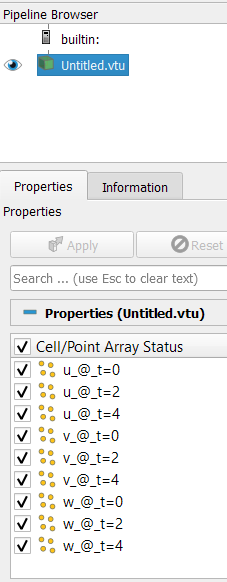
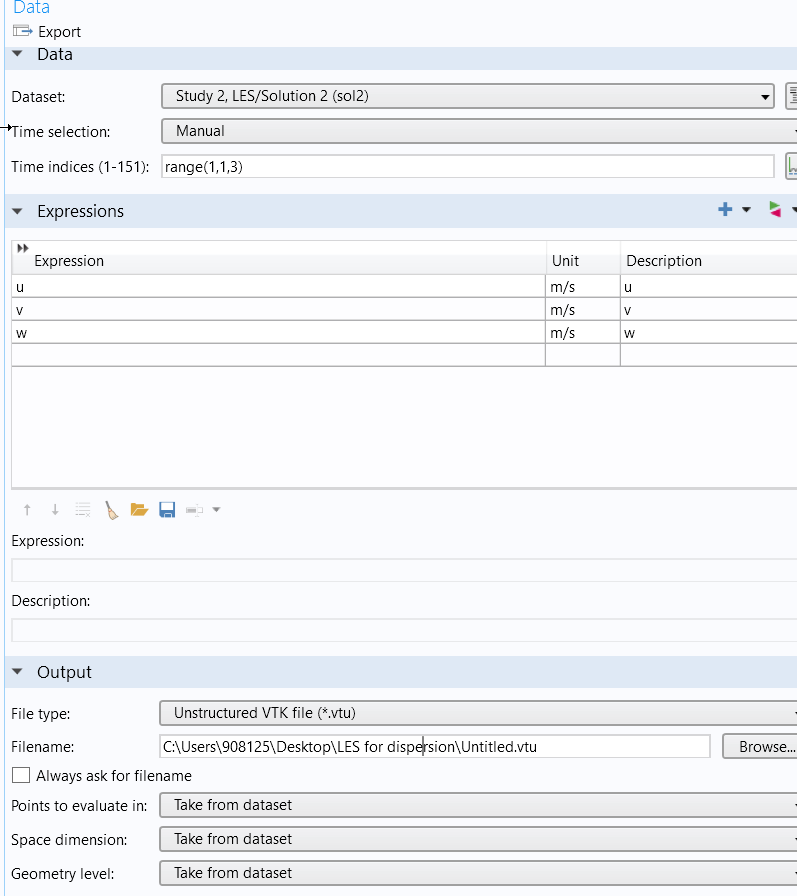
When I try to export transient results from a COMSOL simulation to paraview via vtk export, I always end up with separate field names, instead of the field names in separate time steps. See images below.
Is there a method / filter to make sure that these are converted to timesteps?
Or should I use a different method to export my results?
---
### Author:  [@mwestphal](https://discourse.paraview.org/u/mwestphal)
#### Post date: [January 28, 2021, 3:33pm UTC](https://discourse.paraview.org/t/timesteps-from-comsol-vtk-writer-are-read-as-separate-data-fields/6329/2 "2021-01-28T15:33:50Z")
You should change the way you are exporting your data.
If that is not possible, you can convert your data using ParaView into a temporal one but it requires manual creation of a .pvd file.
Let me know if you need help with that.
---
### Author:  [@fvg](https://discourse.paraview.org/u/fvg)
#### Post date: [January 28, 2021, 3:46pm UTC](https://discourse.paraview.org/t/timesteps-from-comsol-vtk-writer-are-read-as-separate-data-fields/6329/3 "2021-01-28T15:46:57Z")
Well, I can export the separate time steps in separate vtk files (then the field names are plain u, v, w). Otherwise there is little I can change in COMSOL itself I guess (export to txt is possible).
Would that make it easier to load into paraview?
And how would I make a pvd file out of this?
THanks for your help
---
### Author:  [@mwestphal](https://discourse.paraview.org/u/mwestphal)
#### Post date: [January 28, 2021, 3:52pm UTC](https://discourse.paraview.org/t/timesteps-from-comsol-vtk-writer-are-read-as-separate-data-fields/6329/4 "2021-01-28T15:52:21Z")
> Would that make it easier to load into paraview?
Yes
> And how would I make a pvd file out of this?
You can either create .pvd like this one: [merged.pvd](https://discourse.paraview.org/uploads/short-url/sOlAOZyY5XpMVwDrhAC5LZwVuee.pvd) (3.4 KB)
Or use the time series mechanism with the naming of your files:
[https://docs.paraview.org/en/latest/UsersGuide/dataIngestion.html#handling-temporal-file-series](https://docs.paraview.org/en/latest/UsersGuide/dataIngestion.html#handling-temporal-file-series)
---
### Author:  [@fvg](https://discourse.paraview.org/u/fvg)
#### Post date: [January 28, 2021, 4:02pm UTC](https://discourse.paraview.org/t/timesteps-from-comsol-vtk-writer-are-read-as-separate-data-fields/6329/5 "2021-01-28T16:02:44Z")
Great!
I need a macro (‘method’ in COMSOL) to export them as separate files, with the correct name. But then it works as your link proposed.
The time is then not fully correct, that would probably be fixed by the pvd you mention.
But for simple animation purposes, your method is perfect and will use that for now. Thanks a lot!
---
### Author:  [@Sersol](https://discourse.paraview.org/u/Sersol)
#### Post date: [March 1, 2021, 7:50am UTC](https://discourse.paraview.org/t/timesteps-from-comsol-vtk-writer-are-read-as-separate-data-fields/6329/6 "2021-03-01T07:50:11Z")
I have just tried this workflow (COMSOL - VTU - PVD) above, and it’s working without any issues for transient results. Thanks for the discussion.
---
### Author:  [@TienNg](https://discourse.paraview.org/u/TienNg)
#### Post date: [November 10, 2021, 2:02pm UTC](https://discourse.paraview.org/t/timesteps-from-comsol-vtk-writer-are-read-as-separate-data-fields/6329/7 "2021-11-10T14:02:27Z")
Hi Mathieu,
I am having the same problem. There is only one way, that I know of, to export .vtu files from COMSOL and when importing to Paraview, each timestep is a fieldname basically. Can you explain more on how can I use Paraview to manually create .pvd files and how can I merge them? I am having around 70 fileldnames (such as Pressure\_@_t=1, Pressure_@\_t=2,etc…).
After import the .vtu files into Paraview, I tried to save them as .pvd as you said but they dont seem to do anything.
Thanks.
Tien
---
### Author:  [@Sersol](https://discourse.paraview.org/u/Sersol)
#### Post date: [November 10, 2021, 2:55pm UTC](https://discourse.paraview.org/t/timesteps-from-comsol-vtk-writer-are-read-as-separate-data-fields/6329/8 "2021-11-10T14:55:36Z")
Hi Tien,
Drag all vtu data in paraview pipeline browser and then file → save data → .pvd (do select write time steps option before saving from the box).
You can also do it manually just writing a PVD file with text editor such as follows:
```auto
```
In order to make this work, you should put all VTU data under the “auto directory”. “auto.pvd” and “auto directory” should also be under the same directory to find VTU data. By dragging “auto.pvd” in paraview pipeline, it should automatically read all VTU data.
---
### Author:  [@TienNg](https://discourse.paraview.org/u/TienNg)
#### Post date: [November 10, 2021, 3:24pm UTC](https://discourse.paraview.org/t/timesteps-from-comsol-vtk-writer-are-read-as-separate-data-fields/6329/9 "2021-11-10T15:24:03Z")
> [@Sersol](#):
>
> auto direc
Hi Serkan,
Thanks for a quick reply. I have followed the instruction and it still does not seem to work. I have got the .pvd file and also the folder and they are both in the same directory. But when I drag the .pvd file into Paraview, it still does not combine all the fieldname.
Here is the .vtu file I have exported from COMSOL ([Untitled.vtu - Google Drive](https://drive.google.com/file/d/1rVuH8fbxFo70lLGUby4G2Je6ZJKHorV9/view?usp=sharing)), I cant do an animation with this type of export.
---
### Author:  [@fvg](https://discourse.paraview.org/u/fvg)
#### Post date: [November 10, 2021, 3:31pm UTC](https://discourse.paraview.org/t/timesteps-from-comsol-vtk-writer-are-read-as-separate-data-fields/6329/10 "2021-11-10T15:31:56Z")
Hi Tien, I guess that it helps to export all the timesteps as separate vtu files.
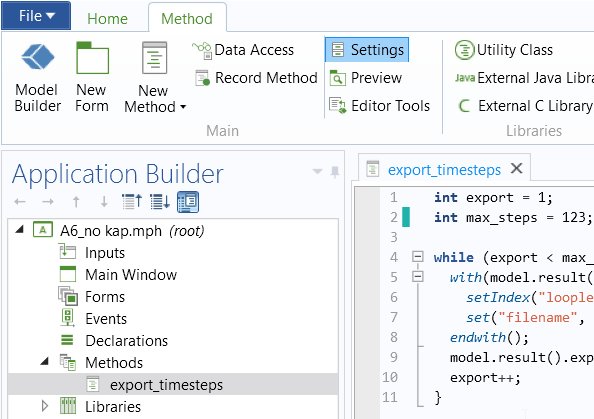
I used a method for that which looks like this:
The maxsteps is the max index of the results. For the rest make sure that the folder is correct, and that
You can also export all the steps manually, make sure that the numbering increases with every step.
int export = 1;
int max\_steps = 12;
while (export \< max\_steps) {
with(model.result().export(“data1”));
setIndex(“looplevelindices”, export, 0);
set(“filename”, “C:\vtk export\res\_”+export+".vtu");
endwith();
model.result().export(“data1”).run();
export++;
}
---
### Author:  [@TienNg](https://discourse.paraview.org/u/TienNg)
#### Post date: [November 10, 2021, 3:37pm UTC](https://discourse.paraview.org/t/timesteps-from-comsol-vtk-writer-are-read-as-separate-data-fields/6329/11 "2021-11-10T15:37:33Z")
Hi Frank,
Thank you. I was also about to ask how you can export multiple .vtu from COMSOL? and with a large number of timesteps, I dont think exporting it manually and changing the name accordingly is a viable option.
Where do you put that piece of code in COMSOL?
---
### Author:  [@fvg](https://discourse.paraview.org/u/fvg)
#### Post date: [November 10, 2021, 3:46pm UTC](https://discourse.paraview.org/t/timesteps-from-comsol-vtk-writer-are-read-as-separate-data-fields/6329/12 "2021-11-10T15:46:51Z")
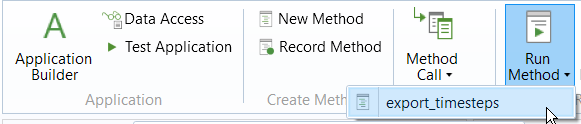
You can use a “method” for this (depending on the version you use).
There are several blogs and movies [Build Simulation Apps from Your COMSOL Multiphysics® Model](https://www.comsol.com/video/build-simulation-apps-from-your-comsol-multiphysics-model).
Sometimes it can be useful to record a method to see the code that is needed.
I use version 5.5 btw.
and then to run them:
---
### Author:  [@Sersol](https://discourse.paraview.org/u/Sersol)
#### Post date: [November 10, 2021, 4:03pm UTC](https://discourse.paraview.org/t/timesteps-from-comsol-vtk-writer-are-read-as-separate-data-fields/6329/13 "2021-11-10T16:03:28Z")
Now I got your problem. You have a single VTU composed of multiple arrays for transient pressure data. I have currently no idea how this dataset could be broken into pieces.
Instead, what Frank proposed sounds wise. Get a “method” in COMSOL to automate data extraction. You should get a VTU extract for each time step. Then the way PVD we discuss above should definitely work.
You exactly have the same data processing problem as Frank had had. You cannot create temporal data from fieldnames saved as point/cell arrays.
---
### Author:  [@TienNg](https://discourse.paraview.org/u/TienNg)
#### Post date: [November 10, 2021, 5:28pm UTC](https://discourse.paraview.org/t/timesteps-from-comsol-vtk-writer-are-read-as-separate-data-fields/6329/14 "2021-11-10T17:28:42Z")
Thanks for the screenshot. I will try to export them this way. I am also on 5.5 as well.
---
### Author:  [@TienNg](https://discourse.paraview.org/u/TienNg)
#### Post date: [November 10, 2021, 5:30pm UTC](https://discourse.paraview.org/t/timesteps-from-comsol-vtk-writer-are-read-as-separate-data-fields/6329/15 "2021-11-10T17:30:16Z")
Thanks Serkan, it should work if I can get COMSOL to export the files that suit Paraview.