# Transform geometry based on input from a table of points
**URL:** https://discourse.paraview.org/t/transform-geometry-based-on-input-from-a-table-of-points/5816
**Category:** ParaView Support
**Tags:** python
**Created:** [November 16, 2020, 5:06pm UTC](https://discourse.paraview.org/t/transform-geometry-based-on-input-from-a-table-of-points/5816 "2020-11-16T17:06:27Z")
**Posts on this page:** 6
**Page:** 1
### Author:  [@Lukasz](https://discourse.paraview.org/u/Lukasz)
#### Post date: [November 16, 2020, 5:06pm UTC](https://discourse.paraview.org/t/transform-geometry-based-on-input-from-a-table-of-points/5816/1 "2020-11-16T17:06:27Z")
This topic appears quite often in the archives but I was not able to figure out how to do this, perhaps because I’m a total vtk/python noob.
I have a geometry file (think of the VTK cow for example) and a time series of csv files with the new centre of gravity and orientation angles. I convert the csv files to points (TableToPoints) and I am trying to use them as input for a filter to translate and rotate my geometry (cow).
The problems I have to solve are:
- how to reference the TableToPoints inputs in the transformation of the cow. The python calculator requires that both datasets are equal if I want to use the input[0].\* and input [1].\* si I guess this is not the right method.
- The transform filter through a python script is probably the way to go but I am at a loss how to reference the TableToPoin inputs. [Animate polydata using programmable filter](https://discourse.paraview.org/t/animate-polydata-using-programmable-filter/2843) is close but the author takes a constant multiplied by the time in `transform.RotateY(-5*t)` and I would like see something like TableToPoints.PointData[“Pitch”]
- ideally I would like to do the rotations and translations myself and simply update the coordinates of the geometry without going through the built in Transform functions, perhaps the programmable filter is the solution then. Is it possibly to simply use the `inputs[0].Points[:,:]` vector and rotate and translate it using custom transformations?
My test setpup looks like this:
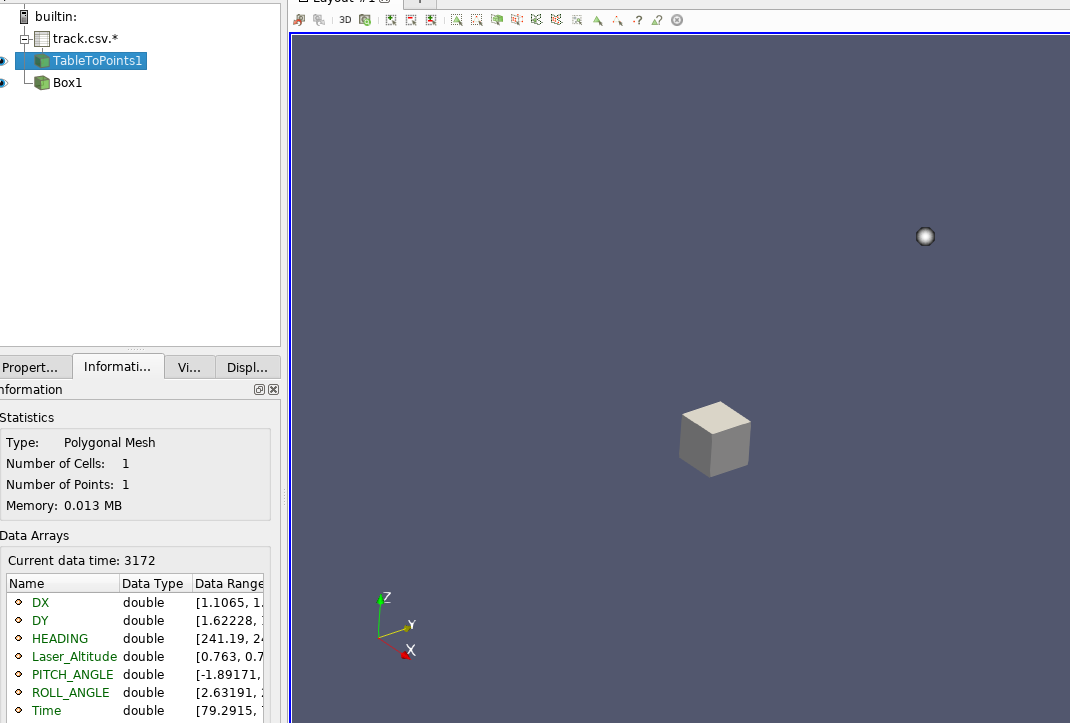
the goal would be to make the box follow the DX,DY,LaserAltitude path and rotate with HEADING(Z), PITCH\_ANGLE(Y) and ROLL\_ANGLE(X).
---
### Author:  [@mwestphal](https://discourse.paraview.org/u/mwestphal)
#### Post date: [November 16, 2020, 5:38pm UTC](https://discourse.paraview.org/t/transform-geometry-based-on-input-from-a-table-of-points/5816/2 "2020-11-16T17:38:39Z")
The programmable filter approach seems to be the right one, you should be able to recover the point data as well.
---
### Author:  [@Lukasz](https://discourse.paraview.org/u/Lukasz)
#### Post date: [November 17, 2020, 9:42am UTC](https://discourse.paraview.org/t/transform-geometry-based-on-input-from-a-table-of-points/5816/3 "2020-11-17T09:42:23Z")
I would appreciate a hint how to do it. My knowledge of programming in Paraview is unfortunately close to zero.
My base script would be this (taken from the wiki):
```auto
pdi = self.GetPolyDataInput()
pdo = self.GetPolyDataOutput()
newPoints = vtk.vtkPoints()
numPoints = pdi.GetNumberOfPoints()
for i in range(0, numPoints):
coord = pdi.GetPoint(i)
x, y, z = coord[:3]
x = x + 1
y = y + 1
z = z + 1
newPoints.InsertPoint(i, x, y, z)
pdo.SetPoints(newPoints)
```
I can operate on the cube’s coordinates but I have no idea how to reference the TabletoToPoints point data in the script.
---
### Author:  [@Lukasz](https://discourse.paraview.org/u/Lukasz)
#### Post date: [November 17, 2020, 9:53am UTC](https://discourse.paraview.org/t/transform-geometry-based-on-input-from-a-table-of-points/5816/4 "2020-11-17T09:53:40Z")
okay, some progress.
```auto
input0=inputs[1]
data0=input0.PointData["DX"]
data1=input0.PointData["DY"]
data2=input0.PointData["Laser_Altitude"]
print(data0,data1,data2)
pdi = self.GetPolyDataInput()
pdo = self.GetPolyDataOutput()
newPoints = vtk.vtkPoints()
numPoints = pdi.GetNumberOfPoints()
for i in range(0, numPoints):
coord = pdi.GetPoint(i)
x, y, z = coord[:3]
x = x + data0
y = y + data1
z = z + data2
newPoints.InsertPoint(i, x, y, z)
pdo.SetPoints(newPoints)
```
I am able to reference the TableToPoints. What is missing is to force the filter to update with each new time step.
…I’m getting there 😉
---
### Author:  [@Lukasz](https://discourse.paraview.org/u/Lukasz)
#### Post date: [November 17, 2020, 10:46am UTC](https://discourse.paraview.org/t/transform-geometry-based-on-input-from-a-table-of-points/5816/5 "2020-11-17T10:46:08Z")
I managed to update the Programmable Filter, yuhuuu.
so I added the RequestInformation Script:
```auto
def setOutputTimesteps(algorithm , timesteps):
"helper routine to set timestep information"
executive = algorithm.GetExecutive()
outInfo = executive.GetOutputInformation(0)
outInfo.Remove(executive.TIME_STEPS())
for timestep in timesteps:
outInfo.Append(executive.TIME_STEPS(), timestep)
outInfo.Remove(executive.TIME_RANGE())
outInfo.Append(executive.TIME_RANGE(), timesteps[0])
outInfo.Append(executive.TIME_RANGE(), timesteps[-1])
setOutputTimesteps(self,(0,0))
```
and it works. It’s some Frankenstein filter which frankly speaking I do not understand but it does the job for now.
---
### Author:  [@Lukasz](https://discourse.paraview.org/u/Lukasz)
#### Post date: [December 3, 2020, 11:11am UTC](https://discourse.paraview.org/t/transform-geometry-based-on-input-from-a-table-of-points/5816/6 "2020-12-03T11:11:11Z")
Just to finish this thread and close it. I achieved exactly what I wanted with the help of:
> [@How to speed up point loop in programmable filter](https://discourse.paraview.org/t/how-to-speed-up-point-loop-in-programmable-filter/5934):
>
> Hi, I have written a programmable filter to perform Euler transformations based on a poly data set and a csv input. The code boils down to a loop over the mesh points and a set of standard matrix transformations of the form for i in range(0, numPoints): coord = pdi.GetPoint(i) x, y, z = coord[:3] x : rotate around ZYX with psi, theta, phi y : rotate around ZYX with psi, theta, phi z : rotate around ZYX with psi, theta, phi newPoints.InsertPoint(i, x, y, z) pdo.SetPoints…
The key point is to avoid loops and use numpy dot product with broadcasting.
Programmable Filter
1. Select geometry and Ctrl+TabletoPoints
TableToPoints should have Keep All Data Arrays ticked
2. Script
```auto
import numpy
#get cog and angles from the cvs file (TableToPoints)
input1=inputs[1]
x_cg=input1.PointData["DX"]
y_cg=input1.PointData["DY"]
z_cg=input1.PointData["Radar_Altitude"]
yaw=float(-input1.PointData["HEADING"]*numpy.pi/180)
pitch=float(input1.PointData["PITCH_ANGLE"]*numpy.pi/180)
roll=float(-input1.PointData["ROLL_ANGLE"]*numpy.pi/180)
#initiliase the geometry class
pdi = self.GetPolyDataInput()
pdo = self.GetPolyDataOutput()
#initialise time (file number actually)
executive = self.GetExecutive()
outInfo = executive.GetOutputInformation(0)
ts= outInfo.Get(executive.UPDATE_TIME_STEP())
t=float(ts)
# from body to inertial frame
R = numpy.array([[cos(yaw)*cos(pitch),cos(yaw)*sin(roll)*sin(pitch)-cos(roll)*sin(yaw),sin(roll)*sin(yaw)+cos(roll)*cos(yaw)*sin(pitch)] , [cos(pitch)*sin(yaw),cos(roll)*cos(yaw)+sin(roll)*sin(pitch)*sin(yaw),cos(roll)*sin(pitch)*sin(yaw)-cos(yaw)*sin(roll)] , [-sin(pitch),cos(pitch)*sin(roll),cos(roll)*cos(pitch)] ])
output.Points = R.dot(inputs[0].Points.T).T
output.Points = (output.Points.T+[x_cg,y_cg,z_cg+1.795]).T
```
1. RequestInformation Script
```auto
def setOutputTimesteps(algorithm , timesteps):
"helper routine to set timestep information"
executive = algorithm.GetExecutive()
outInfo = executive.GetOutputInformation(0)
outInfo.Remove(executive.TIME_STEPS())
for timestep in timesteps:
outInfo.Append(executive.TIME_STEPS(), timestep)
outInfo.Remove(executive.TIME_RANGE())
outInfo.Append(executive.TIME_RANGE(), timesteps[0])
outInfo.Append(executive.TIME_RANGE(), timesteps[-1])
setOutputTimesteps(self,(0,0))
```