# Treating multiple .xmf files as a time series
**URL:** https://discourse.paraview.org/t/treating-multiple-xmf-files-as-a-time-series/14594
**Category:** ParaView Support
**Created:** [May 10, 2024, 3:58am UTC](https://discourse.paraview.org/t/treating-multiple-xmf-files-as-a-time-series/14594 "2024-05-10T03:58:00Z")
**Posts on this page:** 11
**Page:** 1
### Author:  [@hsheldon](https://discourse.paraview.org/u/hsheldon)
#### Post date: [May 10, 2024, 3:58am UTC](https://discourse.paraview.org/t/treating-multiple-xmf-files-as-a-time-series/14594/1 "2024-05-10T03:58:00Z")
I have a series of .xmf files (\*-000.xmf, \*-001.xmf, \*-002.xmf etc), each of which reads 1 timestep from a corresponding .h5 file. Paraview is not recognising these xmf files as a time series, nor does it recognise the time in each individual xmf file. Any suggestions why this isn’t working and how I can fix it?
---
### Author:  [@mwestphal](https://discourse.paraview.org/u/mwestphal)
#### Post date: [May 14, 2024, 12:55pm UTC](https://discourse.paraview.org/t/treating-multiple-xmf-files-as-a-time-series/14594/2 "2024-05-14T12:55:46Z")
Please share your files.
---
### Author:  [@hsheldon](https://discourse.paraview.org/u/hsheldon)
#### Post date: [May 29, 2024, 4:14am UTC](https://discourse.paraview.org/t/treating-multiple-xmf-files-as-a-time-series/14594/3 "2024-05-29T04:14:17Z")
Having some trouble uploading files, is there a size limit?
---
### Author:  [@mwestphal](https://discourse.paraview.org/u/mwestphal)
#### Post date: [May 29, 2024, 5:40am UTC](https://discourse.paraview.org/t/treating-multiple-xmf-files-as-a-time-series/14594/4 "2024-05-29T05:40:31Z")
use [wetranfer.com](http://wetranfer.com)
---
### Author:  [@hsheldon](https://discourse.paraview.org/u/hsheldon)
#### Post date: [May 29, 2024, 10:49pm UTC](https://discourse.paraview.org/t/treating-multiple-xmf-files-as-a-time-series/14594/5 "2024-05-29T22:49:30Z")
I haven’t used that service before. What email address do I send the files to?
---
### Author:  [@mwestphal](https://discourse.paraview.org/u/mwestphal)
#### Post date: [May 30, 2024, 6:10am UTC](https://discourse.paraview.org/t/treating-multiple-xmf-files-as-a-time-series/14594/6 "2024-05-30T06:10:41Z")
you can send to [mathieu.westphal@kitware.com](mailto:mathieu.westphal@kitware.com)
---
### Author:  [@mwestphal](https://discourse.paraview.org/u/mwestphal)
#### Post date: [May 30, 2024, 11:45am UTC](https://discourse.paraview.org/t/treating-multiple-xmf-files-as-a-time-series/14594/7 "2024-05-30T11:45:37Z")
Seems to work fine here, just open the `pflotran_fault_flow-..xmf` file.
---
### Author:  [@hsheldon](https://discourse.paraview.org/u/hsheldon)
#### Post date: [May 30, 2024, 11:02pm UTC](https://discourse.paraview.org/t/treating-multiple-xmf-files-as-a-time-series/14594/8 "2024-05-30T23:02:55Z")
I can open it but it doesn’t give me a time series, it just gives me the last xmf file. There are time increments in the Time drop-down box but they don’t correspond to the xmf files, and choosing different time increments doesn’t change what is displayed.
---
### Author:  [@mwestphal](https://discourse.paraview.org/u/mwestphal)
#### Post date: [May 31, 2024, 8:16am UTC](https://discourse.paraview.org/t/treating-multiple-xmf-files-as-a-time-series/14594/9 "2024-05-31T08:16:11Z")
This is what I see:
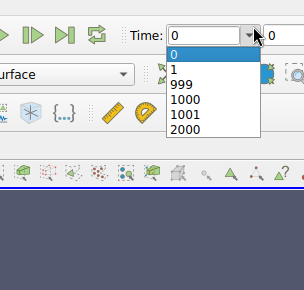
Is that not correct ?
---
### Author:  [@hsheldon](https://discourse.paraview.org/u/hsheldon)
#### Post date: [May 31, 2024, 11:45am UTC](https://discourse.paraview.org/t/treating-multiple-xmf-files-as-a-time-series/14594/10 "2024-05-31T11:45:27Z")
Yes that is correct! But I see something different (which is incorrect):
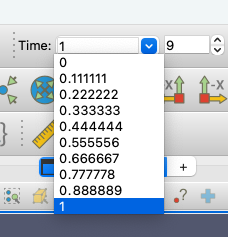
I’m using Paraview 5.12.0 on a Mac.
---
### Author:  [@mwestphal](https://discourse.paraview.org/u/mwestphal)
#### Post date: [May 31, 2024, 11:46am UTC](https://discourse.paraview.org/t/treating-multiple-xmf-files-as-a-time-series/14594/11 "2024-05-31T11:46:44Z")
Works fine on Linux with 5.12.0
maybe @cory.quammen can help.
link to the data: [WeTransfer - Send Large Files & Share Photos Online - Up to 2GB Free](https://wetransfer.com/downloads/fb54570819c27072288c7275ef82ccc720240530071640/d7d2c2f3c625c0575dec221a52eed65e20240530071732/2819ae?trk=TRN_TDL_01&utm_campaign=TRN_TDL_01&utm_medium=email&utm_source=sendgrid)