Dear All,
Using the xml plugin from [Point labels available with PV 5.7? - #7 by jourdain](https://discourse.paraview.org/t/point-labels-available-with-pv-5-7/2478/7), we were able to add text labels to a point cloud in ParaView (Nightly on Mac).
Now, we would like to export the scene to a .vtkjs file to finally allow our colleagues a quick inspection in the [vtk Scene Explorer](https://kitware.github.io/vtk-js/examples/SceneExplorer.html).
Unfortunately, as soon as the Label Representation is selected for our data, the following error message appears upon .vtkjs-export:
```auto
Generic Warning: In vtkPVWebExporter.cxx, line 71
Failed to rename datasets using ParaView proxy name
Traceback (most recent call last):
File "/Applications/ParaView-master-5.10.1-1356-g8c4be40eab.app/Contents/Python/paraview/web/vtkjs_helper.py", line 77, in applyParaViewNaming
renameMap = getRenameMap()
File "/Applications/ParaView-master-5.10.1-1356-g8c4be40eab.app/Contents/Python/paraview/web/vtkjs_helper.py", line 36, in getRenameMap
names = getAllNames()
File "/Applications/ParaView-master-5.10.1-1356-g8c4be40eab.app/Contents/Python/paraview/web/vtkjs_helper.py", line 26, in getAllNames
actorRep = vtkRepInstance.GetActiveRepresentation().GetActor()
AttributeError: 'paraview.modules.vtkRemotingViews.vtkDataLabelRepr' object has no attribute 'GetActor'
```
Do you have any idea what we can do about this? Thank you 🙂
---
Unfortunately I don’t think we have yet an implementation of those 3D labels in vtk.js.
But once we do, we will need to extend some code in VTK/ParaView to properly handle those object in the scene so they can be exported and displayed in vtk.js.
Maybe @martink or @Forrest_Li may know better the status of vtk.js on those text labels.
HTH
---
We do not have a point label class yet on the JS side.
But …you can sort of do what you want with a bit of code like this example
> **[vtk.js](https://kitware.github.io/vtk-js/examples/SpheresAndLabels.html)**
>
> SpheresAndLabelsLive example Sourceimport 'vtk.js/Sources/favicon';// Load the rendering pieces we want to use (for both WebGL and WebGPU)import 'vtk.js/Sources/Rendering/Profiles/Geom
but it isn’t a direct in/out from paraview. But I think it is possible with some JS side coding.
---
Actually @martink suggestion is really good. You could export from ParaView just the pointset with the string array attached to it and have a custom vtk.js scene viewer that will do the same labels technique as that example.
The only caveat I see is that the PV exporter may currently skip non numerical array but that should be easy to fix/extend. And the JS code required to do such viewer will be pretty minimal and quick.
---
Hi @martink , @jourdain ,
thank you for your suggestions and sorry for not coming back to the topic earlier - I needed a while to learn at least some basics of javascript, npm, webpack, etc. to get things running 🙂
Slightly inspired by `SceneExplorerWidget.js`, I put together the following `LabelWidget.js`:
```auto
import vtkPixelSpaceCallbackMapper from '@kitware/vtk.js/Rendering/Core/PixelSpaceCallbackMapper';
import vtkActor from '@kitware/vtk.js/Rendering/Core/Actor';
export default function addWidget(renderer, container, sceneItems, render) {
let dims = null;
const textCanvas = document.createElement('canvas');
textCanvas.classList.add('labelCanvas');
textCanvas.style.position = 'absolute';
textCanvas.style.top = '0px';
textCanvas.style.left = '0px';
textCanvas.style.width = '100%';
textCanvas.style.height = '100%';
textCanvas.style.overflow = 'hidden';
renderer.getContainer().appendChild(textCanvas);
const textCtx = textCanvas.getContext('2d');
window.addEventListener('resize', () => {
dims = container.getBoundingClientRect();
textCanvas.setAttribute('width', dims.width);
textCanvas.setAttribute('height', dims.height);
render();
});
window.dispatchEvent(new Event("resize"));
function getArrayNames(sceneItem) {
return ``
+ sceneItem.source.getArrays()
// introduced "+1" in array index, so that "0" means "no labels"
.map((array, idx) => ``)
.join('');
}
const listStr = sceneItems
.map(
(item, idx) =>
`
${item.name}
`
)
.join('');
const listContainer = document.createElement('ul');
listContainer.innerHTML = listStr;
listContainer.style.position = 'absolute';
listContainer.style.left = '25px';
listContainer.style.top = '100px';
listContainer.style.backgroundColor = 'white';
listContainer.style.borderRadius = '5px';
listContainer.style.listStyle = 'none';
listContainer.style.padding = '5px 10px';
listContainer.style.margin = '0';
listContainer.style.display = 'block';
listContainer.style.border = 'solid 1px black';
container.appendChild(listContainer);
document.querySelector('body').addEventListener('keypress', (e) => {
if (String.fromCharCode(e.charCode) === 'l') {
if (listContainer.style.display === 'none') {
listContainer.style.display = 'block';
} else {
listContainer.style.display = 'none';
}
}
});
const selectList = listContainer.querySelectorAll('select');
for (let i = 0; i < selectList.length; i++) {
const selectElem = selectList[i];
selectElem.addEventListener('change', handleChange);
}
function handleChange(e) {
const itemIdx = Number(e.target.name);
const value = Number(e.target.value);
// ugly hack: we just append an attribute to the sceneItem
sceneItems[itemIdx].labelArray = value;
if (render) {
render();
}
}
for (const sceneItem of sceneItems) {
console.log(`Adding labels to ${sceneItem.name}`)
const psMapper = vtkPixelSpaceCallbackMapper.newInstance();
psMapper.setInputConnection(sceneItem.source.getOutputPort());
psMapper.setCallback((coordsList) => {
if (textCtx && dims) {
textCtx.clearRect(0, 0, dims.width, dims.height);
const labelArray = sceneItem.labelArray;
if (labelArray) {
coordsList.forEach((xy, idx) => {
textCtx.font = '12px serif';
textCtx.textAlign = 'center';
textCtx.textBaseline = 'middle';
textCtx.fillText(
// "-1" to compensate for offset introduced in getArrays()
`${sceneItem.source.getArrays()[labelArray-1].array.values[idx]}`,
// pixel ratio scaling from https://github.com/Kitware/vtk-js/issues/1179#issuecomment-544709725
xy[0] / window.devicePixelRatio,
dims.height - xy[1] / window.devicePixelRatio);
}); }
}
});
const textActor = vtkActor.newInstance();
textActor.setMapper(psMapper);
renderer.getRenderer().addActor(textActor);
}
}
```
which can be instantiated in the `onReady()` function of the SceneExplorer via
```auto
import labelWidget from './LabelWidget';
...
// Add UI to enable labels for different scene items
labelWidget(
fullScreenRenderer,
document.querySelector('body'),
sceneImporter.getScene(),
renderWindow.render
);
```
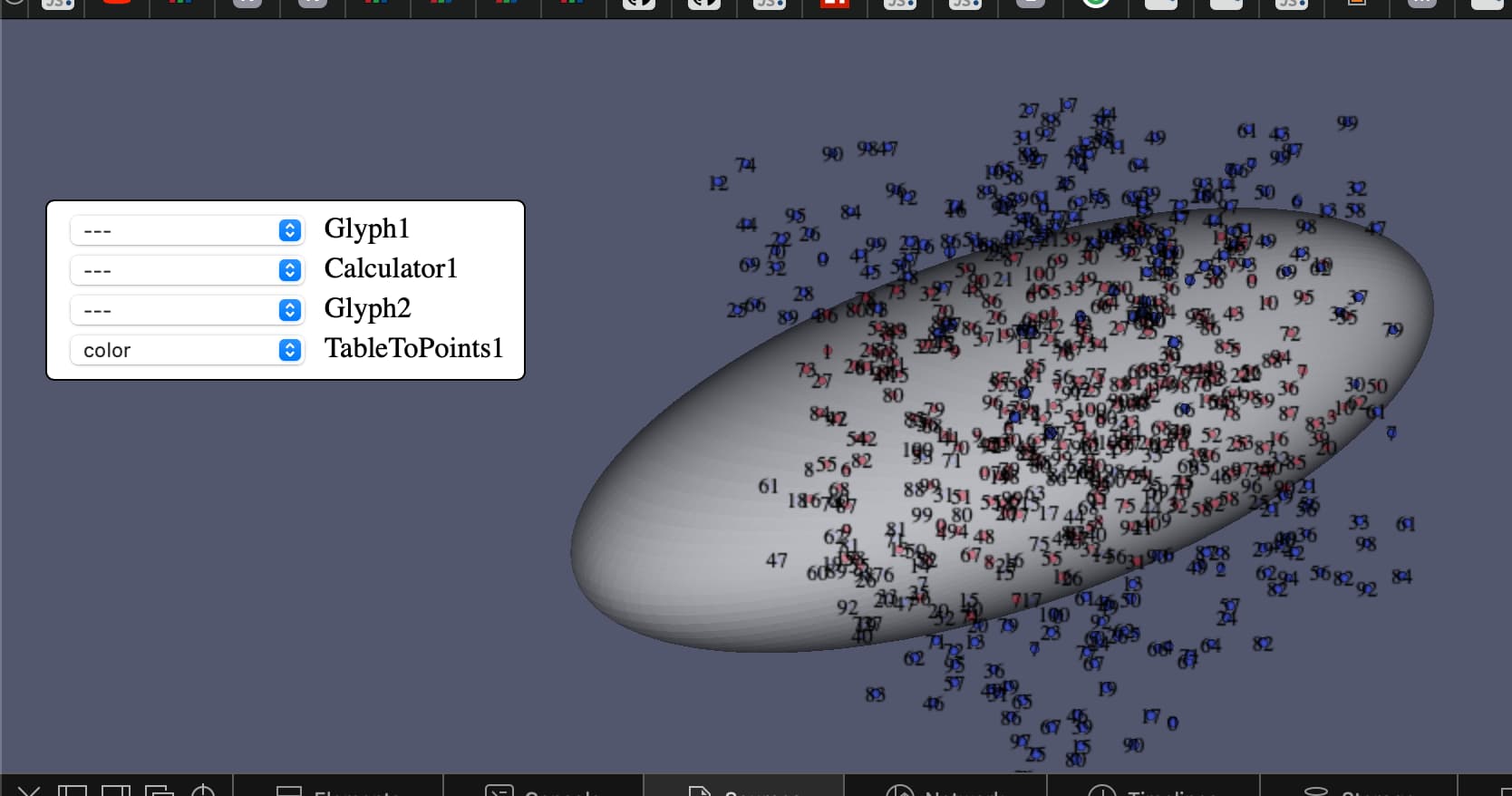
Now, I can conveniently select, for which sceneItems I want to see labels at the respective `vtkPoints` and which data array entries are to be printed (very messy here, this is not the original data):
Missing point is now, to also export the non-numeric point data arrays from Paraview into the `*.vtkjs` file.
Do you possibly have suggestions where I could start with this?
---
You will have to fix [that class](https://github.com/Kitware/VTK/blob/master/IO/Export/vtkJSONDataSetWriter.cxx#L101) and the Array one to support the vtkAbstractArray/vtkStringArray.
---
Ouch, seeing C++ here does that mean I‘d have to build Paraview myself? - Did that years ago on Linux, but today I‘m on a corporate Windows machine with virtually no permissions…
Would there be an option with Python scripting in Paraview?
---
You might be able to do most of it in Python but you will have to use a macro to do the export.
A while back that export was [100% python](https://github.com/Kitware/vtk-js/blob/master/Utilities/ParaView/export-scene-macro.py) rather than C++. You could revive that path to fix it, at least locally. But to make it mainstream, it will have to happen on the C++ side down the road.
HTH
---
Thank you for that hint @jourdain,
I looked into that macro, was able to make it run by fixing some stuff) and also extended it to export all numeric point data instead of only the ` __CustomRGBColorArray__ `.
I also understood, where I would need to add code to support `vtkStringArray`. However, as there does not seem to exist any typed arrays (see [JavaScript typed arrays - JavaScript | MDN](https://developer.mozilla.org/en-US/docs/Web/JavaScript/Typed_arrays)) for strings in JavaScript, I do not know in which form the string data would need to be written to be understood by the \*.vtkjs reader of vtk.js.
These questions possibly also go to @martink: Does the \*.vtkjs file format support string arrays? Is there any documentation on the file format of the reader code available somewhere?
---
Some more progress: Apparently, the \*.vtkjs file format supports string arrays. They need to be written as UTF-8-encoded (UTF-16 might also work, but Python seems to insist on adding a BOM with vtk.js does not like) string that contains a JSON array of strings.
To achieve this besides some logistics changes here and there, I added the following at [vtk-js/export-scene-macro.py at 6ae17f80c8496191d5439eaf746eac772a40450b · Kitware/vtk-js · GitHub](https://github.com/Kitware/vtk-js/blob/6ae17f80c8496191d5439eaf746eac772a40450b/Utilities/ParaView/export-scene-macro.py#L100:)
```auto
elif array.GetDataType() == 13:
# vtkStringArray - write as utf-8 encoded string that contains a json array with the strings
arraySize = array.GetNumberOfTuples() * array.GetNumberOfComponents()
newArray = json.dumps([array.GetValue(v) for v in range(arraySize)])
pBuffer = memoryview(newArray.encode('utf-8'))
```
I’ll see if I can get some more rough corners ironed out and then will post the full solution here in case someone else also needs this.
---
Hi @jourdain, @martink,
Thanks to your support finally, everything is in place and works as expected with a [modified export-scene-macro](https://github.com/dasmy/export-scene-macro), I can export my scene including string arrays that contain label text and with a [modified SceneExplorer](https://github.com/dasmy/SceneExplorer), I can now select for all scene items which of them are to be labelled with data from which array.
Again: Thanks a lot for your support - wouldn’t have worked without your hints.
P.S.: Discussing how to proceed with the modified macro [here](https://github.com/Kitware/vtk-js/issues/2499). Not sure if the modified SceneExplorer would also be interesting for others…