# Trouble with volume rendering (Paraview User Guide Programmable Source Example)
**URL:** https://discourse.paraview.org/t/trouble-with-volume-rendering-paraview-user-guide-programmable-source-example/5337
**Category:** ParaView Support
**Tags:** python
**Created:** [September 14, 2020, 8:23pm UTC](https://discourse.paraview.org/t/trouble-with-volume-rendering-paraview-user-guide-programmable-source-example/5337 "2020-09-14T20:23:23Z")
**Posts on this page:** 8
**Page:** 1
### Author:  [@Mohamed\_Abdelkhalek](https://discourse.paraview.org/u/Mohamed_Abdelkhalek)
#### Post date: [September 14, 2020, 8:23pm UTC](https://discourse.paraview.org/t/trouble-with-volume-rendering-paraview-user-guide-programmable-source-example/5337/1 "2020-09-14T20:23:23Z")
[https://docs.paraview.org/en/latest/ReferenceManual/pythonProgrammableFilter.html?highlight=programmable%20source#fig-readbinarydata](https://docs.paraview.org/en/latest/ReferenceManual/pythonProgrammableFilter.html?highlight=programmable%20source#fig-readbinarydata)
Hello,
I am trying to run this example (in link) of reading a 3D image as a programmable source.
[Paraview User Guide, Reading Binary 2D Image](https://docs.paraview.org/en/latest/ReferenceManual/pythonProgrammableFilter.html?highlight=programmable%20source#fig-readbinarydata)
However, unlike the example. I am unable to view as a volume render. No volume or slice options in representation section.
I ran the example as is, on the same file. Paraview version 5.8, Fedora 32
Any help appreciated, thanks
---
### Author:  [@mwestphal](https://discourse.paraview.org/u/mwestphal)
#### Post date: [September 15, 2020, 8:51am UTC](https://discourse.paraview.org/t/trouble-with-volume-rendering-paraview-user-guide-programmable-source-example/5337/2 "2020-09-15T08:51:00Z")
Please share your data.
---
### Author:  [@Mohamed\_Abdelkhalek](https://discourse.paraview.org/u/Mohamed_Abdelkhalek)
#### Post date: [September 15, 2020, 8:47pm UTC](https://discourse.paraview.org/t/trouble-with-volume-rendering-paraview-user-guide-programmable-source-example/5337/3 "2020-09-15T20:47:04Z")
Here, it is.
[HeadMRVolume.raw](https://discourse.paraview.org/uploads/short-url/5vGL401UheGDskXx6FL4GBD9LfQ.raw) (122.1 KB)
---
### Author:  [@mwestphal](https://discourse.paraview.org/u/mwestphal)
#### Post date: [September 17, 2020, 12:39pm UTC](https://discourse.paraview.org/t/trouble-with-volume-rendering-paraview-user-guide-programmable-source-example/5337/4 "2020-09-17T12:39:22Z")
First Make sure to select vtkImageData in output type.
Second, there is a small typo in the exemple, replace this :
```
assert data.shape[0] == dims[0]*dims[1]*dims[2],
"dimension mismatch"
```
by
`assert data.shape[0] == dims[0]*dims[1]*dims[2], "dimension mismatch"`
This should fix it.
---
### Author:  [@Mohamed\_Abdelkhalek](https://discourse.paraview.org/u/Mohamed_Abdelkhalek)
#### Post date: [September 26, 2020, 9:33pm UTC](https://discourse.paraview.org/t/trouble-with-volume-rendering-paraview-user-guide-programmable-source-example/5337/5 "2020-09-26T21:33:25Z")
Hello,
Thank you for your input and suggesstions. I am not sure how to duplicate this error. But it seems that you have to set the correct output type on first run, any modifications after that don’t seem to work. I have to delete the source and run it again.
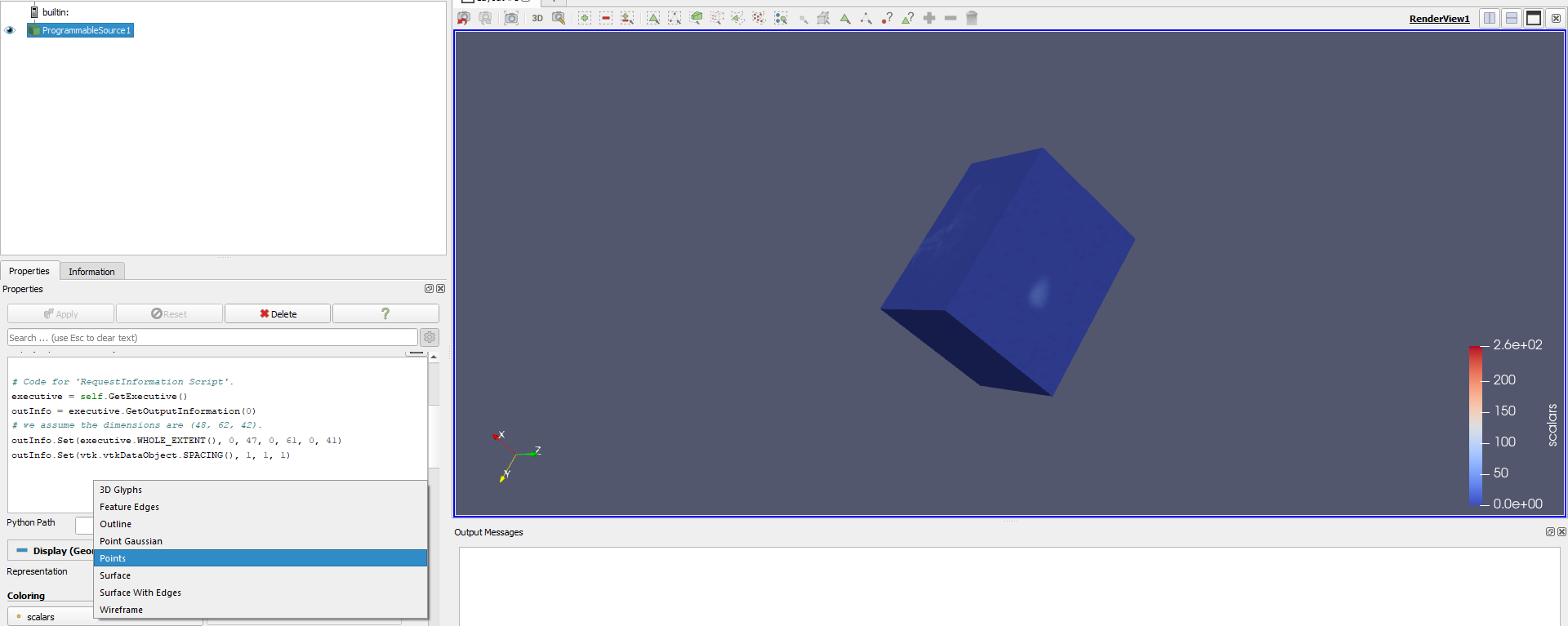
However, I now seem to be getting the same problem in Windows however. Sometimes (not sure why), it works right away and paraview automatically sets Outline as the render type and I can find Volume view in the selection. But most times, I only get what you see in the screenshot.
Could, this be some kind of update issue ?, I mean it seems that the rendering is running before the source has loaded the data.
---
### Author:  [@mwestphal](https://discourse.paraview.org/u/mwestphal)
#### Post date: [September 28, 2020, 9:34am UTC](https://discourse.paraview.org/t/trouble-with-volume-rendering-paraview-user-guide-programmable-source-example/5337/6 "2020-09-28T09:34:12Z")
> [@Mohamed\_Abdelkhalek](#):
>
> But it seems that you have to set the correct output type on first run, any modifications after that don’t seem to work. I have to delete the source and run it again.
Yes, this is correct.
What is the issue here ?
---
### Author:  [@Mohamed\_Abdelkhalek](https://discourse.paraview.org/u/Mohamed_Abdelkhalek)
#### Post date: [September 28, 2020, 5:55pm UTC](https://discourse.paraview.org/t/trouble-with-volume-rendering-paraview-user-guide-programmable-source-example/5337/7 "2020-09-28T17:55:16Z")
I mean there is no Volume/Slice views, for what should be a 3 dimensional vtk image (as in the example shown). If you were to apply a resampleToImage filter, the volume view would be enabled. I am wondering why, it sometimes works from the beginning and most times it only shows a surface.
Thanks
---
### Author:  [@mwestphal](https://discourse.paraview.org/u/mwestphal)
#### Post date: [September 29, 2020, 7:10am UTC](https://discourse.paraview.org/t/trouble-with-volume-rendering-paraview-user-guide-programmable-source-example/5337/8 "2020-09-29T07:10:16Z")
Share your programmable filter script and other settings.