# Unable to clip properly for volume rendered visualization
**URL:** https://discourse.paraview.org/t/unable-to-clip-properly-for-volume-rendered-visualization/1951
**Category:** ParaView Support
**Tags:** python
**Created:** [May 28, 2019, 7:03pm UTC](https://discourse.paraview.org/t/unable-to-clip-properly-for-volume-rendered-visualization/1951 "2019-05-28T19:03:12Z")
**Posts on this page:** 3
**Page:** 1
### Author:  [@opliew13](https://discourse.paraview.org/u/opliew13)
#### Post date: [May 28, 2019, 7:03pm UTC](https://discourse.paraview.org/t/unable-to-clip-properly-for-volume-rendered-visualization/1951/1 "2019-05-28T19:03:12Z")
Hi,
I have a python script that is supposed to do a box clip on a volume rendered image, but the clipping seems wrong and I’m not sure how to fix it.
I copied my code into ParaView and ran it in the Python shell and it gets me this:
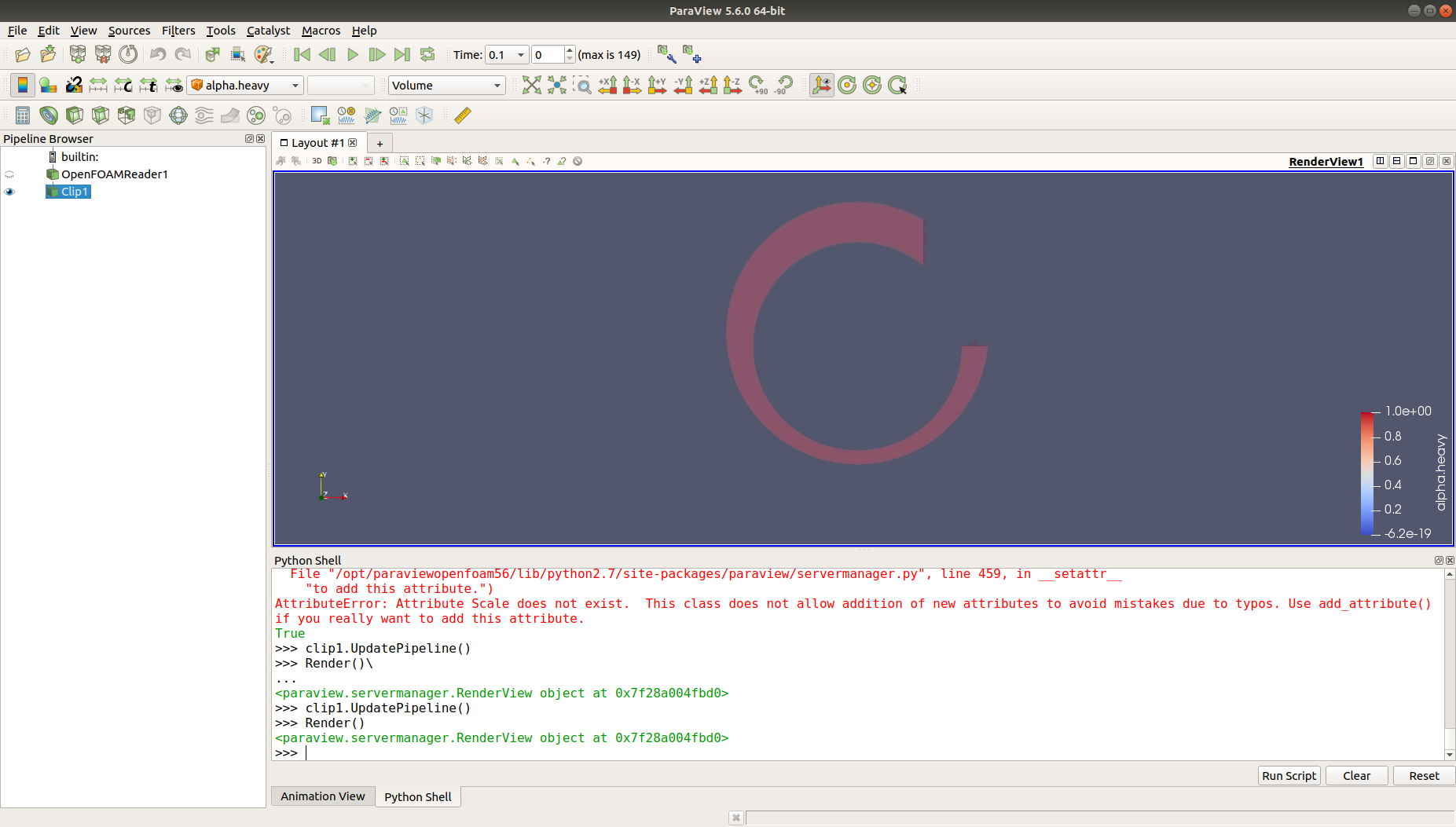
which is not what I wanted. However, viewing the properties panel (and hence showing the box) fixed the problem:
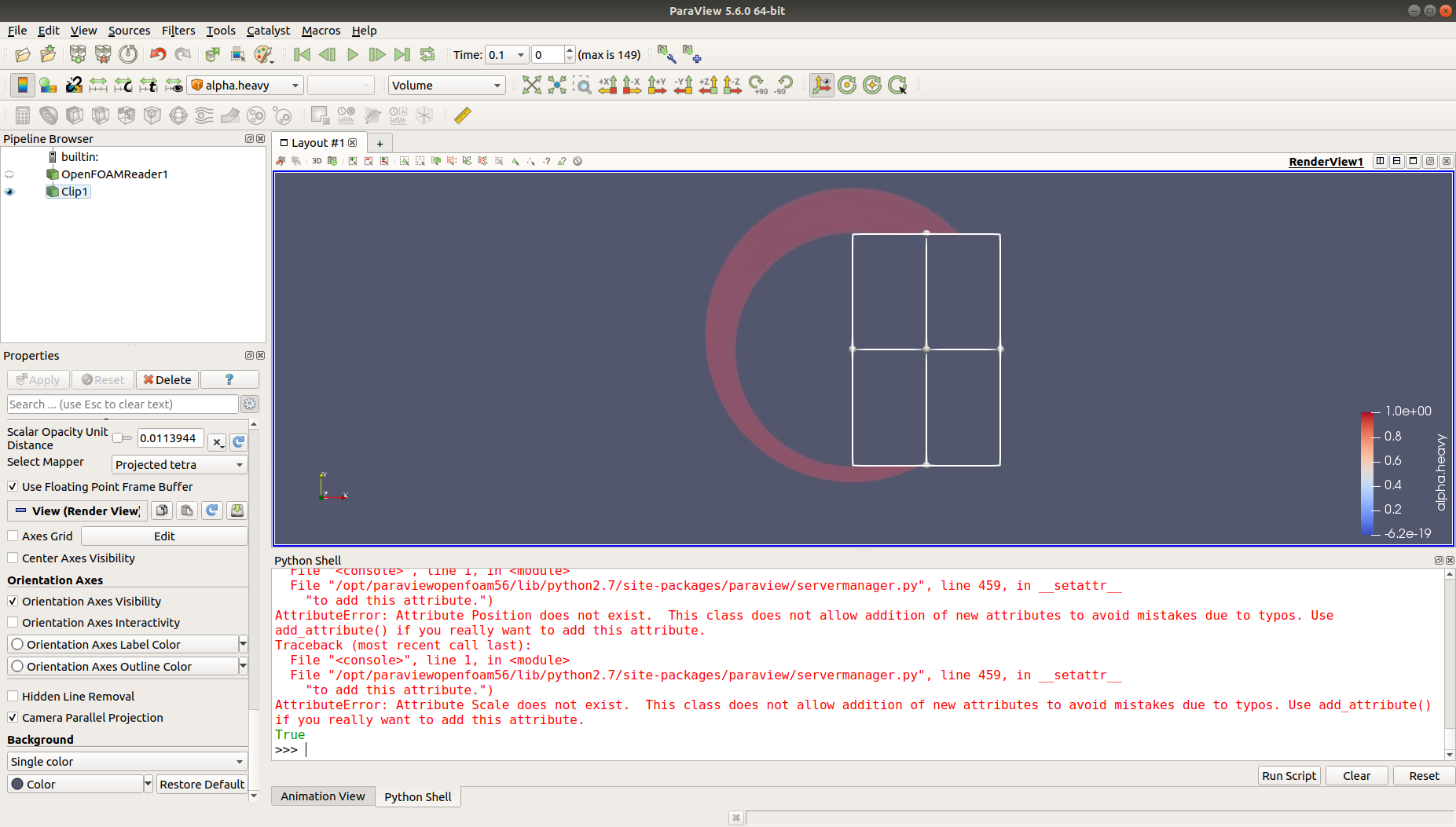
but since I’m running the script using pvpython i.e. without the GUI, there is no way I could write a line of code that “opens the properties panel” (tracing in ParaView showed nothing).
It also seems that the faulty clip is only clipping a quarter of the box (top-right). Is this a bug, or is there any way I can fix this?
I’m running on ParaView 5.6.0 64-bit. Here’s part of the code that does the clipping:
> from paraview.simple import \*
> import numpy as np
>
> #### disable automatic camera reset on ‘Show’
>
> paraview.simple.\_DisableFirstRenderCameraReset()
>
> # Define global variables
>
> Ro = 22.25/1000.0
> Ri = 17.46/1000.0
> L = 1000/1000.0
> ecc = 46./100.0
> delta = -(Ro-Ri)\*ecc # delta is a negative value
>
> # create a new ‘OpenFOAMReader’
>
> case3foam = OpenFOAMReader(FileName=‘/home/etrati/Documents/OpenFOAM/newtonian/case2/case2.foam’)
>
> case3foam.CaseType = ‘Reconstructed Case’
> case3foam.LabelSize = ‘32-bit’
> case3foam.ScalarSize = ‘64-bit (DP)’
> case3foam.Createcelltopointfiltereddata = 1
> case3foam.Adddimensionalunitstoarraynames = 0
> case3foam.MeshRegions = [‘internalMesh’]
> case3foam.CellArrays = [‘alpha.heavy’]
> case3foam.PointArrays = [‘alpha.heavy’]
> case3foam.LagrangianArrays =
> case3foam.Cachemesh = 1
> case3foam.Decomposepolyhedra = 1
> case3foam.ListtimestepsaccordingtocontrolDict = 0
> case3foam.Lagrangianpositionswithoutextradata = 1
> case3foam.Readzones = 0
> case3foam.Copydatatocellzones = 0
>
> # get active source.
>
> # case3foam is the file that we want to load
>
> case3foam = GetActiveSource()
>
> # set active source
>
> SetActiveSource(case3foam)
>
> # get active view
>
> renderView1 = GetActiveViewOrCreate(‘RenderView’)
>
> # Properties modified on renderView1
>
> renderView1.CameraParallelProjection = 1
>
> # show data in view
>
> case3foamDisplay = Show(case3foam, renderView1)
>
> #\*\*\*\*\*\*\*\*\*\*\*\*\*\*\*\*\*\*\*\*\*\*\*\*\*\*\*\*\*\*\*\*\*\*\*\*\*\*\*\*\*\*\*\*\*\*\*\*\*\*\*\*\*\*\*\*\*\*\*\*\*\*\*\*\*\*\*\*\*\*\*\*\*\*\*\*\*\*\*\*\*\*\*\*\*\*\*\*\*\*\*#
>
> # get active source.
>
> openFOAMReader1 = GetActiveSource()
>
> # get display properties
>
> openFOAMReader1Display = GetDisplayProperties(openFOAMReader1, view=renderView1)
>
> # set scalar coloring
>
> ColorBy(openFOAMReader1Display, (‘CELLS’, ‘alpha.heavy’))
>
> # rescale color and/or opacity maps used to include current data range
>
> openFOAMReader1Display.RescaleTransferFunctionToDataRange(True, False)
>
> # show color bar/color legend
>
> openFOAMReader1Display.SetScalarBarVisibility(renderView1, True)
>
> # get color transfer function/color map for ‘alphaheavy’
>
> alphaheavyLUT = GetColorTransferFunction(‘alphaheavy’)
>
> # get opacity transfer function/opacity map for ‘alphaheavy’
>
> alphaheavyPWF = GetOpacityTransferFunction(‘alphaheavy’)
>
> # change representation type
>
> openFOAMReader1Display.SetRepresentationType(‘Volume’)
>
> # create a new ‘Clip’
>
> clip1 = Clip(Input=openFOAMReader1)
>
> # get animation scene
>
> animationScene1 = GetAnimationScene()
>
> # update animation scene based on data timesteps
>
> animationScene1.UpdateAnimationUsingDataTimeSteps()
>
> # toggle 3D widget visibility (only when running from the GUI)
>
> Show3DWidgets(proxy=clip1.ClipType)
>
> # Properties modified on clip1
>
> clip1.ClipType = ‘Box’
> clip1.Invert = 0
>
> # Define variables for clipping
>
> xpos = 0
> xscale = 1
> ypos = delta - Ri
> yscale = 2\*Ri/Ro
>
> # Properties modified on clip1.ClipType
>
> clip1.ClipType.Position = [xpos, ypos, 0.0]
> clip1.ClipType.Scale = [xscale, yscale, 1.0]
>
> # show data in view
>
> clip1Display = Show(clip1, renderView1)
>
> # Properties modified on openFOAMReader1
>
> openFOAMReader1.MeshRegions = [‘internalMesh’]
> openFOAMReader1.CellArrays = [‘alpha.heavy’]
>
> # update the view to ensure updated data information
>
> renderView1.Update()
>
> # change representation type
>
> clip1Display.SetRepresentationType(‘Volume’)
>
> # hide data in view
>
> Hide(openFOAMReader1, renderView1)
Thanks in advance!
---
### Author:  [@mwestphal](https://discourse.paraview.org/u/mwestphal)
#### Post date: [June 3, 2019, 12:44pm UTC](https://discourse.paraview.org/t/unable-to-clip-properly-for-volume-rendered-visualization/1951/2 "2019-06-03T12:44:42Z")
Looks like your python code is incorrect. What was needed to do manually in the properties panel ?
---
### Author:  [@opliew13](https://discourse.paraview.org/u/opliew13)
#### Post date: [June 3, 2019, 4:56pm UTC](https://discourse.paraview.org/t/unable-to-clip-properly-for-volume-rendered-visualization/1951/3 "2019-06-03T16:56:06Z")
For the clipping, it is to specify the clip type (box) and no invert as well as specifying the clip dimension. Apart from that, it’s just setting the camera parallel projection. Nothing was changed when I view the properties panel after running the code. Does that answer your question?
The python code is mostly copied from the ParaView trace function, except adding a few user-defined variables and moving blocks of code around for troubleshooting. Any help would be appreciated!