# Unable to launch paraview: Could not load the Qt platform plugin
**URL:** https://discourse.paraview.org/t/unable-to-launch-paraview-could-not-load-the-qt-platform-plugin/7339
**Category:** ParaView Support
**Created:** [June 1, 2021, 2:49pm UTC](https://discourse.paraview.org/t/unable-to-launch-paraview-could-not-load-the-qt-platform-plugin/7339 "2021-06-01T14:49:40Z")
**Posts on this page:** 11
**Page:** 1
### Author:  [@Bo\_Zeng](https://discourse.paraview.org/u/Bo_Zeng)
#### Post date: [June 1, 2021, 2:49pm UTC](https://discourse.paraview.org/t/unable-to-launch-paraview-could-not-load-the-qt-platform-plugin/7339/1 "2021-06-01T14:49:40Z")
Hi,
## I am trying to install ParaView-5.9.1-MPI-Linux-Python3.8-64bit on Ubuntu 20.04 LTS on a Windows10 machine. When I enter ./paraview in the bin directory, it returns:
qt.qpa.xcb: could not connect to display
qt.qpa.plugin: Could not load the Qt platform plugin “xcb” in “” even though it was found.
This application failed to start because no Qt platform plugin could be initialized. Reinstalling the application may fix this problem.
Available platform plugins are: xcb.
## error: exception occurred: Child aborted
Can you tell me how to fix it?
---
### Author:  [@mwestphal](https://discourse.paraview.org/u/mwestphal)
#### Post date: [June 1, 2021, 2:50pm UTC](https://discourse.paraview.org/t/unable-to-launch-paraview-could-not-load-the-qt-platform-plugin/7339/2 "2021-06-01T14:50:46Z")
WSL is not supported, use the windows release downloaded from:
[https://www.paraview.org/download/](https://www.paraview.org/download/)
---
### Author:  [@Bo\_Zeng](https://discourse.paraview.org/u/Bo_Zeng)
#### Post date: [June 1, 2021, 2:54pm UTC](https://discourse.paraview.org/t/unable-to-launch-paraview-could-not-load-the-qt-platform-plugin/7339/3 "2021-06-01T14:54:35Z")
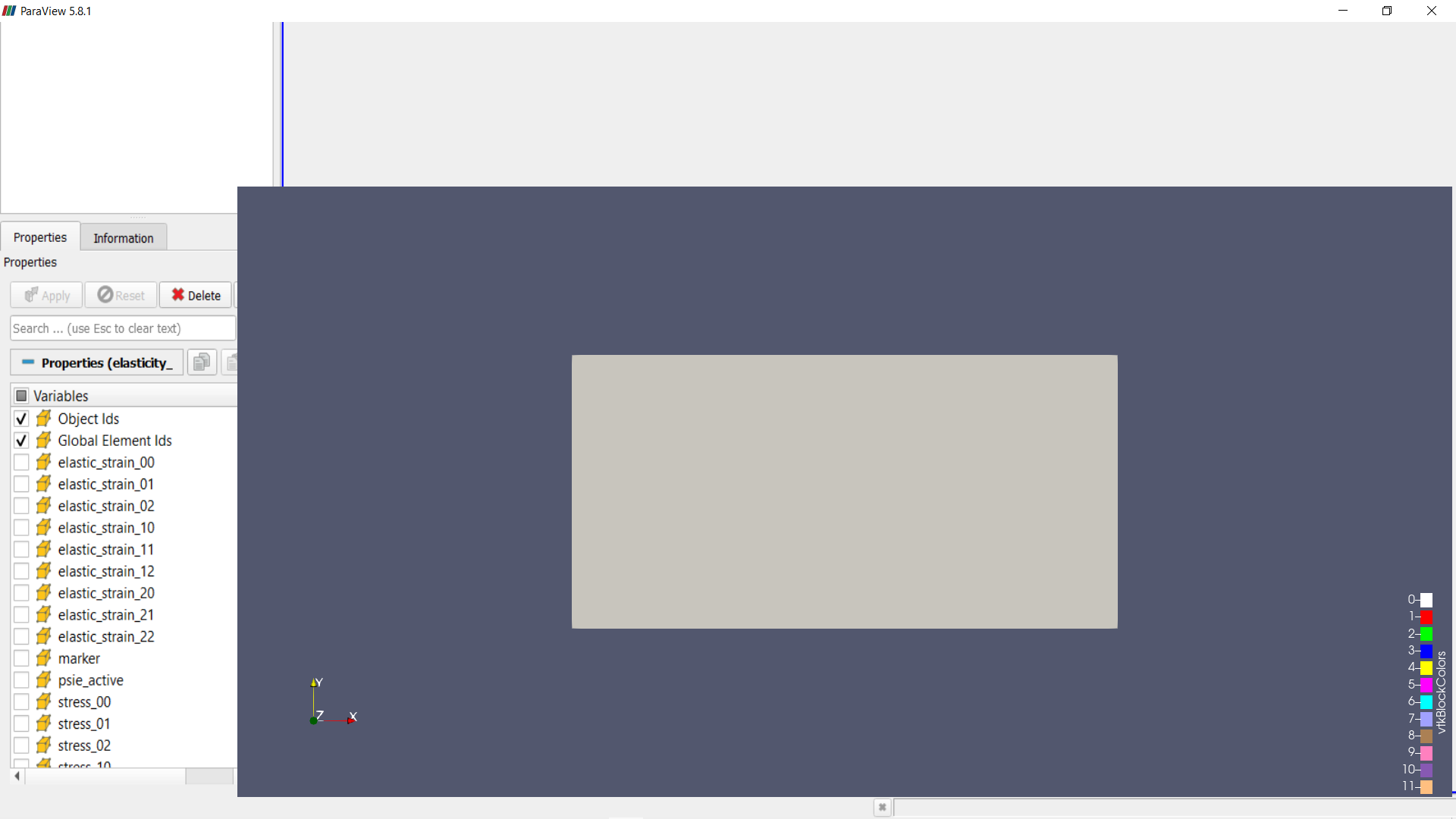
But the windows release would become like this when I loaded an exodus file
---
### Author:  [@mwestphal](https://discourse.paraview.org/u/mwestphal)
#### Post date: [June 1, 2021, 2:55pm UTC](https://discourse.paraview.org/t/unable-to-launch-paraview-could-not-load-the-qt-platform-plugin/7339/4 "2021-06-01T14:55:51Z")
Intel bug, see here for solutions:
> [@I am using ParaView 5.8.0 on Windows 10, and my GUI is completely broken, with missing icons! What is happening?](https://discourse.paraview.org/t/i-am-using-paraview-5-8-0-on-windows-10-and-my-gui-is-completely-broken-with-missing-icons-what-is-happening/4509):
>
> This is due to the "Intel Driver Bug., You can find all info about it here: [https://gitlab.kitware.com/paraview/paraview/-/issues/19364](https://gitlab.kitware.com/paraview/paraview/-/issues/19364) Possible solutions are: Upgrade to ParaView 5.8.1 or more recent Use another GPU (eg: NVIDIA instead of Intel) Downgrade your Intel driver to the version before 26.20.100.6708 Upgrade your Intel driver to the version after 26.20.100.7528 Use mesa instead : [How to run ParaView (including the binary release) using Mesa on Windows](https://discourse.paraview.org/t/how-to-run-paraview-including-the-binary-release-using-mesa-on-windows/4321/2) Downgrade to ParaView…
---
### Author:  [@ben.boeckel](https://discourse.paraview.org/u/ben.boeckel)
#### Post date: [June 1, 2021, 3:14pm UTC](https://discourse.paraview.org/t/unable-to-launch-paraview-could-not-load-the-qt-platform-plugin/7339/5 "2021-06-01T15:14:24Z")
> [@Bo\_Zeng](#):
>
> qt.qpa.xcb: could not connect to display
> qt.qpa.plugin: Could not load the Qt platform plugin “xcb” in “” even though it was found.
> This application failed to start because no Qt platform plugin could be initialized. Reinstalling the application may fix this problem.
You need to install the xcb libraries (should be `libxcb-x11` in Ubuntu).
---
### Author:  [@williamfgc](https://discourse.paraview.org/u/williamfgc)
#### Post date: [December 2, 2022, 3:54pm UTC](https://discourse.paraview.org/t/unable-to-launch-paraview-could-not-load-the-qt-platform-plugin/7339/6 "2022-12-02T15:54:27Z")
On Ubuntu 22.04 it’s `libxcb-xinput-dev`
---
### Author:  [@Nicholas\_Yue](https://discourse.paraview.org/u/Nicholas_Yue)
#### Post date: [December 4, 2022, 2:58am UTC](https://discourse.paraview.org/t/unable-to-launch-paraview-could-not-load-the-qt-platform-plugin/7339/7 "2022-12-04T02:58:55Z")
On my Ubuntu 22.04, my error message is a little different
```auto
$ ./paraview
Warning: Ignoring XDG_SESSION_TYPE=wayland on Gnome. Use QT_QPA_PLATFORM=wayland to run on Wayland anyway.
qt.qpa.plugin: Could not load the Qt platform plugin "xcb" in "" even though it was found.
This application failed to start because no Qt platform plugin could be initialized. Reinstalling the application may fix this problem.
Available platform plugins are: xcb.
error: exception occurred: Subprocess aborted
```
FYI, my box does not have any GPU graphics card.
glxinfo -B
```auto
$ glxinfo -B
name of display: :0
display: :0 screen: 0
direct rendering: Yes
Extended renderer info (GLX_MESA_query_renderer):
Vendor: nouveau (0x10de)
Device: NVA8 (0xa6c)
Version: 22.0.5
Accelerated: yes
Video memory: 501MB
Unified memory: no
Preferred profile: core (0x1)
Max core profile version: 3.3
Max compat profile version: 3.3
Max GLES1 profile version: 1.1
Max GLES[23] profile version: 3.1
OpenGL vendor string: nouveau
OpenGL renderer string: NVA8
OpenGL core profile version string: 3.3 (Core Profile) Mesa 22.0.5
OpenGL core profile shading language version string: 3.30
OpenGL core profile context flags: (none)
OpenGL core profile profile mask: core profile
OpenGL version string: 3.3 (Compatibility Profile) Mesa 22.0.5
OpenGL shading language version string: 3.30
OpenGL context flags: (none)
OpenGL profile mask: compatibility profile
OpenGL ES profile version string: OpenGL ES 3.1 Mesa 22.0.5
OpenGL ES profile shading language version string: OpenGL ES GLSL ES 3.10
```
---
### Author:  [@mwestphal](https://discourse.paraview.org/u/mwestphal)
#### Post date: [December 5, 2022, 9:26am UTC](https://discourse.paraview.org/t/unable-to-launch-paraview-could-not-load-the-qt-platform-plugin/7339/8 "2022-12-05T09:26:36Z")
@Nicholas_Yue
The Qt client requires a graphical environnement.
Best,
---
### Author:  [@Nicholas\_Yue](https://discourse.paraview.org/u/Nicholas_Yue)
#### Post date: [September 14, 2024, 8:13pm UTC](https://discourse.paraview.org/t/unable-to-launch-paraview-could-not-load-the-qt-platform-plugin/7339/9 "2024-09-14T20:13:19Z")
I had to revisit this issue as I am working to deploy a demo to some cluster
I have also found the following help me in my situation (same xcb error)
I install the following (for Ubuntu) and the problem went away
sudo apt-get install libxcb-xinerama0
Hope this is helpful for some in the future.
Kind regards
---
### Author:  [@mwestphal](https://discourse.paraview.org/u/mwestphal)
#### Post date: [September 16, 2024, 7:36am UTC](https://discourse.paraview.org/t/unable-to-launch-paraview-could-not-load-the-qt-platform-plugin/7339/10 "2024-09-16T07:36:02Z")
documented here: [I'm using Ubuntu 22 and ParaView reports "Could not load the Qt platform plugin 'xcb'"](https://discourse.paraview.org/t/im-using-ubuntu-22-and-paraview-reports-could-not-load-the-qt-platform-plugin-xcb/10642)
---
### Author:  [@Felipin](https://discourse.paraview.org/u/Felipin)
#### Post date: [January 28, 2025, 2:05am UTC](https://discourse.paraview.org/t/unable-to-launch-paraview-could-not-load-the-qt-platform-plugin/7339/11 "2025-01-28T02:05:00Z")
Thanks W Godoy !
I had spent literally more than 4 hours today trying to solve this problem, Paraview launching…I tried more than ten different solutions…
On Ubuntu 24 I followed W Godoy:
sudo apt-get install libxcb-xinput-dev
and hell yeah it worked, it finally worked !
Thanks !