# Unable to open data with ParaView
**URL:** https://discourse.paraview.org/t/unable-to-open-data-with-paraview/14218
**Category:** ParaView Support
**Created:** [March 19, 2024, 10:17am UTC](https://discourse.paraview.org/t/unable-to-open-data-with-paraview/14218 "2024-03-19T10:17:48Z")
**Posts on this page:** 20
**Page:** 1
### Author:  [@Rohan](https://discourse.paraview.org/u/Rohan)
#### Post date: [March 19, 2024, 10:17am UTC](https://discourse.paraview.org/t/unable-to-open-data-with-paraview/14218/1 "2024-03-19T10:17:48Z")
I have the exact same issue. It seems paraview was updated in the linux mint repos to 5.10.0.
With this version, none of the .vtr or .vtp files that I have open. This was not an issues a couple of days ago. I get a similar error.
```auto
ERROR: In ./VTK/IO/XMLParser/vtkXMLParser.cxx, line 375
vtkXMLDataParser (0x5628263efe30): Error parsing XML in stream at line 21, column 0, byte index 1251: not well-formed (invalid token)
ERROR: In ./VTK/IO/XML/vtkXMLReader.cxx, line 521
vtkXMLRectilinearGridReader (0x5628257d6160): Error parsing input file. ReadXMLInformation aborting.
ERROR: In ./VTK/IO/XMLParser/vtkXMLParser.cxx, line 375
vtkXMLDataParser (0x562826a92a60): Error parsing XML in stream at line 21, column 0, byte index 1251: not well-formed (invalid token)
ERROR: In ./VTK/IO/XML/vtkXMLReader.cxx, line 521
vtkXMLRectilinearGridReader (0x5628257d6160): Error parsing input file. ReadXMLInformation aborting.
```
However, with an older version 5.8.1, I am able to open these same files without any issues. Hope the mint repos deprecate to an older/newer version soon.
---
### Author:  [@mwestphal](https://discourse.paraview.org/u/mwestphal)
#### Post date: [March 19, 2024, 12:47pm UTC](https://discourse.paraview.org/t/unable-to-open-data-with-paraview/14218/2 "2024-03-19T12:47:22Z")
Please try with the binary release of ParaView instead: [https://www.paraview.org/download/](https://www.paraview.org/download/)
---
### Author:  [@cory.quammen](https://discourse.paraview.org/u/cory.quammen)
#### Post date: [March 19, 2024, 3:37pm UTC](https://discourse.paraview.org/t/unable-to-open-data-with-paraview/14218/3 "2024-03-19T15:37:59Z")
Reminds me of the expat 2.5 issue reported in [this thread](https://discourse.paraview.org/t/i-cannot-read-a-vtp-file-i-could-open-yesterday-can-someone-try-to-open-it/13938/9)
---
### Author:  [@Rohan](https://discourse.paraview.org/u/Rohan)
#### Post date: [March 20, 2024, 9:08am UTC](https://discourse.paraview.org/t/unable-to-open-data-with-paraview/14218/4 "2024-03-20T09:08:39Z")
Thanks a lot for the replies.
I have tried three versions of the binary releases from paraview website. I am still having issues, though these might not be the same as those mentioned earlier.
So with the binary version Paraview 5.8.1 everything seems to work fine, with no warnings in the temrinal.
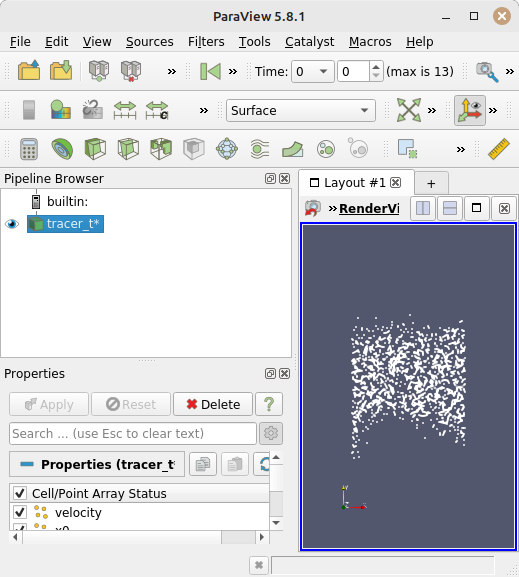
```auto
VisRTX 0.1.6, using devices:
0: NVIDIA T600 Laptop GPU (Total: 4.1 GB, Available: 3.5 GB)
```
So with the binary version Paraview 5.12.0 the files seem to load all at once, and Paraview is not able to recognize that these are temporal files. I also get a warning when I launch Paraview through the terminal, though I am not sure what it means.
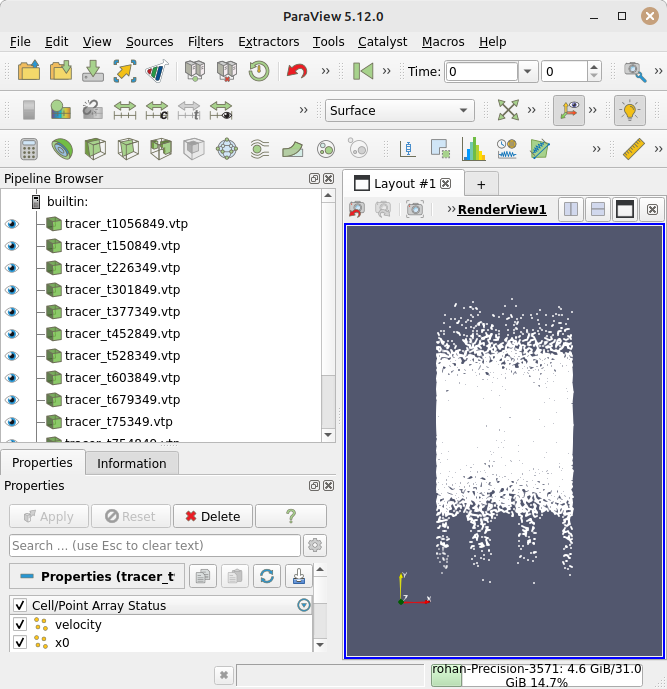
```auto
hwloc/linux: Ignoring PCI device with non-16bit domain.
Pass --enable-32bits-pci-domain to configure to support such devices
(warning: it would break the library ABI, don't enable unless really needed).
VisRTX 0.1.6, using devices:
0: NVIDIA T600 Laptop GPU (Total: 4.1 GB, Available: 3.5 GB)
```
I also tried with the binary version 5.11.2, and have the same warning and problem as with the latest v5.12.0.
The problem with the linux mint repo version 5.10.0-RC1 remains the same as in my previous post. The full error message in the terminal is below (repeating for clarity).
```auto
hwloc/linux: Ignoring PCI device with non-16bit domain.
Pass --enable-32bits-pci-domain to configure to support such devices
(warning: it would break the library ABI, don't enable unless really needed).
hwloc/linux: Ignoring PCI device with non-16bit domain.
Pass --enable-32bits-pci-domain to configure to support such devices
(warning: it would break the library ABI, don't enable unless really needed).
( 19.008s) [paraview] vtkXMLParser.cxx:375 ERR| vtkXMLDataParser (0x5568042c1330): Error parsing XML in stream at line 21, column 3, byte index 1029: not well-formed (invalid token)
( 19.019s) [paraview] vtkXMLReader.cxx:521 ERR| vtkXMLPolyDataReader (0x556803fb3a30): Error parsing input file. ReadXMLInformation aborting.
( 30.644s) [paraview] vtkXMLParser.cxx:375 ERR| vtkXMLDataParser (0x5568001e10d0): Error parsing XML in stream at line 21, column 3, byte index 1029: not well-formed (invalid token)
( 30.649s) [paraview] vtkXMLReader.cxx:521 ERR| vtkXMLPolyDataReader (0x556803fb3a30): Error parsing input file. ReadXMLInformation aborting.
```
I am not really sure what to do here, as things seemed to be working well last week. I will try the flatpak version next and see if that works without issues on my computer.
---
### Author:  [@mwestphal](https://discourse.paraview.org/u/mwestphal)
#### Post date: [March 20, 2024, 9:19am UTC](https://discourse.paraview.org/t/unable-to-open-data-with-paraview/14218/5 "2024-03-20T09:19:00Z")
Hi @Rohan
Please share your files.
Best,
---
### Author:  [@Rohan](https://discourse.paraview.org/u/Rohan)
#### Post date: [March 20, 2024, 9:39am UTC](https://discourse.paraview.org/t/unable-to-open-data-with-paraview/14218/6 "2024-03-20T09:39:27Z")
Hi Mathieu,
Thanks for the quick response. I tried with the flatpak version and get the following output.
```auto
Gtk-Message: 10:19:32.899: Failed to load module "xapp-gtk3-module"
Qt: Session management error: Could not open network socket
hwloc/linux: Ignoring PCI device with non-16bit domain.
Pass --enable-32bits-pci-domain to configure to support such devices
(warning: it would break the library ABI, don't enable unless really needed).
```
The issue where Paraview is unable to identify that the files that are read are temporal remains in this version as well. See the image below.
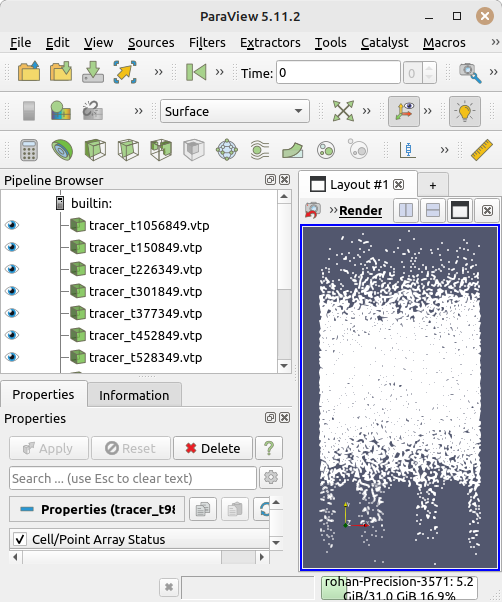
I have uploaded the files [here](https://filesender.renater.fr/?s=download&token=5c411372-203d-4632-8658-5f18f34ce6c6). Thanks again for the help!
---
### Author:  [@mwestphal](https://discourse.paraview.org/u/mwestphal)
#### Post date: [March 21, 2024, 8:19am UTC](https://discourse.paraview.org/t/unable-to-open-data-with-paraview/14218/7 "2024-03-21T08:19:55Z")
> [@Rohan](#):
>
> I tried with the flatpak version
Kitware does not distribute such version, please try with the latest binary release of ParaView from [https://www.paraview.org/download/](https://www.paraview.org/download/)
---
### Author:  [@mwestphal](https://discourse.paraview.org/u/mwestphal)
#### Post date: [March 21, 2024, 8:22am UTC](https://discourse.paraview.org/t/unable-to-open-data-with-paraview/14218/8 "2024-03-21T08:22:19Z")
I just tried, it works fine, your file is loaded as temporal. Also you are using the builtin server in your screenshot, which is not the case of the original issue. separating the topics.
---
### Author:  [@Rohan](https://discourse.paraview.org/u/Rohan)
#### Post date: [March 21, 2024, 9:42am UTC](https://discourse.paraview.org/t/unable-to-open-data-with-paraview/14218/9 "2024-03-21T09:42:44Z")
> [@mwestphal](#):
>
> Kitware does not distribute such version, please try with the latest binary release of ParaView from [https://www.paraview.org/download/](https://www.paraview.org/download/)
Hi @mwestphal , I have tried with the binary versions 5.12.0, 5.11.2 from the link that you have posted. In both these cases I am unable to get the files to load as temporal
With the binary version 5.8.1 they do load as temporal on the same machine with the same system, I have posted screenshots and terminal output in my post here
[quote=“Rohan, post:4, topic:14218”]
So with the binary version Paraview 5.8.1 everything seems to work fine, with no warnings in the temrinal.
[/quote].
Is there a way to get paraview to print more information when files are loaded so that I can share it here? (–verbose does not seem to print debug information).
Thanks.
---
### Author:  [@mwestphal](https://discourse.paraview.org/u/mwestphal)
#### Post date: [March 21, 2024, 9:56am UTC](https://discourse.paraview.org/t/unable-to-open-data-with-paraview/14218/10 "2024-03-21T09:56:18Z")
Can you show a screenshot of the file dialog when you select the file ?
---
### Author:  [@Rohan](https://discourse.paraview.org/u/Rohan)
#### Post date: [March 21, 2024, 10:22am UTC](https://discourse.paraview.org/t/unable-to-open-data-with-paraview/14218/11 "2024-03-21T10:22:40Z")
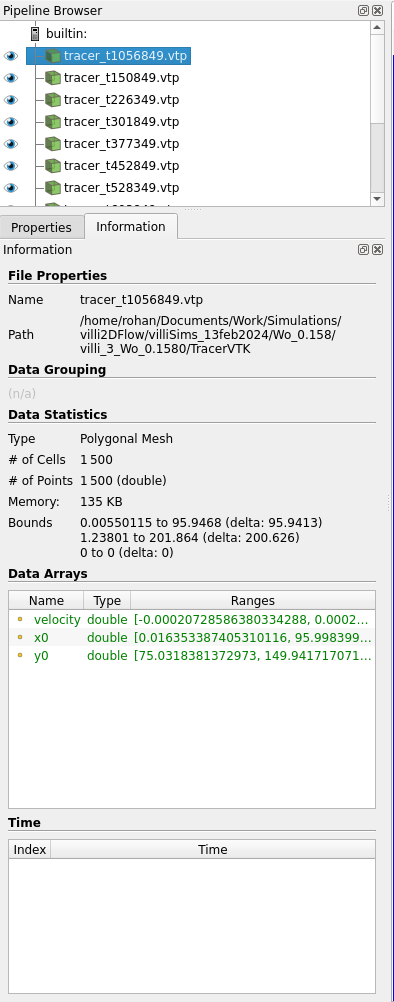
You mean the “information” box, right? Here it is. This is with the v5.12.0 binary.
(sorry, i have edited this post to put a screenshot with the same files that I had shared with you earlier).
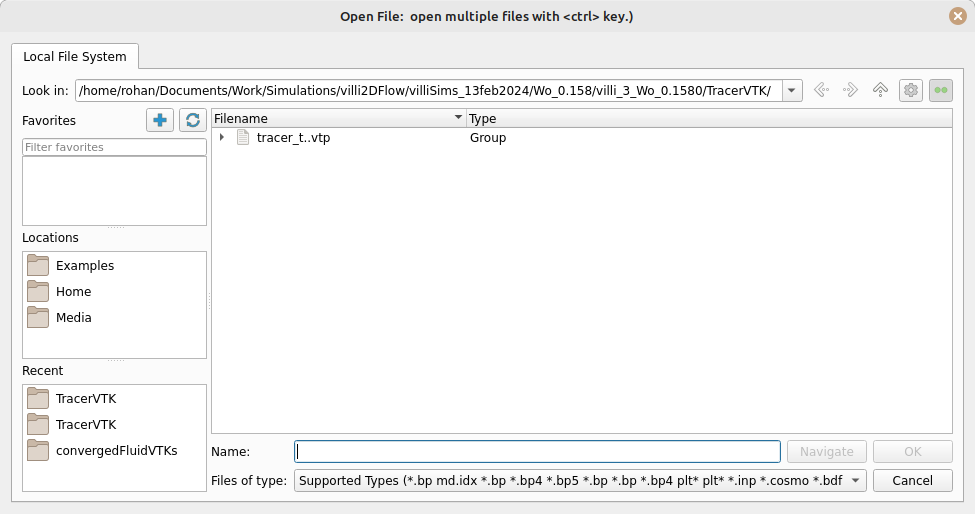
If you mean the file load dialogue, here above is the screenshot for that. The files appear collapsed temporally, but when loaded, they separate out and all files are loaded at once.
---
### Author:  [@mwestphal](https://discourse.paraview.org/u/mwestphal)
#### Post date: [March 21, 2024, 11:00am UTC](https://discourse.paraview.org/t/unable-to-open-data-with-paraview/14218/12 "2024-03-21T11:00:16Z")
The file dialog looks fine. can you try resering your settings ?
---
### Author:  [@Rohan](https://discourse.paraview.org/u/Rohan)
#### Post date: [March 21, 2024, 11:10am UTC](https://discourse.paraview.org/t/unable-to-open-data-with-paraview/14218/13 "2024-03-21T11:10:32Z")
I am not sure what you mean? How do I reset setting? I simply run paraview as `./paraview` from the terminal in the `/bin` folder of the extracted folders.
---
### Author:  [@mwestphal](https://discourse.paraview.org/u/mwestphal)
#### Post date: [March 21, 2024, 12:01pm UTC](https://discourse.paraview.org/t/unable-to-open-data-with-paraview/14218/14 "2024-03-21T12:01:43Z")
Edit → Settings → ResetSettings
---
### Author:  [@Rohan](https://discourse.paraview.org/u/Rohan)
#### Post date: [March 21, 2024, 12:51pm UTC](https://discourse.paraview.org/t/unable-to-open-data-with-paraview/14218/15 "2024-03-21T12:51:33Z")
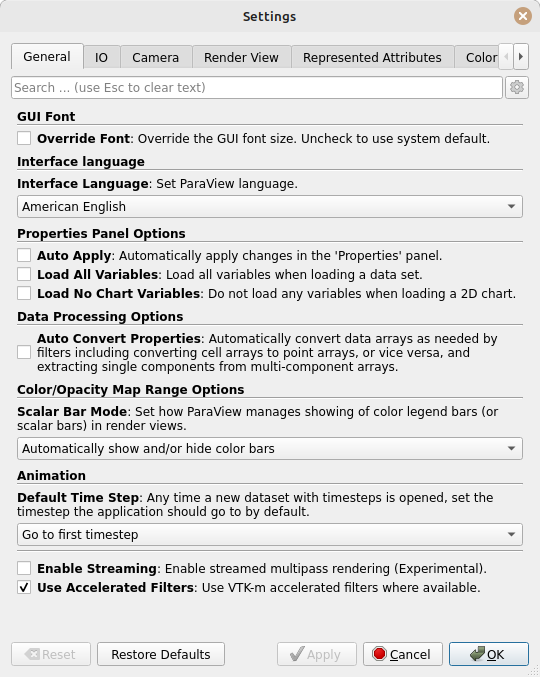
It seems that button is greyed out for me. Though I did a restore defaults and then tried again, but I have the same issue.
Thanks for the help.
---
### Author:  [@mwestphal](https://discourse.paraview.org/u/mwestphal)
#### Post date: [March 21, 2024, 12:53pm UTC](https://discourse.paraview.org/t/unable-to-open-data-with-paraview/14218/16 "2024-03-21T12:53:10Z")
Which OS are you using ?
---
### Author:  [@Rohan](https://discourse.paraview.org/u/Rohan)
#### Post date: [March 21, 2024, 1:13pm UTC](https://discourse.paraview.org/t/unable-to-open-data-with-paraview/14218/17 "2024-03-21T13:13:27Z")
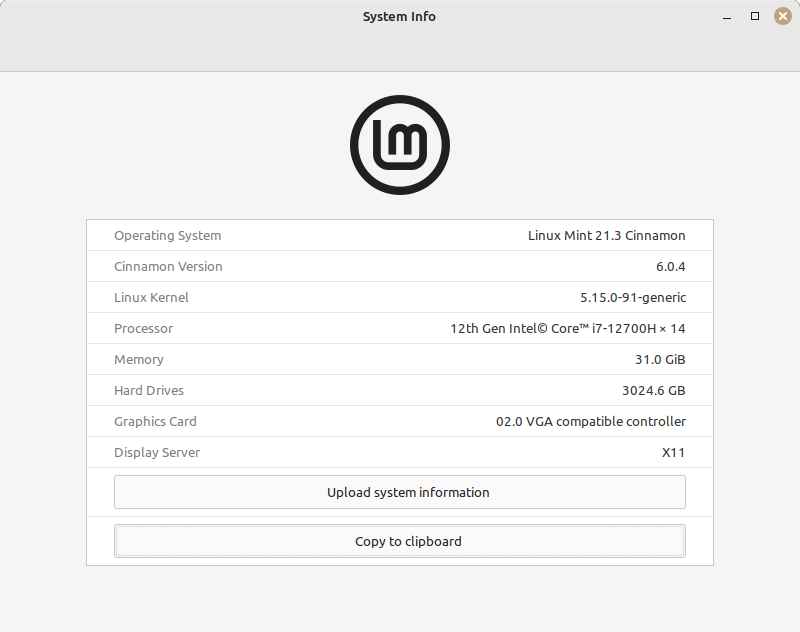
I am using Linux Mint 21-3. If you would like the full info I could upload it here.
---
### Author:  [@cory.quammen](https://discourse.paraview.org/u/cory.quammen)
#### Post date: [March 21, 2024, 2:21pm UTC](https://discourse.paraview.org/t/unable-to-open-data-with-paraview/14218/18 "2024-03-21T14:21:28Z")
Also try Edit menu → Restore to Default Settings then restart ParaView and try again.
---
### Author:  [@Rohan](https://discourse.paraview.org/u/Rohan)
#### Post date: [March 21, 2024, 2:52pm UTC](https://discourse.paraview.org/t/unable-to-open-data-with-paraview/14218/19 "2024-03-21T14:52:58Z")
Hi @cory.quammen , I tried as you suggested again, but the issue remains the same. All files are loaded at once.
---
### Author:  [@wascott](https://discourse.paraview.org/u/wascott)
#### Post date: [March 21, 2024, 5:14pm UTC](https://discourse.paraview.org/t/unable-to-open-data-with-paraview/14218/20 "2024-03-21T17:14:33Z")
I tried opening this dataset with MacOS ARM and Linux (RHEL 7), 5.12.0, builtin server. Both open the dataset as a temporally spread dataset with 14 timesteps.
The only thing I can think of is:
- cd into ~/.config/ParaView, and delete everything.
- Download a new, Kitware version of Linux 5.12.0 paraview. Untar it.
- Pull a new copy of your data from the download site you presented above into a clean directory.
- Type “which paraview”. Are you getting the correct one?
- Explicitly run your new ParaView. /directoryToParaView/bin/paraview
If that doesn’t work, I’m out of ideas…
Alan
[Next page](https://discourse.paraview.org/t/unable-to-open-data-with-paraview/14218.md?page=2)