# Updated PCL plugin for ParaView
**URL:** https://discourse.paraview.org/t/updated-pcl-plugin-for-paraview/1200
**Category:** Tips and Tricks
**Created:** [January 29, 2019, 1:55pm UTC](https://discourse.paraview.org/t/updated-pcl-plugin-for-paraview/1200 "2019-01-29T13:55:16Z")
**Posts on this page:** 20
**Page:** 1
### Author:  [@Mike\_Rye](https://discourse.paraview.org/u/Mike_Rye)
#### Post date: [January 29, 2019, 1:55pm UTC](https://discourse.paraview.org/t/updated-pcl-plugin-for-paraview/1200/1 "2019-01-29T13:55:16Z")
Hi everyone,
The PCL plugin for ParaView has received a significant update with yesterday’s release. You can find the announcement [here](https://blog.kitware.com/pcl-plugin-for-paraview/) and the new Git repo [here](https://gitlab.kitware.com/mike.rye/paraview-pcl-plugin).
For ParaView users, this update introduces support for much more modular filters. For example, the short demo video in the announcement shows that it is now possible to calculate normals or features in one filter and pass them to another via the ParaView pipeline. This gives users greater control over the PCL workflow and allows them to do things such as visualize intermediate data or swap out one feature descriptor for another with just a few pipeline clicks.
For ParaView and PCL developers, the new plugin provides a framework for rapidly developing new PCL filters. All that is needed is to copy 3 files, search-replace a name, expose some parameters, tweak some xml and implement the ParaView-independent PCL algorithm. This will be covered in detail in a follow-up blog post but anyone who wants to get an idea of the process before then is invited to take a look at the new PCLPassThroughFilter VTK class and XML file. The filter itself is essentially trivial and the code is fully commented so it serves as a good starting point.
The goal is to gradually add filters with a one-to-one correspondence to pure PCL functions so that we eventually cover most if not all of PCL’s functionality. We also plan to provide some filters to encapsulate common workflows either for convenience or to avoid the overhead of redundant data conversions.
Please don’t hesitate to contact me if you have any questions about the plugin or want to give feedback. I will try to follow this thread but email will likely get the quickest reply.
Regards,
Mike
---
### Author:  [@gregory.zaccaro](https://discourse.paraview.org/u/gregory.zaccaro)
#### Post date: [September 14, 2020, 1:10pm UTC](https://discourse.paraview.org/t/updated-pcl-plugin-for-paraview/1200/2 "2020-09-14T13:10:27Z")
Hi Mike,
I’m not able to build the filters under Windows. I had linking errors to PCL, for example:
unresolved external symbol “public: virtual bool \_\_cdecl pcl::RandomSampleConsensus::computeModel(int)”
I built PCL 1.9.0 from sources with options WITH\_VTK:BOOL=OFF and BUILD\_visualization:BOOL=OFF and I used Eigen 3.3.6 and Boost 1.68 that has been tested. Also, I tried building them against Paraview 5.6 and 5.7.
I don’t know what’s wrong with my configurations. I wonder if anyone succeeded building the PCL filters under Windows
---
### Author:  [@bastien.jacquet](https://discourse.paraview.org/u/bastien.jacquet)
#### Post date: [September 14, 2020, 2:37pm UTC](https://discourse.paraview.org/t/updated-pcl-plugin-for-paraview/1200/3 "2020-09-14T14:37:30Z")
Hi Gregory,
I’m not sure it has been tested with Windows at all, and certainly not with multiple MSVC versions. What version of msvc are you using?
Bastien Jacquet
---
### Author:  [@gregory.zaccaro](https://discourse.paraview.org/u/gregory.zaccaro)
#### Post date: [September 14, 2020, 2:39pm UTC](https://discourse.paraview.org/t/updated-pcl-plugin-for-paraview/1200/4 "2020-09-14T14:39:54Z")
Thanks for the answer! I tried MSVC 2019 first and then MSVC 2017 with the same results.
It’s worth mentioning that my CMake PCL\_DIR variable points to my PCL install folder (/cmake), I chose it because, when I tried using the build folder, CMake threw errors trying to locate Eigen.
---
### Author:  [@JT3d](https://discourse.paraview.org/u/JT3d)
#### Post date: [July 18, 2023, 1:23pm UTC](https://discourse.paraview.org/t/updated-pcl-plugin-for-paraview/1200/5 "2023-07-18T13:23:54Z")
Hi Mike,
I am interested in testing the PLC plugin and seeing what available filters are available (if any). How would you advise best getting started?
Thanks
JT
---
### Author:  [@mwestphal](https://discourse.paraview.org/u/mwestphal)
#### Post date: [July 24, 2023, 11:19am UTC](https://discourse.paraview.org/t/updated-pcl-plugin-for-paraview/1200/6 "2023-07-24T11:19:11Z")
@Gatien_Ferret @Timothee_Couble
---
### Author:  [@JT3d](https://discourse.paraview.org/u/JT3d)
#### Post date: [July 31, 2023, 2:29pm UTC](https://discourse.paraview.org/t/updated-pcl-plugin-for-paraview/1200/7 "2023-07-31T14:29:53Z")
Hi Mathieu, Gatien & Tomothee
I am looking to build this plugin on Windows 10. Is there a step by step guide on how to accomplish this? I have this old guide ([link](https://www.paraview.org/Wiki/ParaView/PCL_Plugin/Download_And_Build_Instructions)) and I have this new page ([link](https://gitlab.kitware.com/keu-computervision/paraview-pcl-plugin)) but not much detail
For example
- What exactly do I need? QT, PCL, boost, eigen, ParaView etc?
- Do I need to build everting from a scratch or can I use binaries?
- What version of the binaries should I use if I can use them?
So basically what is the easiest way to build, test and extend this plugin on windows 10 and then load into Paraview 5.11.1 ?
Thanks
JT
(i can use either visual studio 2019 or 2022 if that helps any)
---
### Author:  [@Timothee\_Couble](https://discourse.paraview.org/u/Timothee_Couble)
#### Post date: [July 31, 2023, 4:07pm UTC](https://discourse.paraview.org/t/updated-pcl-plugin-for-paraview/1200/8 "2023-07-31T16:07:57Z")
Hi @JT3d,
This plugin has not been maintained with the latest Paraview and PCL versions, and had not been tested on Windows.
We more recently created another one, starting from scratch and importing filters (and combination of filters for a few functionalities) that make sense for point clouds inside LidarView, the PV-based application specifically made for LiDAR sensors (tested on Windows with VS2019 compiler).
You may find the link to this plugin here : [https://gitlab.kitware.com/LidarView/lidarview-core/-/tree/master/Plugins/PCLPlugin](https://gitlab.kitware.com/LidarView/lidarview-core/-/tree/master/Plugins/PCLPlugin)
As of now, you may only build it from LidarView build, but it could be added as a Superbuild module to be built alone if needed. No binaries are provided so far.
Instructions for building LidarView may be found here [https://gitlab.kitware.com/LidarView/lidarview-superbuild/-/blob/master/README.md](https://gitlab.kitware.com/LidarView/lidarview-superbuild/-/blob/master/README.md)
You will need to enable `-DENABLE_pcl=True`
The plugin can then be imported in ParaView (Through Tools-\>Manage Plugins)
It is still in progress and not everything has been imported (you may find additional filters in the LidarView merge requests [https://gitlab.kitware.com/LidarView/lidarview-core/-/merge\_requests](https://gitlab.kitware.com/LidarView/lidarview-core/-/merge_requests))
What PCL filters would you be interested in importing and in which context?
Thanks,
---
### Author:  [@JT3d](https://discourse.paraview.org/u/JT3d)
#### Post date: [July 31, 2023, 4:55pm UTC](https://discourse.paraview.org/t/updated-pcl-plugin-for-paraview/1200/9 "2023-07-31T16:55:28Z")
Hi Timothee,
Many thanks for the reply. Ok that makes a little more sense. I’m finding it difficult to figure out if I should be using ParaView, Lidarview or VeloView to get the most from the latest / supported PCL plugin. The documentation looks to be outdated so it’s hard to know where to best start. You might be able to point me in the right direction based upon future development.
Here are some of the filters I am looking to create (if they haven’t been already!)
- Plane segmentation,
- Fit a plane, cylinder, sphere etc. (sample consensus)
- Creating normals.
- Features
- Recognition
- Voxel grid
- Filter noise etc…
I also need to have some interaction with the point cloud so that I could select areas of the point cloud. For example, I would need to to fit a plane to a number of selected points with the mouse, then select another group of points, fit a plane to it, show both planes in the view, and create a measurement that says the distance between the two planes, all in ParaView pipeline. Think of a point cloud that has a number of different heights and I need to check the heights of the planes relative to each other. Would this be possible?
A few more questions if that is ok?
1. Is LidarView the same as VeloView but with more support for Lidar sensor manufacturers?
2. What functionality is in LidarView that is not possible to bring into ParaView?
3. What filters are available in the LidarView PCL plugin at present? ( I could only see same consensus)
4. When a new version of ParaView comes out how and when is LidarView upgraded?
5. Based upon my use case what would you recommend at a high level? Should I just use ParaView but use Lidarview to build the pcl plugin or does it make more sense to use LidarView and remove the functionality not applicable to my use case?
Thanks in advance
JT
---
### Author:  [@JT3d](https://discourse.paraview.org/u/JT3d)
#### Post date: [August 1, 2023, 2:54pm UTC](https://discourse.paraview.org/t/updated-pcl-plugin-for-paraview/1200/10 "2023-08-01T14:54:32Z")
Hi Timothee,
I followed the instructions on the link you sent to build ([https://gitlab.kitware.com/LidarView/lidarview-superbuild/-/blob/master/README.md](https://gitlab.kitware.com/LidarView/lidarview-superbuild/-/blob/master/README.md)) and was successfully able to build it but I faced two problems
1. Not long after trying to launch LidarView.exe it crashes. Is there a log available that can help me pinpoint why it is crashing. I see the splash screen and the start of the main window. (The binary works fine)
2. The build created the PCL plugin and I tried to import it into Paraview 5.11.1 but it errored on import giving the following error message
ERROR: In vtkPVPluginLoader.cxx, line 536
vtkPVPluginLoader (000001899082DC70): C:\Users\JT\Downloads\LidarView-4.4.0-Windows-AMD64\LidarView-4.4.0\bin\lidarview\plugins\PCLPlugin\PCLPlugin.dll: The specified module could not be found.
Any ideas?
(Separately I could build paraview and launch it with no problems if that helps any?)
Thanks in advance
JT
---
### Author:  [@JT3d](https://discourse.paraview.org/u/JT3d)
#### Post date: [August 1, 2023, 3:04pm UTC](https://discourse.paraview.org/t/updated-pcl-plugin-for-paraview/1200/11 "2023-08-01T15:04:16Z")
Hi Timothee,
I can pay for support if this would help accelerate the development cycle. I filled out this form yesterday so hopefully someone in Kitware can reply
[https://www.kitware.com/contact/advanced-support/](https://www.kitware.com/contact/advanced-support/)
Thanks
JT
---
### Author:  [@Timothee\_Couble](https://discourse.paraview.org/u/Timothee_Couble)
#### Post date: [August 1, 2023, 4:06pm UTC](https://discourse.paraview.org/t/updated-pcl-plugin-for-paraview/1200/12 "2023-08-01T16:06:25Z")
Hi @JT3d ,
> [@JT3d](#):
>
> I’m finding it difficult to figure out if I should be using ParaView, Lidarview or VeloView to get the most from the latest / supported PCL plugin.
Concerning ParaView, LidarView and VeloView, I think it comes down to which data you want to manipulate - if this is lidar temporal data (pcap), LidarView is the best otherwise if this only point cloud data in a .vtk or .las format you may also use ParaView.
They all share the same base so it does not have an impact on the pcl plugin. (Note: VeloView is not based on the latest ParaView so it will not work importing the plugin)
Regarding the others questions:
> [@JT3d](#):
>
> - Is LidarView the same as VeloView but with more support for Lidar sensor manufacturers?
1. Yes, they share the same base but VeloView is not updated with the latest ParaView. It is specific to Velodyne sensors, but handles some velodyne sensors that LidarView does not (Velarray and Alpha Prime APF format, see [https://www.kitware.com/veloview-5-1-released/](https://www.kitware.com/veloview-5-1-released/) for more details). On the other hand LidarView handles some Hesai sensors.
> [@JT3d](#):
>
> - What functionality is in LidarView that is not possible to bring into ParaView?
1. Lidar PCAP reading, some point cloud specific filters and temporal filters (including SLAM algorithm : [https://www.kitware.com/lidar-slam-spotlight-on-kitwares-open-source-library/](https://www.kitware.com/lidar-slam-spotlight-on-kitwares-open-source-library/)).
> [@JT3d](#):
>
> - What filters are available in the LidarView PCL plugin at present? ( I could only see same consensus)
1. For now sample consensus filters (fitting model, plane alignment), normal space sampling, outlier removal, voxel grid. And soon a indoor wall fitting filter.
> [@JT3d](#):
>
> - When a new version of ParaView comes out how and when is LidarView upgraded?
1. The new ParaView version will come out in September, LidarView shall be updated with the latest ParaView version later that year.
> [@JT3d](#):
>
> - Based upon my use case what would you recommend at a high level? Should I just use ParaView but use Lidarview to build the pcl plugin or does it make more sense to use LidarView and remove the functionality not applicable to my use case?
1. If you’re using (or plan to use) Lidar data (in particular in pcap format) and want to use filters we specifically made for it (including voxel grid, SLAM or point accumulation for instance), I would advise to use LidarView, otherwise you may also use ParaView. Regarding the build system, we could update to make it easier if you want to use it with ParaView.
Regarding the build issue:
> [@JT3d](#):
>
> Not long after trying to launch LidarView.exe it crashes. Is there a log available that can help me pinpoint why it is crashing. I see the splash screen and the start of the main window. (The binary works fine)
- I’m not sure what is happening, the windows nightly is working fine on my side. You could try [theses](https://gitlab.kitware.com/LidarView/lidarview-superbuild/-/blob/master/Documentation/faq.md#how-to-debug-lidarview-with-visual-studio-on-windows) instructions to debug LidarView on Windows
> [@JT3d](#):
>
> The build created the PCL plugin and I tried to import it into Paraview 5.11.1 but it errored on import giving the following error message
- This is because windows needs the pcl dll next to paraview otherwise it doesn’t find it / search it and it can’t load the plugin. Could you try with the paraview built with lidarview-superbuild? (in install/bin)
> [@JT3d](#):
>
> I can pay for support if this would help accelerate the development cycle. I filled out this form yesterday so hopefully someone in Kitware can reply
- Thank you for your trust, we’ll get back to you from there as well to check out the priorities and how we can support.
Timothée Couble
---
### Author:  [@JT3d](https://discourse.paraview.org/u/JT3d)
#### Post date: [August 1, 2023, 4:18pm UTC](https://discourse.paraview.org/t/updated-pcl-plugin-for-paraview/1200/13 "2023-08-01T16:18:24Z")
Thanks for all the replies. Very much appreciated
Just on the crash
> [@JT3d](#):
>
> The build created the PCL plugin and I tried to import it into Paraview 5.11.1 but it errored on import giving the following error message
- This is because windows needs the pcl dll next to paraview otherwise it doesn’t find it / search it and it can’t load the plugin. Could you try with the paraview built with lidarview-superbuild? (in install/bin)
[/quote]
The ParaView.exe in install/bin doesn’t launch at all so something weird going on. I’ll try and build with debug info and see if I can attach to the process and see what is going on?
Should I be able to bring the PCL plugin into Paraview 5.11.1 binary install? (It fails to load too)
Thanks again
JT
---
### Author:  [@Timothee\_Couble](https://discourse.paraview.org/u/Timothee_Couble)
#### Post date: [August 1, 2023, 4:24pm UTC](https://discourse.paraview.org/t/updated-pcl-plugin-for-paraview/1200/14 "2023-08-01T16:24:21Z")
> [@JT3d](#):
>
> The ParaView.exe in install/bin doesn’t launch at all so something weird going on. I’ll try and build with debug info and see if I can attach to the process and see what is going on?
Yes please.
> [@JT3d](#):
>
> Should I be able to bring the PCL plugin into Paraview 5.11.1 binary install? (It fails to load too)
It might be tricky as you will need to copy all pcl dlls + pcl dependencies dlls ( `flann eigen boost png zlib qhull`) in paraview binary folder.
---
### Author:  [@JT3d](https://discourse.paraview.org/u/JT3d)
#### Post date: [August 2, 2023, 8:57am UTC](https://discourse.paraview.org/t/updated-pcl-plugin-for-paraview/1200/15 "2023-08-02T08:57:16Z")
Hi Timothee,
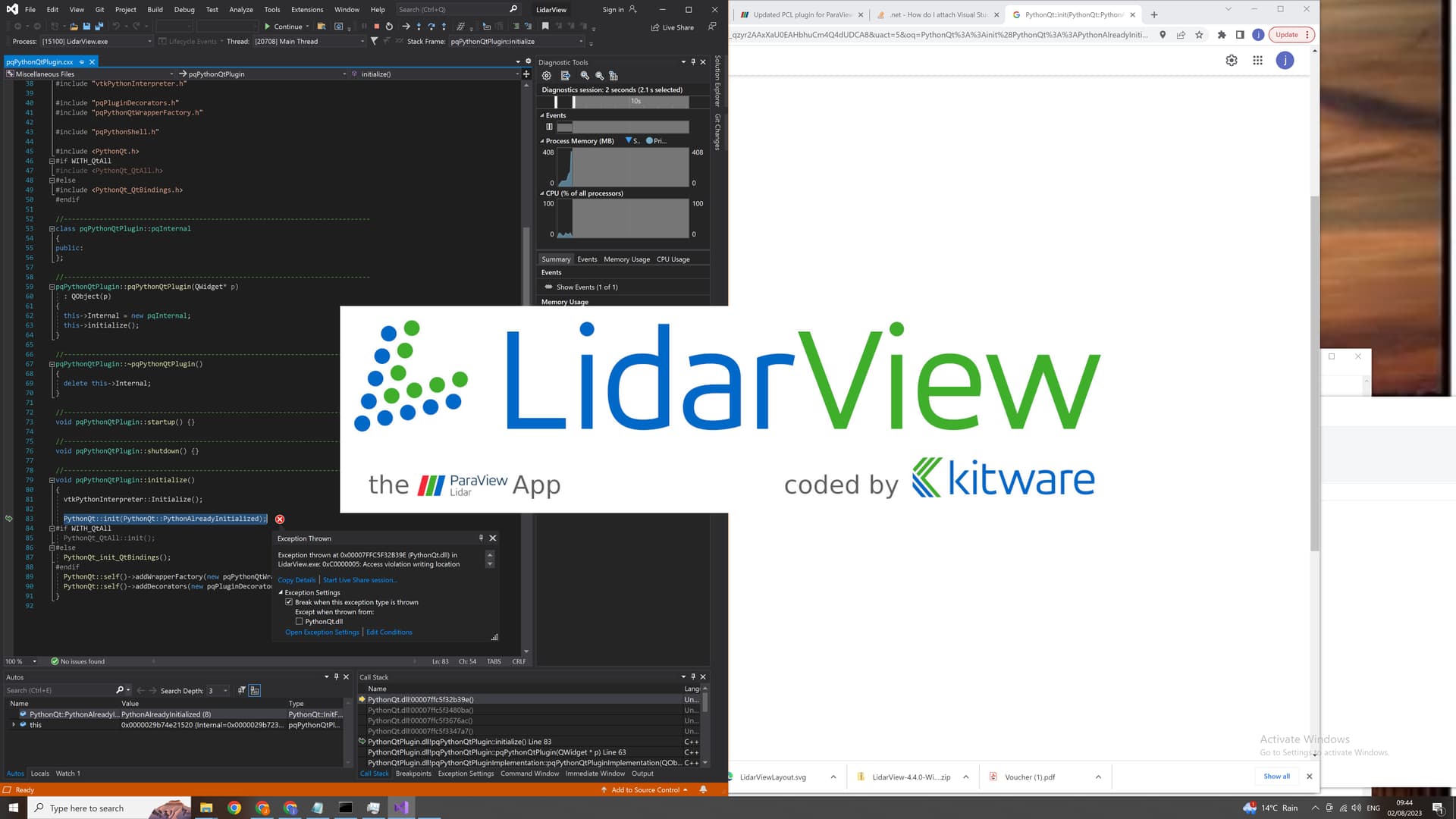
I attached the debugger and both LidarView.exe & Paraview.exe are crashing on line
PythonQt::init(PythonQt::PythonAlreadyInitialized);
See full function below and attached screenshot
Any ideas - seems to be some sort or write violation. Permissions of some sort?
(I am using Python 3.9.13)
```auto
void pqPythonQtPlugin::initialize()
{
vtkPythonInterpreter::Initialize();
PythonQt::init(PythonQt::PythonAlreadyInitialized);
#if WITH_QtAll
PythonQt_QtAll::init();
#else
PythonQt_init_QtBindings();
#endif
PythonQt::self()->addWrapperFactory(new pqPythonQtWrapperFactory);
PythonQt::self()->addDecorators(new pqPluginDecorators());
}
```
---
### Author:  [@Timothee\_Couble](https://discourse.paraview.org/u/Timothee_Couble)
#### Post date: [August 2, 2023, 11:51am UTC](https://discourse.paraview.org/t/updated-pcl-plugin-for-paraview/1200/16 "2023-08-02T11:51:03Z")
Hi @JT3d,
Did you use you’re python system or the python that come with the superbuild? (option `USE_SYSTEM_python3`) Could you try with that option on `OFF`?
---
### Author:  [@JT3d](https://discourse.paraview.org/u/JT3d)
#### Post date: [August 2, 2023, 1:48pm UTC](https://discourse.paraview.org/t/updated-pcl-plugin-for-paraview/1200/17 "2023-08-02T13:48:40Z")
Hi Timothee,
I used the python that comes with the superbuild. I’ll try and build with that option off and see how I get on
Thanks
---
### Author:  [@JT3d](https://discourse.paraview.org/u/JT3d)
#### Post date: [August 4, 2023, 11:31am UTC](https://discourse.paraview.org/t/updated-pcl-plugin-for-paraview/1200/18 "2023-08-04T11:31:04Z")
Hi Timothee,
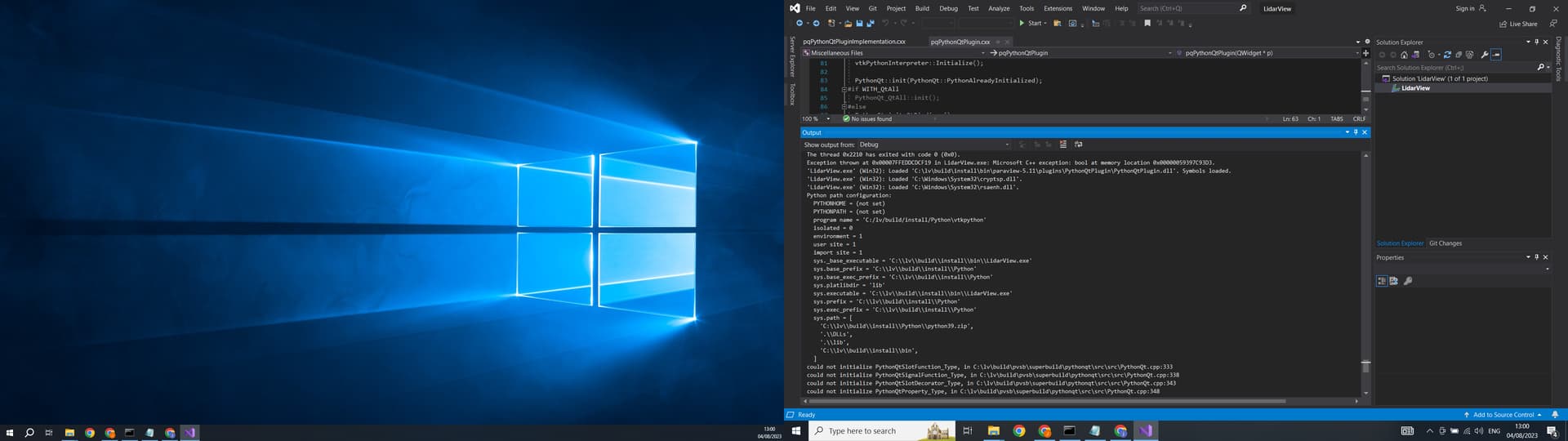
I just tried a new build on a fresh install of windows and I am still getting the crash. I tried setting the python flag to not use system python
I am using QT 5.15.2 on windows 10 to build against. Is that correct? Can’t see much else that can be going wrong. I had to add the python path to my path “C:\lv\build\install\Python” Anything else you can think that is going wrong? Admin mode perhaps etc…?
See screenshot - may be hepful
Thanks
JT
---
### Author:  [@JT3d](https://discourse.paraview.org/u/JT3d)
#### Post date: [August 4, 2023, 3:20pm UTC](https://discourse.paraview.org/t/updated-pcl-plugin-for-paraview/1200/19 "2023-08-04T15:20:29Z")
Hi Tomothee,
Just tried building ParaView on the new build of Windows 10 and used the python 3.9 included with LidarView and it built and launched fine so it’s not a python issue per say.
Would it be possible to quickly test this yourselves and see that LidarView superbuild does build and launch on a fresh install of windows 10.
Thanks
JT
---
### Author:  [@Timothee\_Couble](https://discourse.paraview.org/u/Timothee_Couble)
#### Post date: [August 7, 2023, 1:08pm UTC](https://discourse.paraview.org/t/updated-pcl-plugin-for-paraview/1200/20 "2023-08-07T13:08:16Z")
Hi @JT3d,
LidarView superbuild builds and runs on our Windows machine with Qt5.12 and Qt5.15 (I’ve tried with different machines) - are you using another version of Qt?
As only the PythonQt plugin makes ParaView crash, you could disable the autoload of this plugin by modifying the `bin/paraview-5.11/plugins/paraview.plugins.xml` file and changing `` to 0. (LidarView needs this plugin to work).
We could also send you one of our nighlty LidarView build.
Best regards,
Timothée