# Urgent: Screenshot\_error
**URL:** https://discourse.paraview.org/t/urgent-screenshot-error/8657
**Category:** ParaView Support
**Created:** [December 19, 2021, 7:02pm UTC](https://discourse.paraview.org/t/urgent-screenshot-error/8657 "2021-12-19T19:02:21Z")
**Posts on this page:** 6
**Page:** 1
### Author:  [@Aakash](https://discourse.paraview.org/u/Aakash)
#### Post date: [December 19, 2021, 7:02pm UTC](https://discourse.paraview.org/t/urgent-screenshot-error/8657/1 "2021-12-19T19:02:21Z")
Dear paraview community,
I use Paraview 5.9.1 and facing issues while taking a screen shot (.png/.jpeg.bmp). When I set the opacity less than 1, then resultant screen shot has a non-uniform opacity as in the image below. The lower half is must more transparent than the top region. (I’ve set zero compression)
Could anyone please help at that !
Please suggest me the best settings for taking high quality screenshots while using transparency!
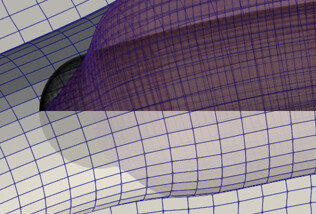
Thanks with kind regards,
Aakash
---
### Author:  [@wascott](https://discourse.paraview.org/u/wascott)
#### Post date: [December 20, 2021, 5:03pm UTC](https://discourse.paraview.org/t/urgent-screenshot-error/8657/2 "2021-12-20T17:03:02Z")
Edit/ Reset to Default Settings? (I’m suspicious you have turned on MPI or something.)
Also, be sore to post what you are doing. OS, Surface with Edges, multiple datasets, you are inside the dataset looking out, etc.
---
### Author:  [@Aakash](https://discourse.paraview.org/u/Aakash)
#### Post date: [December 21, 2021, 7:35pm UTC](https://discourse.paraview.org/t/urgent-screenshot-error/8657/3 "2021-12-21T19:35:38Z")
Hi Mr Scott,
I use Windows 10 64 bit OS and the visualization is using surface with edges!
Thanks with regards,
Aakash
---
### Author:  [@wascott](https://discourse.paraview.org/u/wascott)
#### Post date: [December 21, 2021, 8:27pm UTC](https://discourse.paraview.org/t/urgent-screenshot-error/8657/4 "2021-12-21T20:27:44Z")
Did you try reset to default settings?
---
### Author:  [@Aakash](https://discourse.paraview.org/u/Aakash)
#### Post date: [December 22, 2021, 5:13pm UTC](https://discourse.paraview.org/t/urgent-screenshot-error/8657/5 "2021-12-22T17:13:54Z")
I will check this and update you soon, thank you very much 🙂
---
### Author:  [@Aakash](https://discourse.paraview.org/u/Aakash)
#### Post date: [December 24, 2021, 5:27pm UTC](https://discourse.paraview.org/t/urgent-screenshot-error/8657/6 "2021-12-24T17:27:49Z")
Sorry, I got involved in other tasks of my project. Although, the deflault settings dont lead to this issue, however, I need to take best high quality screenshots unlike the default settings which are adjusted for medium quality pictures. With high quality settings, for example, with zero compression, the issue is very often.
Thanks with regards,
Aakash