# using NVIDIA device of a server in clinet-server mode
**URL:** https://discourse.paraview.org/t/using-nvidia-device-of-a-server-in-clinet-server-mode/8356
**Category:** ParaView Support
**Created:** [November 9, 2021, 2:14am UTC](https://discourse.paraview.org/t/using-nvidia-device-of-a-server-in-clinet-server-mode/8356 "2021-11-09T02:14:48Z")
**Posts on this page:** 9
**Page:** 1
### Author:  [@Gwang-Jin\_Lee](https://discourse.paraview.org/u/Gwang-Jin_Lee)
#### Post date: [November 9, 2021, 2:14am UTC](https://discourse.paraview.org/t/using-nvidia-device-of-a-server-in-clinet-server-mode/8356/1 "2021-11-09T02:14:48Z")
Hello,
I would like to connect from my macbook to ubuntu server having NVIDIA graphic card. But I met two problems:
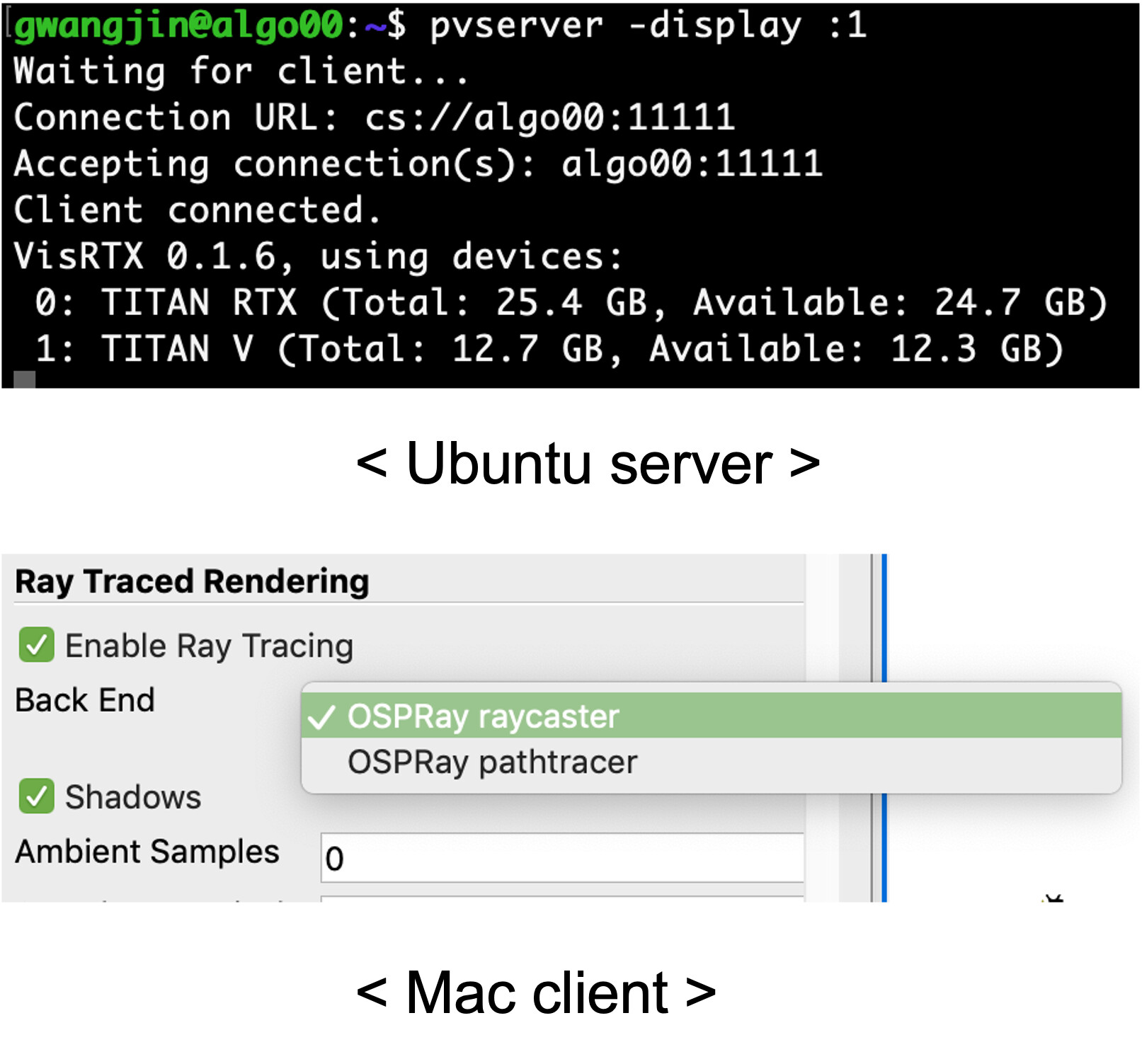
First, I couldn’t use “OptiX pathtracer” when I connected to ubuntu server.
Second, I couldn’t use “IndeX plugin”:
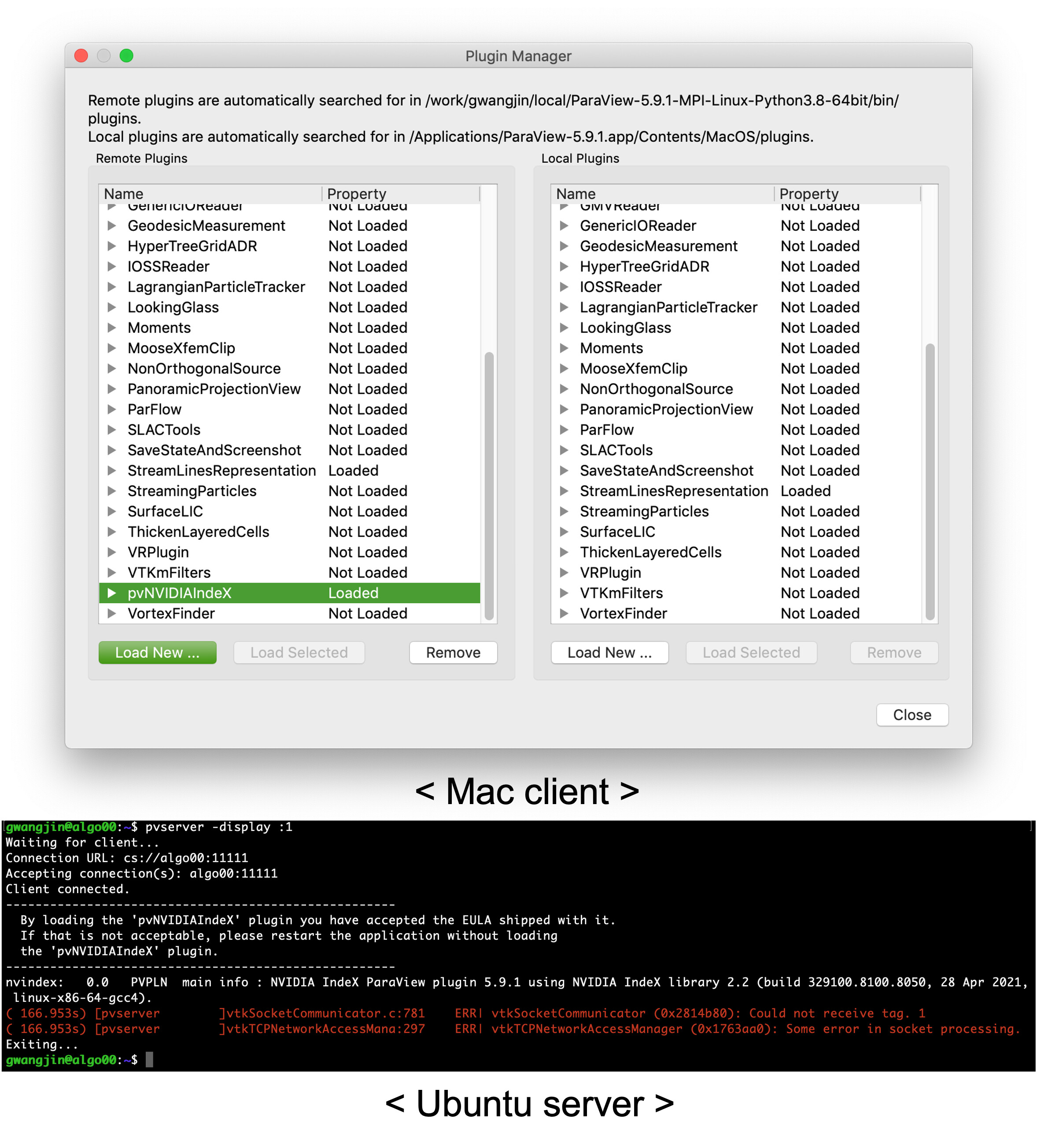
The error messages were
> gwangjin@algo00:~$ pvserver -display :1
> Waiting for client…
> Connection URL: cs://algo00:11111
> Accepting connection(s): algo00:11111
> Client connected.
> By loading the ‘pvNVIDIAIndeX’ plugin you have accepted the EULA shipped with it.
> If that is not acceptable, please restart the application without loading
> the ‘pvNVIDIAIndeX’ plugin.
> nvindex: 0.0 PVPLN main info : NVIDIA IndeX ParaView plugin 5.9.1 using NVIDIA IndeX library 2.2 (build 329100.8100.8050, 28 Apr 2021, linux-x86-64-gcc4).
> ( 166.953s) [pvserver]vtkSocketCommunicator.c:781 ERR| vtkSocketCommunicator (0x2814b80): Could not receive tag. 1
> ( 166.953s) [pvserver]vtkTCPNetworkAccessMana:297 ERR| vtkTCPNetworkAccessManager (0x1763aa0): Some error in socket processing.
> Exiting…
Is it impossible to use NVIDIA graphic card of (ubuntu) server in clinet-server mode?
Thank you.
---
### Author:  [@mwestphal](https://discourse.paraview.org/u/mwestphal)
#### Post date: [November 10, 2021, 8:54am UTC](https://discourse.paraview.org/t/using-nvidia-device-of-a-server-in-clinet-server-mode/8356/2 "2021-11-10T08:54:44Z")
Optix and Index are two completelly different components, which one are you trying to use ?
> Is it impossible to use NVIDIA graphic card of (ubuntu) server in client-server mode?
It is possible, you are using your NVIDIA graphic card when using remote rendering.
---
### Author:  [@Gwang-Jin\_Lee](https://discourse.paraview.org/u/Gwang-Jin_Lee)
#### Post date: [November 12, 2021, 8:09am UTC](https://discourse.paraview.org/t/using-nvidia-device-of-a-server-in-clinet-server-mode/8356/3 "2021-11-12T08:09:50Z")
I am trying to use both OptiX and IndeX. But I can’t use anything of them when using remote rendering.
Regarding OptiX pathtracer, there wasn’t the option “OptiX pathtracer” in (left) Properties panel of mac client. For reference, my macbook has no NVIDIA graphic driver.
1. connect from mac to server
2. check on “Eable Ray Tracing” in (left) Properties panel
3. Is there “OptiX pathtracer” in Back End? (I can’t find.)
And regarding IndeX, although I activated pvNVIDIAIndeX in Plugin Manager, when I tried to represent volume with IndeX, I found no “NVIDIA IndeX”.
1. connect from mac to server
2. Load pvNVIDIAIndeX of remote plugins in Plugin Manager
3. Source \> add FastUniformGrid
4. Select X filed.
5. Is there “NVIDIA IndeX” in Representaion (I can’t find.)
---
### Author:  [@mwestphal](https://discourse.paraview.org/u/mwestphal)
#### Post date: [November 12, 2021, 8:59am UTC](https://discourse.paraview.org/t/using-nvidia-device-of-a-server-in-clinet-server-mode/8356/4 "2021-11-12T08:59:37Z")
I’m afraid you need to have Optix and NvidiaIndex enabled on your client to be able to use them, and I do not think this is the case for your MacOS binary release.
@utkarsh.ayachit @cory.quammen may know more.
---
### Author:  [@Gwang-Jin\_Lee](https://discourse.paraview.org/u/Gwang-Jin_Lee)
#### Post date: [November 15, 2021, 3:06am UTC](https://discourse.paraview.org/t/using-nvidia-device-of-a-server-in-clinet-server-mode/8356/5 "2021-11-15T03:06:32Z")
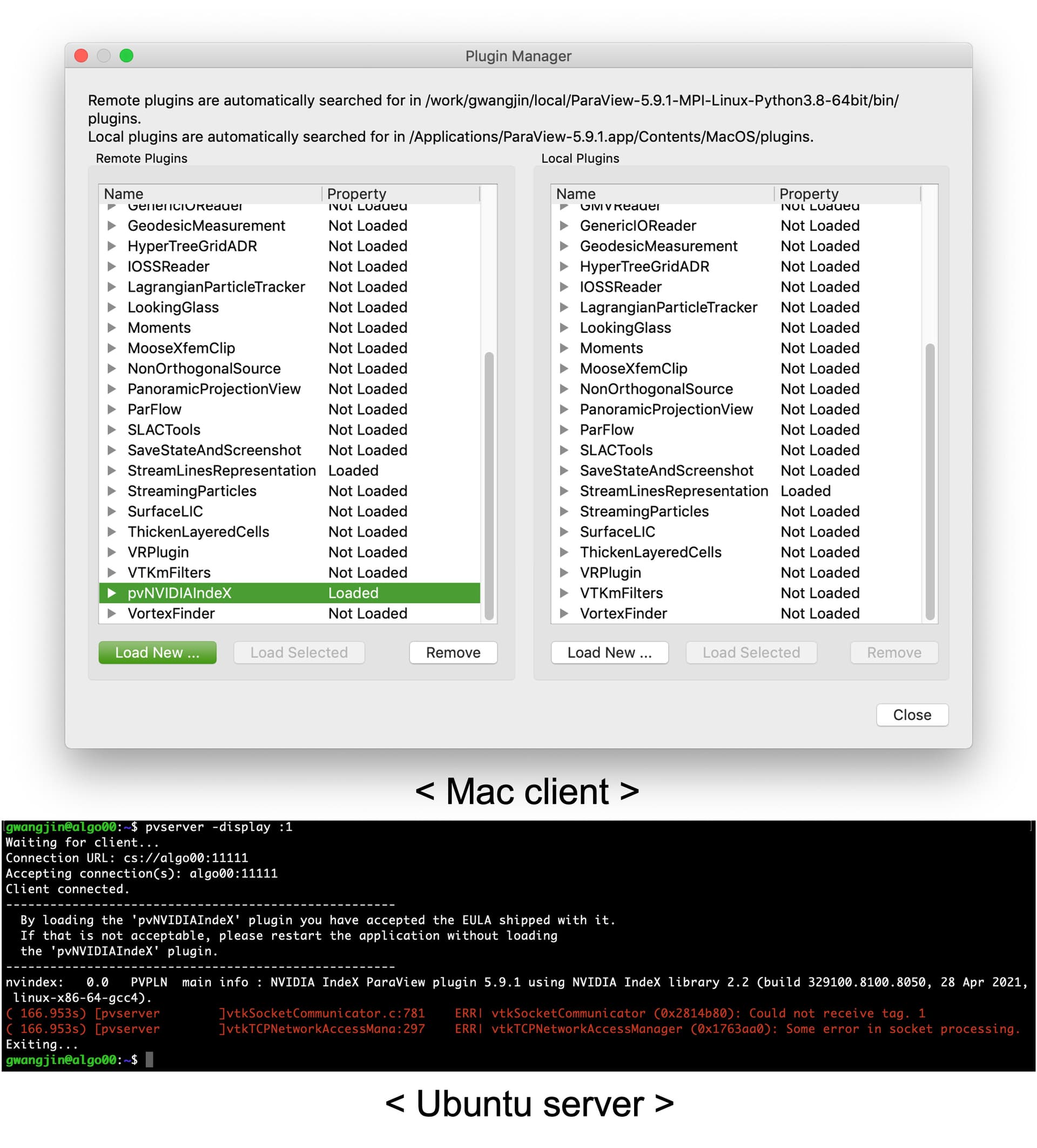
The screenshot shows there is no pvNVIDIAIndeX on my mac client after connection.
VTKmFilters is followed by VortexFinder in Plugin Manager of my mac client (right column).
---
### Author:  [@mwestphal](https://discourse.paraview.org/u/mwestphal)
#### Post date: [November 15, 2021, 8:24am UTC](https://discourse.paraview.org/t/using-nvidia-device-of-a-server-in-clinet-server-mode/8356/6 "2021-11-15T08:24:44Z")
Yes, this is what I mean, not supported with a MacOS client.
---
### Author:  [@Gwang-Jin\_Lee](https://discourse.paraview.org/u/Gwang-Jin_Lee)
#### Post date: [November 15, 2021, 8:35am UTC](https://discourse.paraview.org/t/using-nvidia-device-of-a-server-in-clinet-server-mode/8356/7 "2021-11-15T08:35:41Z")
Okay. Thank you for replying.
---
### Author:  [@jmensmann](https://discourse.paraview.org/u/jmensmann)
#### Post date: [November 15, 2021, 10:35am UTC](https://discourse.paraview.org/t/using-nvidia-device-of-a-server-in-clinet-server-mode/8356/8 "2021-11-15T10:35:31Z")
This use case will be supported by the NVIDIA IndeX plugin in the upcoming ParaView 5.10. From the [release notes](https://gitlab.kitware.com/paraview/paraview/-/blob/master/Documentation/release/ParaView-5.10.0.md#plugin-updates):
> A limited “remote rendering only” version of the NVIDIA IndeX plugin is now available for macOS, making it possible to connect a macOS ParaView client to a remote `pvserver` running Linux and rendering with NVIDIA IndeX there. The plugin does not support local rendering on macOS and an error will be printed when the user tries to enable the “NVIDIA IndeX” representation locally.
---
### Author:  [@Gwang-Jin\_Lee](https://discourse.paraview.org/u/Gwang-Jin_Lee)
#### Post date: [November 20, 2021, 2:36pm UTC](https://discourse.paraview.org/t/using-nvidia-device-of-a-server-in-clinet-server-mode/8356/9 "2021-11-20T14:36:31Z")
Thank you for your comment.