# Using WarpbyVector in python script
**URL:** https://discourse.paraview.org/t/using-warpbyvector-in-python-script/10403
**Category:** ParaView Support
**Tags:** python
**Created:** [September 24, 2022, 9:17am UTC](https://discourse.paraview.org/t/using-warpbyvector-in-python-script/10403 "2022-09-24T09:17:12Z")
**Posts on this page:** 7
**Page:** 1
### Author:  [@ChiaYoung96](https://discourse.paraview.org/u/ChiaYoung96)
#### Post date: [September 24, 2022, 9:17am UTC](https://discourse.paraview.org/t/using-warpbyvector-in-python-script/10403/1 "2022-09-24T09:17:12Z")
Hello everyone,
I wanted to implement a python script, which will deform a “.vtu” mesh by a vector called “Displacement” that I saved from another “.vtu” and stored as an array of [3\*number of points]. The two meshes have the same number of nodes. Then save the new deformed mesh (preserving the existing other data contained in it).
I haven’t figured it out completely yet…
What am i missing?
import vtk
from vtk.numpy\_interface import dataset\_adapter as dsa
reader2 = vtk.vtkXMLUnstructuredGridReader()
reader2.SetFileName(fname)
reader2.Update()
output = reader2.GetOutput()
MS\_D=dsa.WrapDataObject(output)
MS\_D.PointData.append(Displacement,“Disp”)
warp = vtk.vtkWarpVector()
warp.SetInputConnection(reader2.GetOutputPort())
#warp.SetInputData(MS\_D.GetPointData().SetActiveVectors(‘Disp’))
warp.SetInputArrayToProcess(???)
warp.SetScaleFactor(1)
warp.Update()
outputw = warp.GetUnstructuredGridOutput()
writer = vtk.vtkXMLUnstructuredGridWriter()
writer.SetFileName(“Disp\_def\_” + fname)
writer.SetInputData(outputw.VTKObject)
writer.Write()
I’m a newbie here, so I’m sorry if it’s a dumb question… 😃
---
### Author:  [@hdz19900725](https://discourse.paraview.org/u/hdz19900725)
#### Post date: [September 24, 2022, 2:16pm UTC](https://discourse.paraview.org/t/using-warpbyvector-in-python-script/10403/2 "2022-09-24T14:16:48Z")
I suggest you use paraview Tools—\>Start Trace to do the job.
---
### Author:  [@ChiaYoung96](https://discourse.paraview.org/u/ChiaYoung96)
#### Post date: [September 24, 2022, 7:51pm UTC](https://discourse.paraview.org/t/using-warpbyvector-in-python-script/10403/3 "2022-09-24T19:51:48Z")
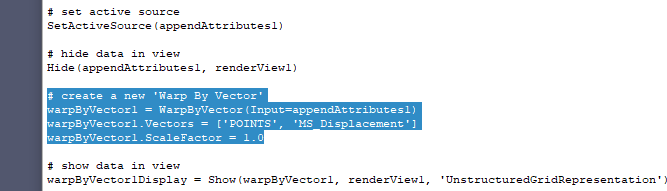
I already tried but the syntax is slightly different and doesn’t really work in my python script…
---
### Author:  [@cory.quammen](https://discourse.paraview.org/u/cory.quammen)
#### Post date: [September 26, 2022, 9:20pm UTC](https://discourse.paraview.org/t/using-warpbyvector-in-python-script/10403/4 "2022-09-26T21:20:12Z")
ParaView Python tracing will produce Python scripts that operate at the ParaView application level, hence the difference in syntax. You can use that do reach your objective, but writing VTK code as you have should also work fine if you run it via `pvpython`.
Your code looks reasonable, but the part you are missing seems to me to be:
```python
warp.SetInputArrayToProcess(0, 0, 0, vtk.vtkDataObject.FIELD_ASSOCIATION_POINTS, 'Disp')
```
Try that and see if your code works.
You can also streamline the code to
```python
import vtk
reader2 = vtk.vtkXMLUnstructuredGridReader()
reader2.SetFileName(fname)
warp = vtk.vtkWarpVector()
warp.SetInputConnection(reader2.GetOutputPort())
warp.SetInputArrayToProcess(0, 0, 0, vtk.vtkDataObject.FIELD_ASSOCIATION_POINTS, 'Disp')
warp.SetScaleFactor(1)
writer = vtk.vtkXMLUnstructuredGridWriter()
writer.SetFileName(“Disp_def_” + fname)
writer.SetInputConnection(warp.GetOutputPort())
writer.Write()
```
---
### Author:  [@ChiaYoung96](https://discourse.paraview.org/u/ChiaYoung96)
#### Post date: [September 27, 2022, 9:50am UTC](https://discourse.paraview.org/t/using-warpbyvector-in-python-script/10403/5 "2022-09-27T09:50:35Z")
Thank you so much! it works! 😃
I was using “SetInputData” without “SetInputArrayToProcess”
This gives me an empty (deformed) grid (.vtu) - how can I preserve the previous data arrays contained in the undeformed vtu mesh file? (if it’s possible)
Otherwise, I will use the “append” command and re-assign all the variables to the new points of the grid.
---
### Author:  [@cory.quammen](https://discourse.paraview.org/u/cory.quammen)
#### Post date: [October 2, 2022, 7:08pm UTC](https://discourse.paraview.org/t/using-warpbyvector-in-python-script/10403/6 "2022-10-02T19:08:57Z")
That’s odd - the input data arrays should be preserved in the output without you having to do anything.
---
### Author:  [@ChiaYoung96](https://discourse.paraview.org/u/ChiaYoung96)
#### Post date: [October 12, 2022, 8:48am UTC](https://discourse.paraview.org/t/using-warpbyvector-in-python-script/10403/7 "2022-10-12T08:48:02Z")
Ok yes, i got it, my bad! I was inspecting the wrong file
Thank you for the help! 🙂 🙂