# Velocity not available for Coloring of Glyph - Potential bug or a feature?
**URL:** https://discourse.paraview.org/t/velocity-not-available-for-coloring-of-glyph-potential-bug-or-a-feature/1087
**Category:** Development
**Created:** [December 27, 2018, 8:14pm UTC](https://discourse.paraview.org/t/velocity-not-available-for-coloring-of-glyph-potential-bug-or-a-feature/1087 "2018-12-27T20:14:44Z")
**Posts on this page:** 16
**Page:** 1
### Author:  [@Reine\_Granstrom](https://discourse.paraview.org/u/Reine_Granstrom)
#### Post date: [December 27, 2018, 8:14pm UTC](https://discourse.paraview.org/t/velocity-not-available-for-coloring-of-glyph-potential-bug-or-a-feature/1087/1 "2018-12-27T20:14:44Z")
Hi,
I posted a question on a ParaView forum on [CFD-online.com](http://CFD-online.com), and one of the replies I got from an experienced user suggested that I post a thread here to check whether the behaviour is a bug or a feature.
Please see the posts in this thread (starting from 2018-12-26 and onwards): [https://www.cfd-online.com/Forums/openfoam-paraview/141308-bug-paraview-4-1-0-64bit.html#post720214](https://www.cfd-online.com/Forums/openfoam-paraview/141308-bug-paraview-4-1-0-64bit.html#post720214)
The issue is that the velocity magnitude is not available as a “Coloring” option for Glyph Arrows. A workaround, as described in the forum thread, is to add a Calculator filter with expression “mag(U)” to make the velocity magnitude scalar available as a option for “Coloring” in the Glyph settings.
Best regards,
Reine Granström
---
### Author:  [@tomF](https://discourse.paraview.org/u/tomF)
#### Post date: [January 2, 2019, 9:07am UTC](https://discourse.paraview.org/t/velocity-not-available-for-coloring-of-glyph-potential-bug-or-a-feature/1087/2 "2019-01-02T09:07:38Z")
Hi Reine,
Whenever I use the Glyphs for vector, there is a variable Glyph vector available for coloring. That is the original U vector typically. And then you can select the magnitude option.
Best Regards,
Tom
---
### Author:  [@JuliusNepos](https://discourse.paraview.org/u/JuliusNepos)
#### Post date: [April 21, 2020, 7:18pm UTC](https://discourse.paraview.org/t/velocity-not-available-for-coloring-of-glyph-potential-bug-or-a-feature/1087/3 "2020-04-21T19:18:47Z")
I suppose I should call them Glyphs now. Anyhow, running XUbuntu 18.04, 64bit (a LTS) with ParaView 5.6.0. Actually it’s ParaFoam but I think the app is pretty much the same thing.
For a 2-D model: the OpenFoam lid driven cavity tutorial 2.1.
I encountered the error in that Velocity Vectors cannot be colored with Velocity: only with Pressure. I can display countours of Velocity so I guess this means the data set is fully loaded.
This question was previously asked with ParaView 4.1 (2014) but has persisted to ParaView 5.6 and possibly 5.8 now.
A link to that post from Sept, 2014 is:
[https://www.cfd-online.com/Forums/paraview/141308-bug-paraview-4-1-0-64bit.html](https://www.cfd-online.com/Forums/paraview/141308-bug-paraview-4-1-0-64bit.html)
Wyldkat provides a workaround to use a Calculator filter in the middle. I’ve tried this and the Calculator Results still are not displayable. I’ll attach a screenshot:
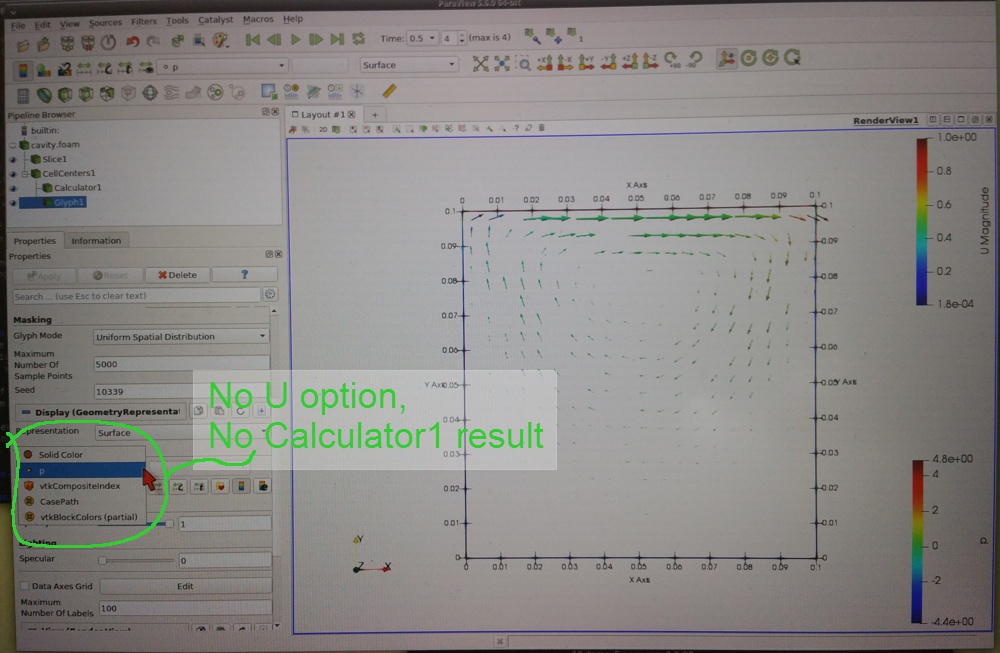
For the Calculator I tried using the U as a Result accoring to the Scalers:
Attrib. type: point data
Result: sqrt(U\_X^2+U\_Y^2+U\_Z^2)
since I really have a 2-D model I also tried
Result: sqrt(U\_X^2+U\_Y^2)
Neither worked. I also downloaded the ParaView 5.8 but I notice that a user at CFD-online that it has the exact same problem so I haven’t fooled with it yet.
---
### Author:  [@mwestphal](https://discourse.paraview.org/u/mwestphal)
#### Post date: [April 22, 2020, 1:52am UTC](https://discourse.paraview.org/t/velocity-not-available-for-coloring-of-glyph-potential-bug-or-a-feature/1087/4 "2020-04-22T01:52:29Z")
Ues ParaView 5.8 and add your glyph filter on the calculator, not the cell centers.
---
### Author:  [@JuliusNepos](https://discourse.paraview.org/u/JuliusNepos)
#### Post date: [April 22, 2020, 4:03pm UTC](https://discourse.paraview.org/t/velocity-not-available-for-coloring-of-glyph-potential-bug-or-a-feature/1087/5 "2020-04-22T16:03:15Z")
Okay, thanks Mathieu,
I have both ParaFoam 5.6.0 + ParaView 5.8.0 on my Xubuntu 18.04 64-bit system. I can get the ParaFoam 5.6 running in my OpenFoam case directory by simply typing “parafoam”. The ParaView 5.8 apparently was an archive (was a .tar file) and I can only get it running by going into it’s installation directory and clicking on an executable there.
Presumably I can load the OpenFoam case files with the ParaView 5.8? I’ll try that now as well as the glyph filter on the calculator Result set.
---
### Author:  [@JuliusNepos](https://discourse.paraview.org/u/JuliusNepos)
#### Post date: [April 23, 2020, 5:15am UTC](https://discourse.paraview.org/t/velocity-not-available-for-coloring-of-glyph-potential-bug-or-a-feature/1087/6 "2020-04-23T05:15:40Z")
Update: I got it to work! I ran the Paraview 5.8.0 64-bit, & it could open my OpenFoam case files. I did get the velocity vectors to display. I used the Calculator with result=sqrt(U\_x^2 + U\_y^2) . I didn’t see a reason to include U\_z. These vectors had orientation, length, and finally _color_ set by the U\_magnitude.
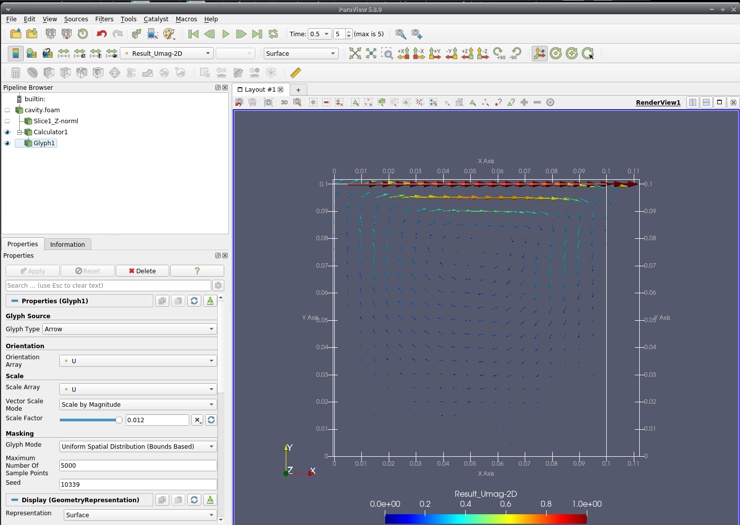
I couldn’t display the Vectors on my cut plane which is midway thru the cells of my domain. It displays duplicate sets velocity vectors on the domain surfaces. Any suggestion on how to fix this?
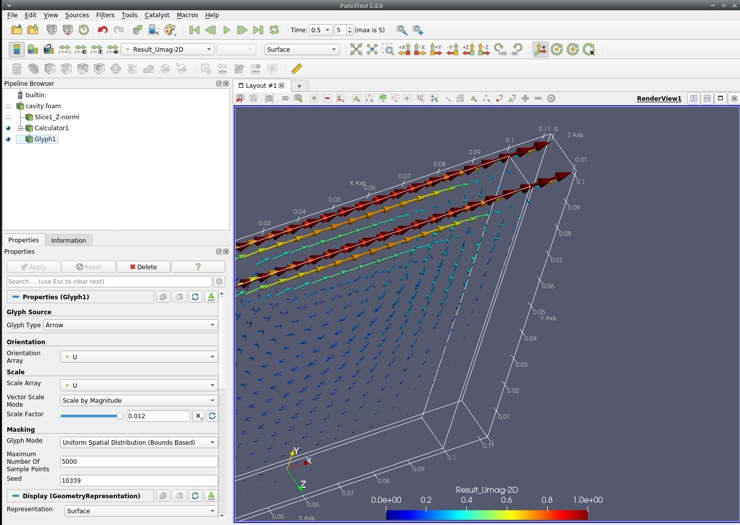
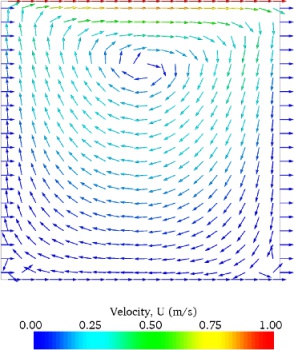
The old ParaView (possibly pre-4.1) had a detailed panel for Velocity Vectors. This version: 5.8.0 seems to only have these 3-D conical appearing structures? Is there any way to get the flat 2-D appearing arrows?
Velocity Vectors from an old version of ParaView. Illustration found on-line.
Thanks again for any help or suggestions & sorry for too many questions. New PV user here obviously.
---
### Author:  [@mwestphal](https://discourse.paraview.org/u/mwestphal)
#### Post date: [April 23, 2020, 5:19am UTC](https://discourse.paraview.org/t/velocity-not-available-for-coloring-of-glyph-potential-bug-or-a-feature/1087/7 "2020-04-23T05:19:53Z")
GlyphType : 2D Glyphs.
2D Glyph : Arrow.
---
### Author:  [@JuliusNepos](https://discourse.paraview.org/u/JuliusNepos)
#### Post date: [April 23, 2020, 6:13am UTC](https://discourse.paraview.org/t/velocity-not-available-for-coloring-of-glyph-potential-bug-or-a-feature/1087/8 "2020-04-23T06:13:34Z")
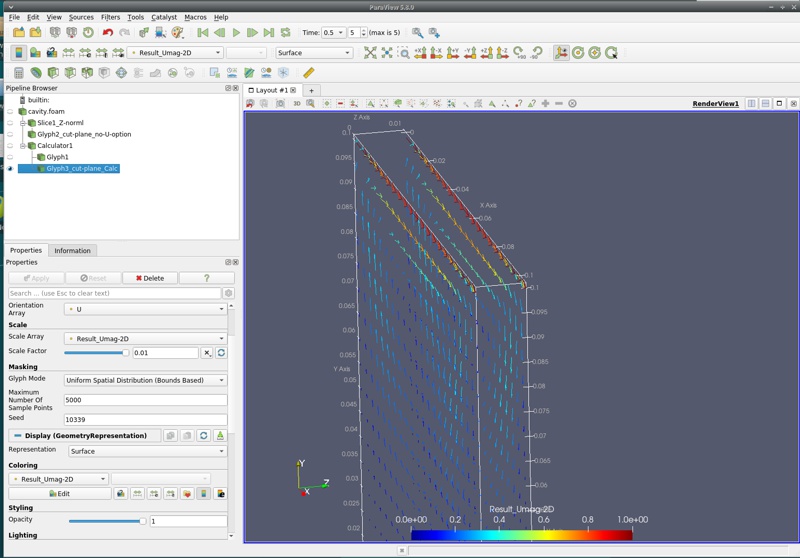
Excellent! Don’t know how I missed that. Ummm, how do I get rid of the mirrored arrows on the front & back and use the arrows (2-D glyphs) on a single plane tho?
---
### Author:  [@mwestphal](https://discourse.paraview.org/u/mwestphal)
#### Post date: [April 23, 2020, 6:28am UTC](https://discourse.paraview.org/t/velocity-not-available-for-coloring-of-glyph-potential-bug-or-a-feature/1087/9 "2020-04-23T06:28:24Z")
Use a Plane clip before your glyph filter.
---
### Author:  [@JuliusNepos](https://discourse.paraview.org/u/JuliusNepos)
#### Post date: [April 23, 2020, 6:30pm UTC](https://discourse.paraview.org/t/velocity-not-available-for-coloring-of-glyph-potential-bug-or-a-feature/1087/10 "2020-04-23T18:30:57Z")
Hi,
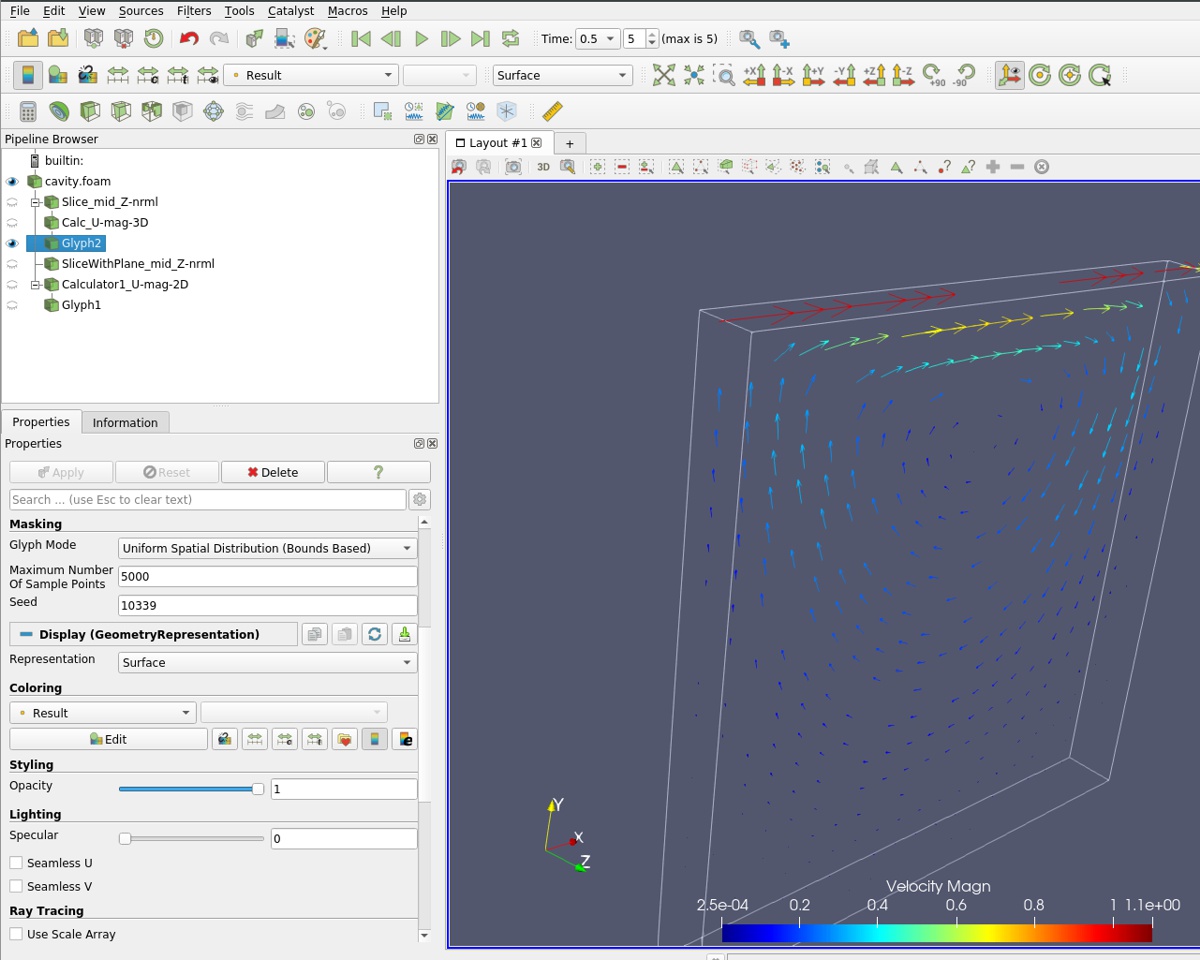
Actually that’s what I did in my cases. I’ll upload a larger res picture so you can see the steps in my pipeline Browser. The order of operations I did were
1. Perform the slice thru the center of the unit with the normal to the plane = Z
2. Do the calculation for U\_mag
3. Generate the gylphs
Still the mirrored glyphs (or velocity vectors) remain on the domain front & back. If I open the eye for my slices then I get a display of contours on the slice. That slice does not have the option to display my 2-D glyphs nor the calculator results since it was made upstream of those.

Actually I tried it again and it seemed to work. As illustrated I’m using the full 3-D calculation of vectors although there may have been other changes.
---
### Author:  [@mwestphal](https://discourse.paraview.org/u/mwestphal)
#### Post date: [April 24, 2020, 7:40am UTC](https://discourse.paraview.org/t/velocity-not-available-for-coloring-of-glyph-potential-bug-or-a-feature/1087/11 "2020-04-24T07:40:28Z")
You should do the calculator on the slice, not on the foam file.
---
### Author:  [@JuliusNepos](https://discourse.paraview.org/u/JuliusNepos)
#### Post date: [April 27, 2020, 7:25pm UTC](https://discourse.paraview.org/t/velocity-not-available-for-coloring-of-glyph-potential-bug-or-a-feature/1087/12 "2020-04-27T19:25:11Z")
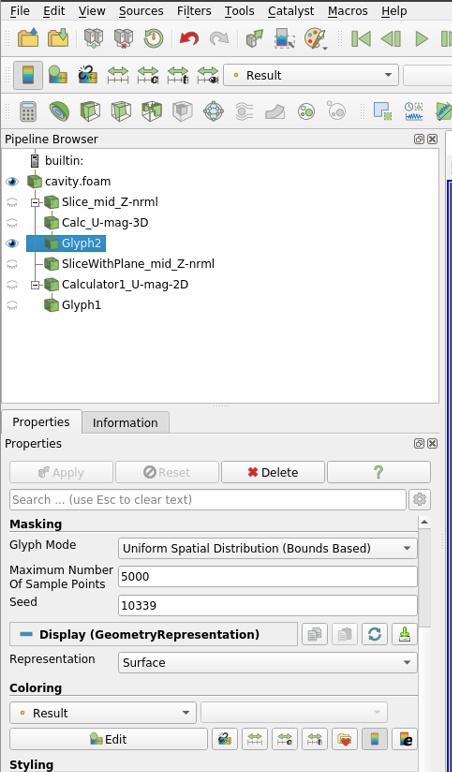
Yes, I think that what I finally did. This shows up in order in the “Pipeline Browser” as shown below?
---
### Author:  [@insley](https://discourse.paraview.org/u/insley)
#### Post date: [May 5, 2020, 10:12pm UTC](https://discourse.paraview.org/t/velocity-not-available-for-coloring-of-glyph-potential-bug-or-a-feature/1087/13 "2020-05-05T22:12:32Z")
I am seeing a similar problem with the glyph filter. I have a particle data set, saved as a vtk unstructured grid, with a velocity vector field. When I apply the glyph filter, the resulting glyphs have no data arrays associated with them. That seems like a bug. Shouldn’t all existing data arrays get passed through to the glyphs?
If I apply a calculator filter to the particle data, and set Result to be the velocity vector, and apply the glyph filter to the calculator, the resulting glyphs will now have the velocity data array, but no Result data array. If instead I set the Result to be a scalar value, coordsX for example, the resulting glyphs will have the Result array, but again no velocity vector. This, too, feels like a bug.
---
### Author:  [@wascott](https://discourse.paraview.org/u/wascott)
#### Post date: [May 6, 2020, 1:27am UTC](https://discourse.paraview.org/t/velocity-not-available-for-coloring-of-glyph-potential-bug-or-a-feature/1087/14 "2020-05-06T01:27:10Z")
Joe,
Could you give us a small dataset, and brain dead directions how to replicate?
As I have been going through this, and the post on the ParaFoam site, it really feels like a problem where ParaView is doing the “right thing”, and not magically converting or calculating something under the covers. A way to test for this is to go Edit/ Settings/ Auto Convert Properties. If things work as you expect here, again, ParaView is not doing a conversion step you need, but don’t know to ask for.
Alan
---
### Author:  [@insley](https://discourse.paraview.org/u/insley)
#### Post date: [May 6, 2020, 2:31am UTC](https://discourse.paraview.org/t/velocity-not-available-for-coloring-of-glyph-potential-bug-or-a-feature/1087/15 "2020-05-06T02:31:28Z")
[particles\_step-03201000.vtu](https://discourse.paraview.org/uploads/short-url/cuJlAwwF0Ry86V9K2d6qBVIAs7c.vtu) (1.2 MB)
[glyph\_test\_01.pvsm](https://discourse.paraview.org/uploads/short-url/uvXU92aHFL4tG7URmPycYpAApLq.pvsm) (710.3 KB)
Alan,
Here is a simple data file, as well as a paraview state file that replicates the problem.
I’ve tried turning on the “Auto Convert Properties” option. This does not seem to have any effect for my case, but it is not clear to me that this is really related to the issue I am seeing. Unlike the ParaFoam case, there should not be any conversion needed in my case. My data is already point centered.
In case the state file causes issues, here’s how you should be able to replicate the problem I am seeing (I currently see this issue while using the v5.8.0 binary. But I believe this has been an issue for me since v5.6).
- Load the particle vtu file
- There is a Velocity vector data array
- Apply the Glyph filter (accepting all of the default settings)
- Under the information tab for the glyphs, there are no data arrays. I would have expected the Velocity data array to be there. I would like to be able to color by this value.
- Apply the Calculator filter to the particle vtu file.
- Leave the Result array name as Result
- Set the calculator equation to: Velocity
- Under the Information tab it now lists the Result and Velocity Data Arrays (both vectors)
- Apply the Glyph filter to Calculator1
- Under the Information tab for this Glyph filter, for the Data Arrays it now lists the Velocity array. But no Result array
- Apply the Calculator filter to the particle vtu file (again)
- Leave the Result array name as Result
- Set the calculator equation to: coordsX (a scalar field)
- Under the Information tab it now lists the Result (a scalar) and Velocity (a vector) Arrays
- Apply the Glyph filter to this Calculator filter
- Under the Information tab, there is a Result array (the scalar), but no Velocity (vector) Array
Let me know if there is additional information that I can provide that would be helpful.
Thanks.
joe
---
### Author:  [@mwestphal](https://discourse.paraview.org/u/mwestphal)
#### Post date: [May 6, 2020, 2:44am UTC](https://discourse.paraview.org/t/velocity-not-available-for-coloring-of-glyph-potential-bug-or-a-feature/1087/16 "2020-05-06T02:44:17Z")
reported here : [https://gitlab.kitware.com/paraview/paraview/-/issues/18662](https://gitlab.kitware.com/paraview/paraview/-/issues/18662)