# Visualise relative errors by applying thesholding
**URL:** https://discourse.paraview.org/t/visualise-relative-errors-by-applying-thesholding/8502
**Category:** ParaView Support
**Created:** [November 27, 2021, 8:55am UTC](https://discourse.paraview.org/t/visualise-relative-errors-by-applying-thesholding/8502 "2021-11-27T08:55:48Z")
**Posts on this page:** 2
**Page:** 1
### Author:  [@chathu](https://discourse.paraview.org/u/chathu)
#### Post date: [November 27, 2021, 8:55am UTC](https://discourse.paraview.org/t/visualise-relative-errors-by-applying-thesholding/8502/1 "2021-11-27T08:55:48Z")
I have two volumetric meshes in .vtk format (i.e. ground-truth and predicted versions) and I want to visualise the relative error (or error ratio per vertex) by thresholding on deformations for example deformation less than 1 mm just make it green, deforamtion within1mm to 5 mm to yellow and deforamtion \> 5 mm in red. Is it possible in Paraview ? If so can you elaborate the steps with an example please ?
I have herewith attached two samples .vtk files for your further reference.
[sample\_data.zip](https://discourse.paraview.org/uploads/short-url/gFs3ZoiEpOVNuVDnUouTGSCt5Us.zip) (80.7 KB)
---
### Author:  [@Kenichiro-Yoshimi](https://discourse.paraview.org/u/Kenichiro-Yoshimi)
#### Post date: [November 28, 2021, 4:22am UTC](https://discourse.paraview.org/t/visualise-relative-errors-by-applying-thesholding/8502/2 "2021-11-28T04:22:43Z")
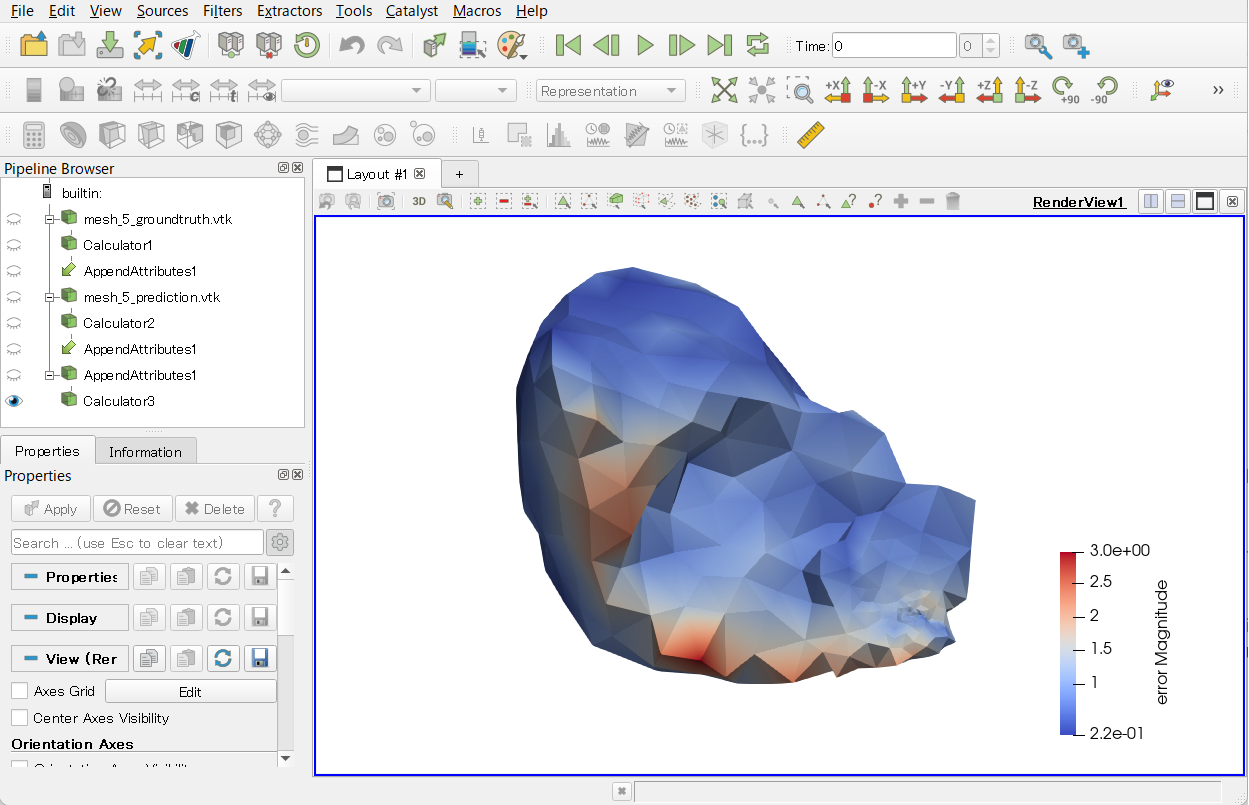
If there is no change in the corresponding nodal IDs between the two meshes, then there is one solution.
1. Create variables for the coordinates in both mesh\_5\_groundtruth.vtk and mesh\_5\_prediction.vtk with the **Calculator** filter, respectively.
- Result Array Name: coords
- Expression: coords
1. Select the two calculators created in step 1, **Calculator1** and **Calculator2** , while holding down the Ctrl key in the Pipeline Browser, and combine the above two coords variables into one mesh using the **Append Attributes** filter.
2. Apply the **Calculator** filter to **AppendAttributes1** and calculate the relative error.
- Result Array Name: error
- Expression: mag(coords\_input\_1-coords)
The following is the State file for the above procedure.
[error.pvsm](https://discourse.paraview.org/uploads/short-url/85C9wHH0qxENzvIDz6Lqa24MH9S.pvsm) (741.2 KB)