# visualization problem in Paraview
**URL:** https://discourse.paraview.org/t/visualization-problem-in-paraview/8576
**Category:** ParaView Support
**Created:** [December 7, 2021, 8:30am UTC](https://discourse.paraview.org/t/visualization-problem-in-paraview/8576 "2021-12-07T08:30:40Z")
**Posts on this page:** 3
**Page:** 1
### Author:  [@charithaRdissanayaka](https://discourse.paraview.org/u/charithaRdissanayaka)
#### Post date: [December 7, 2021, 8:30am UTC](https://discourse.paraview.org/t/visualization-problem-in-paraview/8576/1 "2021-12-07T08:30:40Z")
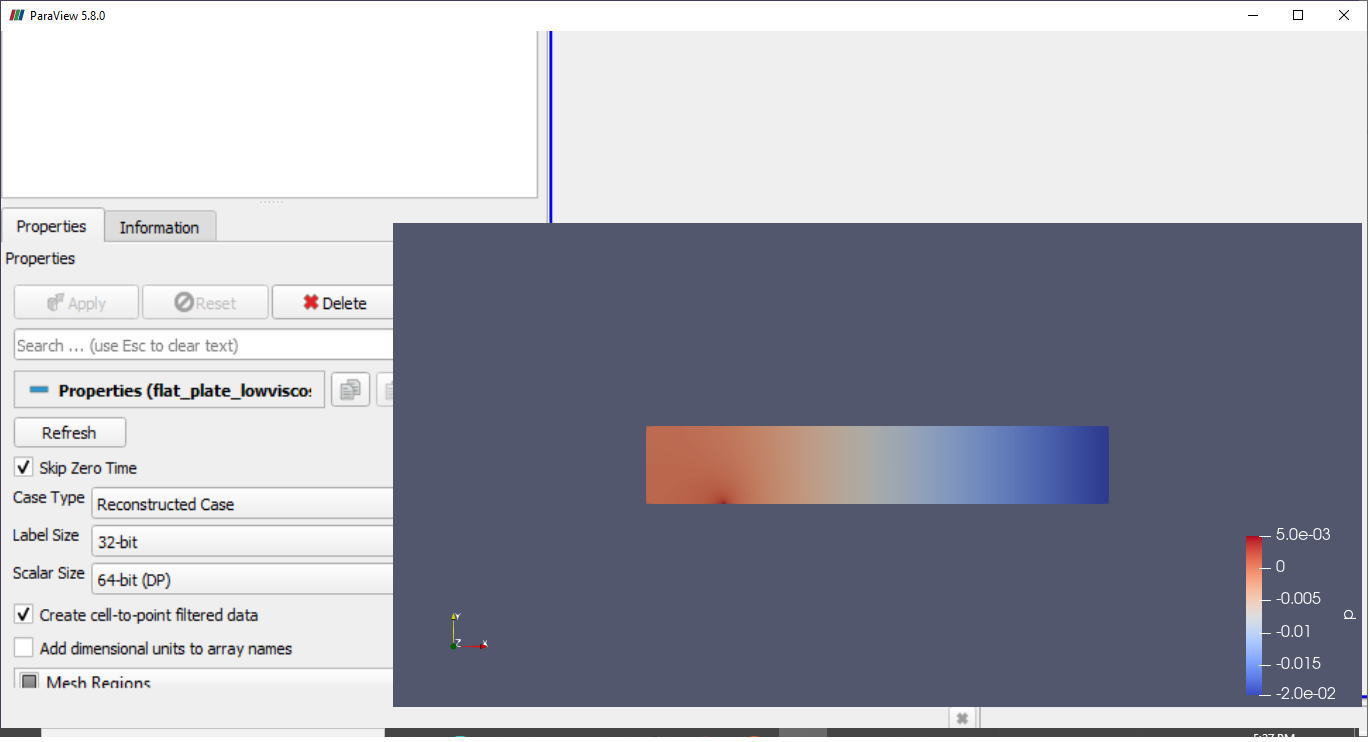
Please be kindly give me an advice for this error. After clicking the apply button, every time paraview output is similar to the attached image. I cannot change any options in it.
So if anyone know the solution for this, let me know.
---
### Author:  [@mwestphal](https://discourse.paraview.org/u/mwestphal)
#### Post date: [December 7, 2021, 12:51pm UTC](https://discourse.paraview.org/t/visualization-problem-in-paraview/8576/2 "2021-12-07T12:51:18Z")
> [@I am using ParaView 5.8.0 on Windows 10, and my GUI is completely broken, with missing icons! What is happening?](https://discourse.paraview.org/t/i-am-using-paraview-5-8-0-on-windows-10-and-my-gui-is-completely-broken-with-missing-icons-what-is-happening/4509):
>
> This is due to the "Intel Driver Bug., You can find all info about it here: [https://gitlab.kitware.com/paraview/paraview/-/issues/19364](https://gitlab.kitware.com/paraview/paraview/-/issues/19364) Possible solutions are: Upgrade to ParaView 5.8.1 or more recent Use another GPU (eg: NVIDIA instead of Intel) Downgrade your Intel driver to the version before 26.20.100.6708 Upgrade your Intel driver to the version after 26.20.100.7528 Use mesa instead : [How to run ParaView (including the binary release) using Mesa on Windows](https://discourse.paraview.org/t/how-to-run-paraview-including-the-binary-release-using-mesa-on-windows/4321/2) Downgrade to ParaView…
---
### Author:  [@charithaRdissanayaka](https://discourse.paraview.org/u/charithaRdissanayaka)
#### Post date: [December 8, 2021, 3:09am UTC](https://discourse.paraview.org/t/visualization-problem-in-paraview/8576/3 "2021-12-08T03:09:17Z")
Dear Sir,
Thank you very much for your kind suggestion. I updated the intel driver and installed lower version of the paraview. Now it is working.