# Volume calculation (surface mesh) in paraview
**URL:** https://discourse.paraview.org/t/volume-calculation-surface-mesh-in-paraview/17776
**Category:** ParaView Support
**Created:** [October 26, 2026, 7:49am UTC](https://discourse.paraview.org/t/volume-calculation-surface-mesh-in-paraview/17776 "2026-10-26T07:49:22Z")
**Posts on this page:** 5
**Page:** 1
### Author:  [@otaolafr](https://discourse.paraview.org/u/otaolafr)
#### Post date: [October 26, 2026, 7:49am UTC](https://discourse.paraview.org/t/volume-calculation-surface-mesh-in-paraview/17776/1 "2026-10-26T07:49:22Z")
Hello,
I was looking to calculate the total volume of a surface mesh, from my previous knowledge and what i have found on the forum [Compute volume of polygonal mesh (volume enclosed by the surface) - #2 by Christos\_Tsolakis](https://discourse.paraview.org/t/compute-volume-of-polygonal-mesh-volume-enclosed-by-the-surface/10880/2) a volumetric mesh should be created and then the total volume can be easily calculated from integrate variables filter. from my knowledge, the only possibility in paraview to create a 3D mesh is 3D Delaunay?
I am asking as it is giving me quite strange results (left stl right result of Delaunay3D filter):
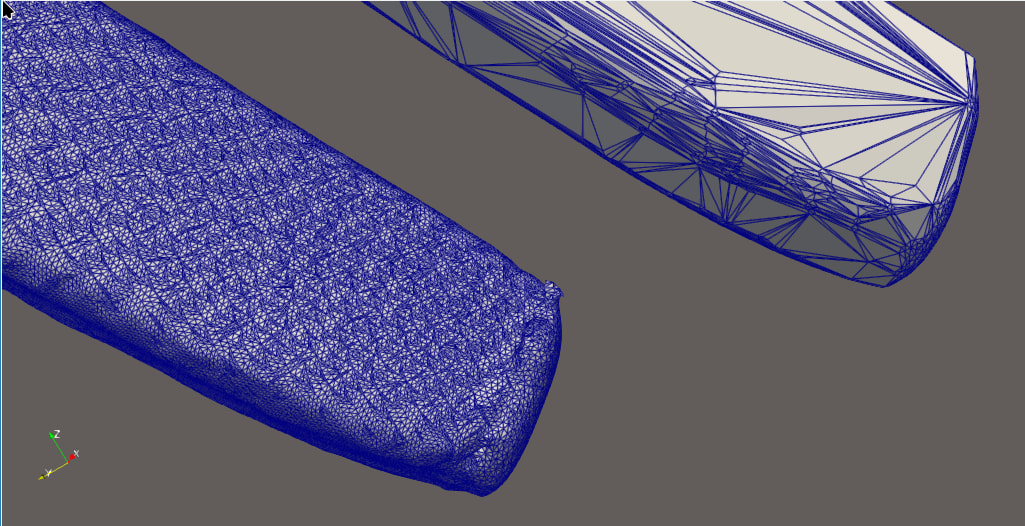
also here is the clip view, i see ‘internal’ small elements where there is a layer of external coarse elements? (the only thing showing is the clip of the delaunay3D **there is not the surface mesh in this renderviewer** )
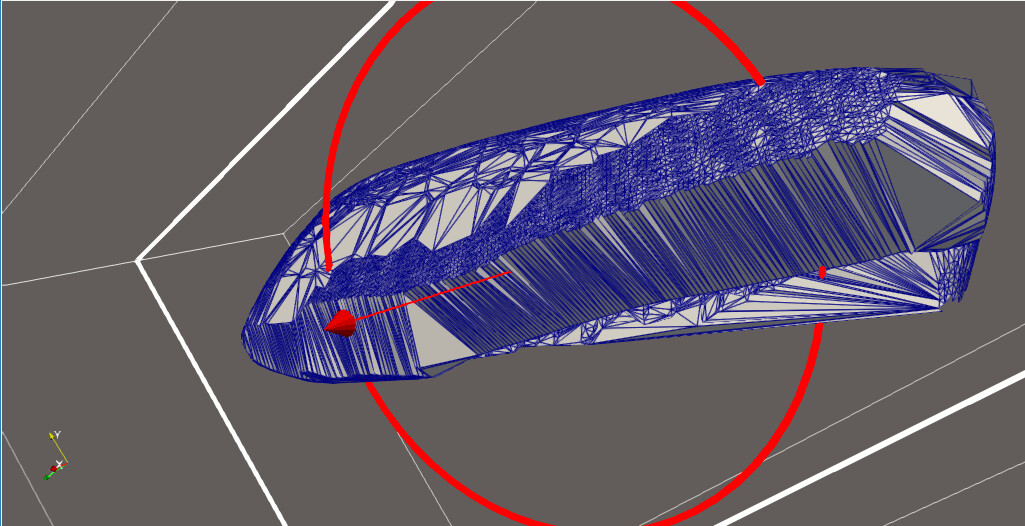
is there a cleaner way to do it in paraview without having to pass thought external meshers? or should i go necessarily go to an outside mesher and bring back the mesh to keep working on paraview? I really dont care about the mesh itself, so a classic advancing front approach with bad quality mesh elements would be more than enough but after some digging not sure this kind of thing is possible in paraview itself.
thanks in advance.
---
### Author:  [@mwestphal](https://discourse.paraview.org/u/mwestphal)
#### Post date: [October 26, 2026, 9:55am UTC](https://discourse.paraview.org/t/volume-calculation-surface-mesh-in-paraview/17776/2 "2026-10-26T09:55:11Z")
Which version of ParaView are you using ?
---
### Author:  [@otaolafr](https://discourse.paraview.org/u/otaolafr)
#### Post date: [October 26, 2026, 9:56am UTC](https://discourse.paraview.org/t/volume-calculation-surface-mesh-in-paraview/17776/3 "2026-10-26T09:56:09Z")
6.2. keep forgetting to add to the post, sorry 😅
---
### Author:  [@mwestphal](https://discourse.paraview.org/u/mwestphal)
#### Post date: [October 26, 2026, 9:57am UTC](https://discourse.paraview.org/t/volume-calculation-surface-mesh-in-paraview/17776/4 "2026-10-26T09:57:41Z")
3D delaunay was recently reworked, you may want to try the nightly.
---
### Author:  [@otaolafr](https://discourse.paraview.org/u/otaolafr)
#### Post date: [October 26, 2026, 10:10am UTC](https://discourse.paraview.org/t/volume-calculation-surface-mesh-in-paraview/17776/5 "2026-10-26T10:10:31Z")
nop, still same issue on nightly I also tested in 6.0.1 (oldest verison i have) same behavior. is see ‘mini elements’ of similar size as the stl when cliping but really large elements outside. worth noticing that in nightly (or 6.2 also) i get a warning (that in 6.0.1 even though same looking result and way slower i was not getting):
```auto
Warning: In vtkDelaunay3D.cxx, line 958
vtkDelaunay3D (0x79399d894fb0): 2221 degenerate triangles encountered, mesh quality suspect
```
here is the model in case you want to play with (not sure if it is a bug or not):
[model.stl](https://discourse.paraview.org/uploads/short-url/oOcryy8PPi6Gyo9maP0UwbcWv3c.stl) (3.3 MB)