# Volume rendering of Scalar Field with Selective Opacity
**URL:** https://discourse.paraview.org/t/volume-rendering-of-scalar-field-with-selective-opacity/329
**Category:** ParaView Support
**Created:** [July 17, 2018, 8:08am UTC](https://discourse.paraview.org/t/volume-rendering-of-scalar-field-with-selective-opacity/329 "2018-07-17T08:08:17Z")
**Posts on this page:** 13
**Page:** 1
### Author:  [@aniruddha](https://discourse.paraview.org/u/aniruddha)
#### Post date: [July 17, 2018, 8:08am UTC](https://discourse.paraview.org/t/volume-rendering-of-scalar-field-with-selective-opacity/329/1 "2018-07-17T08:08:17Z")
Hi Folks,
I have a 3D data of a scalar which is being advected & diffused. What I need is a volumetric representation/rendering of 3D data similar to the one attached(figure1 and figure2)[1] and [2].
My system’s 3D volume rendering is attached (figure3). What I am struggling with is to define the colormap such that the middle ranges become transparent. I hope that by doing this I can reproduce the same figure.
What I have tried as a first cut, is to apply the **iso volume** filter on the VTK file which happens to be a rectilinear grid, only after which I can render it as a Volume (earlier the option wasn’t present). After applying the IsoVolume filter, I apply **color map opacity transfer function** to make certain range as transparent. The output of this pipeline could be found in figure 4. Even after this the visualisation doesnt look as clean as I expected and it happens after applying the iso-volume filter.
Is there some other way out. Any ideas on how to implement/produce this in Paraview.
Attachments(removed): Due to size limitations I am sharing all the figures on this Imgur link
[https://imgur.com/a/oQaJQr1](https://imgur.com/a/oQaJQr1)
VTK File : [https://my.pcloud.com/publink/show?code=XZ3HR27ZNeIJPE0acSzyxxz9PQUjwfp23Jy0](https://my.pcloud.com/publink/show?code=XZ3HR27ZNeIJPE0acSzyxxz9PQUjwfp23Jy0)
Note :- the field I am interested is the Temperature denoted by T. The ends on the +Y and -Y are walls which are hot and cold respectively.
[1] [http://www.pnas.org/content/pnas/113/1/69.full.pdf](http://www.pnas.org/content/pnas/113/1/69.full.pdf)
[2] [https://arxiv.org/pdf/1605.04161.pdf](https://arxiv.org/pdf/1605.04161.pdf)
---
### Author:  [@Michael](https://discourse.paraview.org/u/Michael)
#### Post date: [July 18, 2018, 9:01am UTC](https://discourse.paraview.org/t/volume-rendering-of-scalar-field-with-selective-opacity/329/2 "2018-07-18T09:01:36Z")
Hi,
You can use the filter ResampleToImage and use the Image Volume Representation which has a nice Shade option.
Is it what you are looking for?

Michael
---
### Author:  [@aniruddha](https://discourse.paraview.org/u/aniruddha)
#### Post date: [July 18, 2018, 12:04pm UTC](https://discourse.paraview.org/t/volume-rendering-of-scalar-field-with-selective-opacity/329/3 "2018-07-18T12:04:21Z")
Thanks Michael, that is exactly what I wanted. Another thing that I am struggling with ( also related to your image) is that I want to have the walls represented as a surface (-y and +y) to have certain opacity so that I can have a camera rotating animation of the representation ( rotation about the x axis ). Since my data prints the vtk from the first INTERIOR cell to last INTERIOR cell, hence I don’t have the values of the wall (cell centered finite volume discretization). What I have done is to have two different vtk files for respresenting the surface depicted like this
* * *
# vtk DataFile Version 3.0
## vtk output ASCII DATASET RECTILINEAR\_GRID DIMENSIONS 2 1 2 X\_COORDINATES 2 float -0.002 0.050 Y\_COORDINATES 1 float 0 Z\_COORDINATES 2 float -0.002 0.018 CELL\_DATA 1 POINT\_DATA 4 FIELD FieldData 1 nodal 1 4 float 0 1 1.1 2
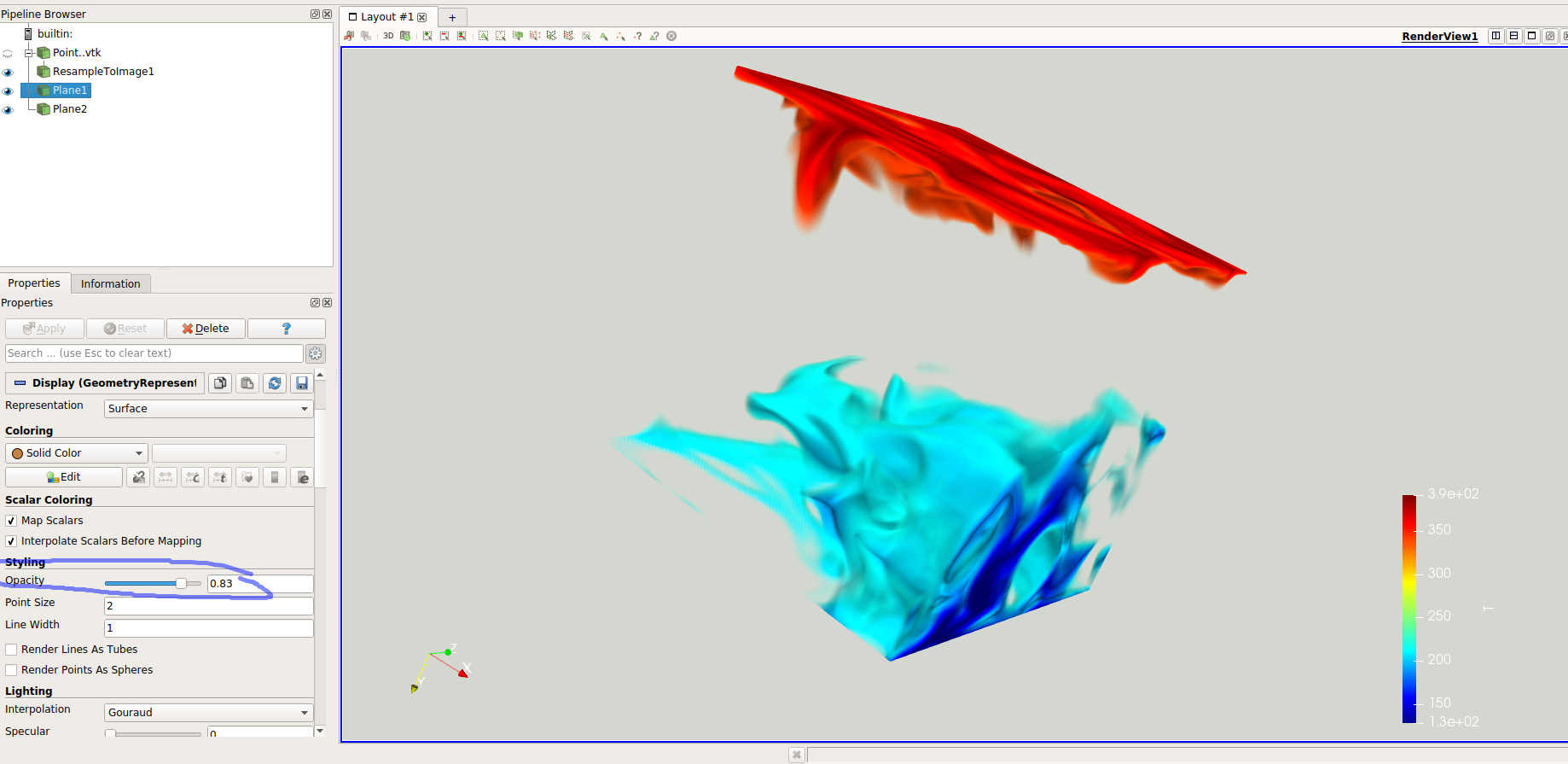
Like this I get the walls but I can’t get them to have an opacity other than 1. As soon as i change the opacity slider for the surface it vanishes from the visualisation. Any idea how to get that ?
P.S. Your pipeline renders visualisation much faster than the iso-volume filter. Thanks again for that.
---
### Author:  [@Michael](https://discourse.paraview.org/u/Michael)
#### Post date: [July 18, 2018, 12:29pm UTC](https://discourse.paraview.org/t/volume-rendering-of-scalar-field-with-selective-opacity/329/4 "2018-07-18T12:29:36Z")
The opacity works fine on my side with this file.
Alternatively, you can create the walls with a plane source.
Here is the state file of my session:
[volume\_render.pvsm](https://discourse.paraview.org/uploads/default/original/1X/b044e6eed310cf33b17f4a8f6473c7ae69f4df94.pvsm) (553.0 KB)
---
### Author:  [@aniruddha](https://discourse.paraview.org/u/aniruddha)
#### Post date: [July 18, 2018, 12:39pm UTC](https://discourse.paraview.org/t/volume-rendering-of-scalar-field-with-selective-opacity/329/5 "2018-07-18T12:39:20Z")
With your state file too it seems not to work. Kindly see the attached images one with opacity 1 and other with opacity other than one. I have chosen the hot wall to be the case.
---
### Author:  [@Michael](https://discourse.paraview.org/u/Michael)
#### Post date: [July 18, 2018, 12:43pm UTC](https://discourse.paraview.org/t/volume-rendering-of-scalar-field-with-selective-opacity/329/6 "2018-07-18T12:43:48Z")
What version of ParaView are you using?
---
### Author:  [@aniruddha](https://discourse.paraview.org/u/aniruddha)
#### Post date: [July 18, 2018, 12:44pm UTC](https://discourse.paraview.org/t/volume-rendering-of-scalar-field-with-selective-opacity/329/7 "2018-07-18T12:44:50Z")
I am using Paraview 5.5.2 still it doesnt work 😕
---
### Author:  [@Michael](https://discourse.paraview.org/u/Michael)
#### Post date: [July 18, 2018, 12:48pm UTC](https://discourse.paraview.org/t/volume-rendering-of-scalar-field-with-selective-opacity/329/8 "2018-07-18T12:48:00Z")
Try to run paraview with the argument `-dr`
---
### Author:  [@aniruddha](https://discourse.paraview.org/u/aniruddha)
#### Post date: [July 18, 2018, 12:52pm UTC](https://discourse.paraview.org/t/volume-rendering-of-scalar-field-with-selective-opacity/329/9 "2018-07-18T12:52:54Z")
The problem still persists. I tried running it with `-dr` flag.
---
### Author:  [@aniruddha](https://discourse.paraview.org/u/aniruddha)
#### Post date: [July 18, 2018, 1:40pm UTC](https://discourse.paraview.org/t/volume-rendering-of-scalar-field-with-selective-opacity/329/10 "2018-07-18T13:40:19Z")
Hi Michael, any idea on what is going wrong ? I never was able to do it ( change opacity for a slice or surface ) and i thought it was usual paraview behavior.
Can you share a snapshot of semi-transparent wall surface that you are able to reproduce ?
---
### Author:  [@Michael](https://discourse.paraview.org/u/Michael)
#### Post date: [July 18, 2018, 2:06pm UTC](https://discourse.paraview.org/t/volume-rendering-of-scalar-field-with-selective-opacity/329/11 "2018-07-18T14:06:34Z")
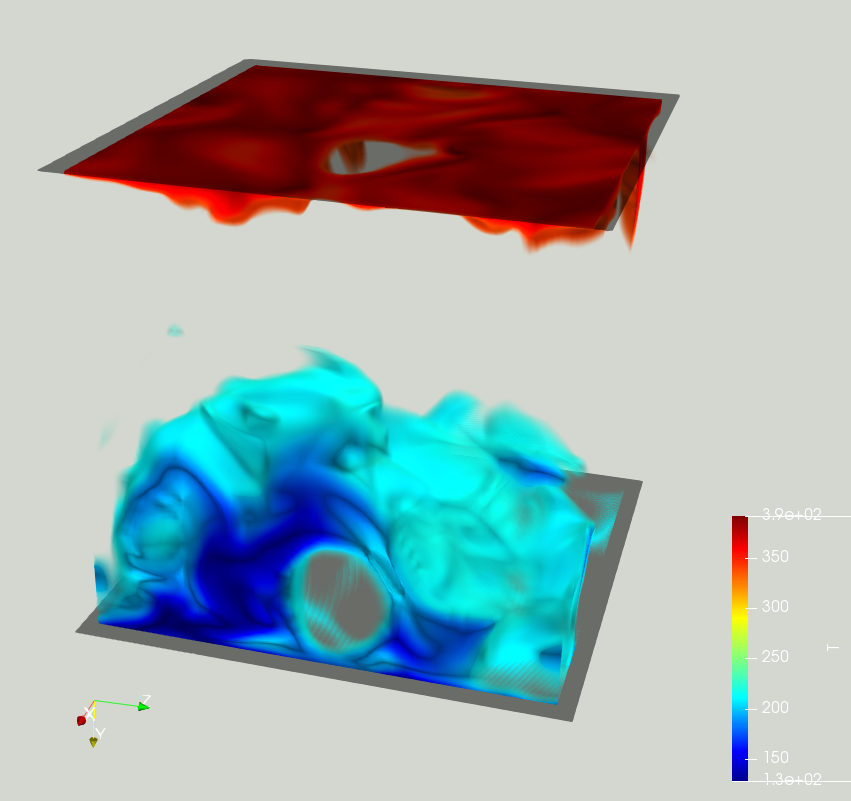
I’m sorry, I’m running out of idea. Maybe a graphic card driver issue?
Here is my screenshot with paraview master (reproduced also with paraview 5.5.1):
---
### Author:  [@aniruddha](https://discourse.paraview.org/u/aniruddha)
#### Post date: [July 18, 2018, 2:48pm UTC](https://discourse.paraview.org/t/volume-rendering-of-scalar-field-with-selective-opacity/329/12 "2018-07-18T14:48:02Z")
Hi Michael,
I tried to reproduce the same pipeline on my laptop and it works just fine (the opacity for the surface). I can now confirm that it has to do something with the graphics drivers. I was earlier testing it with my workstation which has Nvidia graphics card. Has there been a bug/issue already filed for this ?
---
### Author:  [@Michael](https://discourse.paraview.org/u/Michael)
#### Post date: [July 18, 2018, 2:54pm UTC](https://discourse.paraview.org/t/volume-rendering-of-scalar-field-with-selective-opacity/329/13 "2018-07-18T14:54:35Z")
I cannot find an issue related to surface opacity.
You can file one [there](https://gitlab.kitware.com/paraview/paraview/issues).