# VTK file visualization and surface/volume mesh extraction
**URL:** https://discourse.paraview.org/t/vtk-file-visualization-and-surface-volume-mesh-extraction/8757
**Category:** ParaView Support
**Tags:** vtk
**Created:** [January 11, 2022, 11:17pm UTC](https://discourse.paraview.org/t/vtk-file-visualization-and-surface-volume-mesh-extraction/8757 "2022-01-11T23:17:20Z")
**Posts on this page:** 5
**Page:** 1
### Author:  [@Emil](https://discourse.paraview.org/u/Emil)
#### Post date: [January 11, 2022, 11:17pm UTC](https://discourse.paraview.org/t/vtk-file-visualization-and-surface-volume-mesh-extraction/8757/1 "2022-01-11T23:17:20Z")
Hello Gentle people
I am facing an issue when trying to create a stl surface from vtk file generated from a open source program. I am not an expert on the program that outputs the vtk file nor it has many parameters that i can control. Opening the file in paraview does show closed surfaces and is exactly what i need but in an stl format.
- Opened file in ParaView
- Used paraview to extract surface and then exported the surface file as stl.
- Open Stl in meshmixer
It seems the stl has alternating face normals. Please help me to solve this problem.
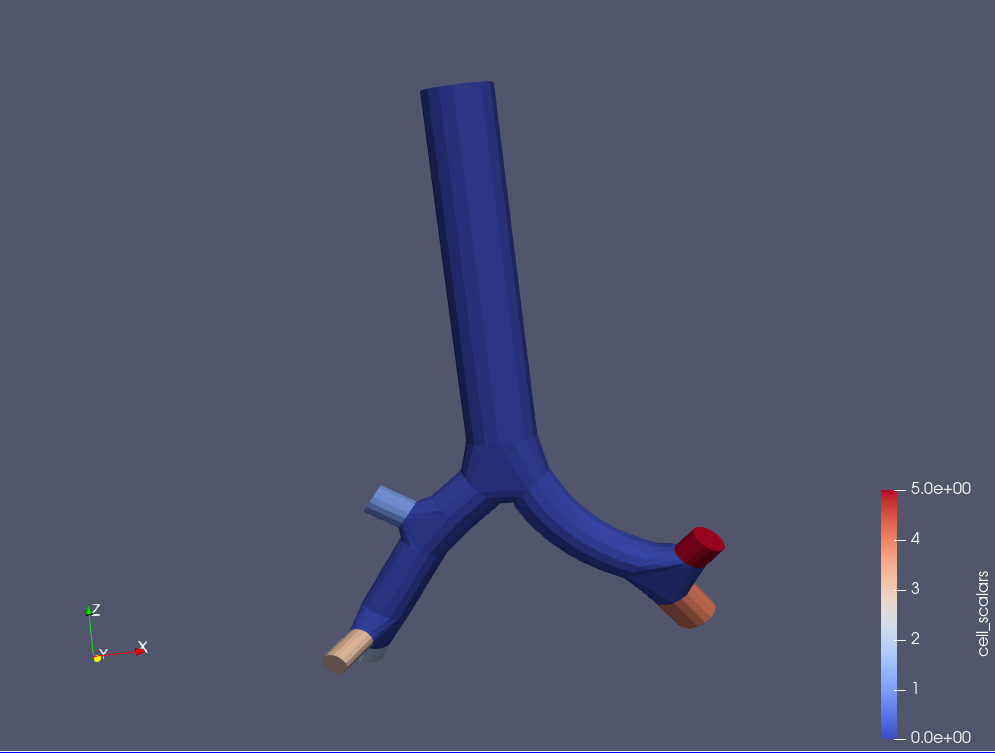
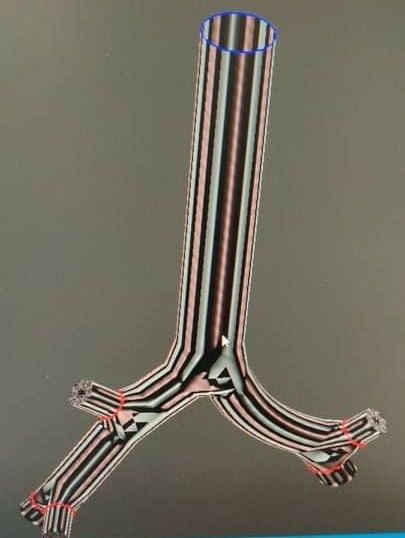
---
### Author:  [@mwestphal](https://discourse.paraview.org/u/mwestphal)
#### Post date: [January 11, 2022, 11:23pm UTC](https://discourse.paraview.org/t/vtk-file-visualization-and-surface-volume-mesh-extraction/8757/2 "2022-01-11T23:23:14Z")
GenerateSurfaceNormals filter maybe ?
This may be an issue in mesh mixer though.
---
### Author:  [@Emil](https://discourse.paraview.org/u/Emil)
#### Post date: [January 12, 2022, 2:30pm UTC](https://discourse.paraview.org/t/vtk-file-visualization-and-surface-volume-mesh-extraction/8757/3 "2022-01-12T14:30:13Z")
I have exported the stl in other programs (CFD solvers) and the alternating face normal strips are also shown there. So i do not think the problem is with meshmixer.
Could you please explain the step where i should apply the GenerateSurfaceNormals filter?
---
### Author:  [@mwestphal](https://discourse.paraview.org/u/mwestphal)
#### Post date: [January 12, 2022, 2:38pm UTC](https://discourse.paraview.org/t/vtk-file-visualization-and-surface-volume-mesh-extraction/8757/4 "2022-01-12T14:38:43Z")
Filters - \> Alphabetical → GenerateSurfaceNormals → Apply
---
### Author:  [@Emil](https://discourse.paraview.org/u/Emil)
#### Post date: [January 18, 2022, 3:20pm UTC](https://discourse.paraview.org/t/vtk-file-visualization-and-surface-volume-mesh-extraction/8757/5 "2022-01-18T15:20:21Z")
Thanks. i applied this filter after GenerateSurface filter and that solved the problem.