# What is the correct way plot particles and clip the scene?
**URL:** https://discourse.paraview.org/t/what-is-the-correct-way-plot-particles-and-clip-the-scene/5696
**Category:** ParaView Support
**Created:** [October 31, 2020, 1:03pm UTC](https://discourse.paraview.org/t/what-is-the-correct-way-plot-particles-and-clip-the-scene/5696 "2020-10-31T13:03:42Z")
**Posts on this page:** 10
**Page:** 1
### Author:  [@Reuben\_Kraft](https://discourse.paraview.org/u/Reuben_Kraft)
#### Post date: [October 31, 2020, 1:03pm UTC](https://discourse.paraview.org/t/what-is-the-correct-way-plot-particles-and-clip-the-scene/5696/1 "2020-10-31T13:03:42Z")
I am looking for a simple example that shows how plot particles that I can color according to point data and clip. I created a VTP file. It loads properly. The coloring by point data works great too. I have to visualize the points using the point gaussian option. However, if I want to clip the science, paraview crashes or does not show the correct clip. I am not sure I am using the correct format and could not find an example online. I am confused if I should be using cell option, but paraview complains when I do not include it.
Any suggestions or help?
Thanks,
Reuben
Here is an example of my current VTP file:
```
-8.440588e+01 5.965692e+01 2.186531e+01
-9.275425e+01 4.851919e+01 -4.325278e+01
-1.052648e+02 2.065449e+01 1.702934e+01
0
1
2
1
1
1
1
1
1
0
0
1
1
1
0
```
---
### Author:  [@mwestphal](https://discourse.paraview.org/u/mwestphal)
#### Post date: [November 2, 2020, 8:56am UTC](https://discourse.paraview.org/t/what-is-the-correct-way-plot-particles-and-clip-the-scene/5696/2 "2020-11-02T08:56:06Z")
Hi,
> However, if I want to clip the science, paraview crashes or does not show the correct clip.
Please provide exact steps to reproduce.
---
### Author:  [@Reuben\_Kraft](https://discourse.paraview.org/u/Reuben_Kraft)
#### Post date: [November 2, 2020, 12:58pm UTC](https://discourse.paraview.org/t/what-is-the-correct-way-plot-particles-and-clip-the-scene/5696/3 "2020-11-02T12:58:45Z")
1. Open Deformed\_Plot\_0.vtu
2. Render points as point gaussian
3. enable clipping filter
4. Render points as point gaussian with Gaussian radius of 2
5. Invert clipping (this step does not work)
See my steps here: [https://www.loom.com/share/d40e7a4ee36b42e598870ecdcb184215](https://www.loom.com/share/d40e7a4ee36b42e598870ecdcb184215)
File: [Deformed\_Plot\_0.vtu](https://discourse.paraview.org/uploads/short-url/fiYcqHIUgrRwoJdn4gBpkENfNcd.vtu) (1.0 KB)
---
### Author:  [@Reuben\_Kraft](https://discourse.paraview.org/u/Reuben_Kraft)
#### Post date: [November 6, 2020, 2:38pm UTC](https://discourse.paraview.org/t/what-is-the-correct-way-plot-particles-and-clip-the-scene/5696/4 "2020-11-06T14:38:20Z")
Hi -
Just wanted to follow up. Even if there is an example VTP file out there that someone is willing to share, I can probably take it from there. To be specific I am looking for a particle file that you can clip. That’s it!
Thanks,
Reubn
---
### Author:  [@mwestphal](https://discourse.paraview.org/u/mwestphal)
#### Post date: [November 9, 2020, 11:34am UTC](https://discourse.paraview.org/t/what-is-the-correct-way-plot-particles-and-clip-the-scene/5696/5 "2020-11-09T11:34:08Z")
Your loom link doesn’t seems to work, it is all blurry for some reasons.
What do you mean by:
- enable clipping filter
?
---
### Author:  [@Reuben\_Kraft](https://discourse.paraview.org/u/Reuben_Kraft)
#### Post date: [November 9, 2020, 4:00pm UTC](https://discourse.paraview.org/t/what-is-the-correct-way-plot-particles-and-clip-the-scene/5696/6 "2020-11-09T16:00:14Z")
I am sorry about the loom link, please try this [https://youtu.be/qmiYOYuCGLw](https://youtu.be/qmiYOYuCGLw).
By clip I mean the button in the attached picture
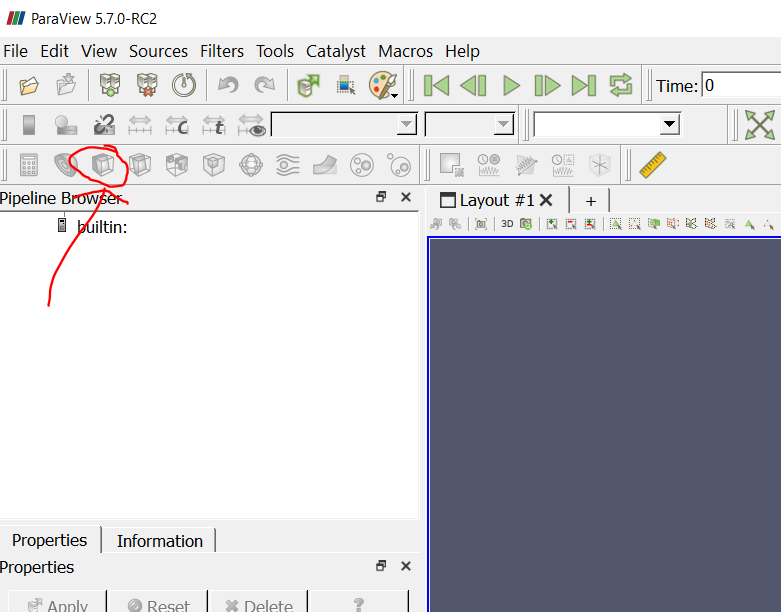
If I have a collection of particles, I want to clip half of them away.
---
### Author:  [@mwestphal](https://discourse.paraview.org/u/mwestphal)
#### Post date: [November 9, 2020, 4:47pm UTC](https://discourse.paraview.org/t/what-is-the-correct-way-plot-particles-and-clip-the-scene/5696/7 "2020-11-09T16:47:07Z")
There is some issues with your file, you can check the spreadsheet. You could use a polyvertex instead.
[Deformed\_Plot\_0(1).vtu](https://discourse.paraview.org/uploads/short-url/cJnSoxAer8EmNXPFpRl2rUWUeMc.vtu) (1.0 KB)
---
### Author:  [@Reuben\_Kraft](https://discourse.paraview.org/u/Reuben_Kraft)
#### Post date: [November 9, 2020, 6:21pm UTC](https://discourse.paraview.org/t/what-is-the-correct-way-plot-particles-and-clip-the-scene/5696/8 "2020-11-09T18:21:58Z")
great thank you. I see what you did. Will this be an issue if I go to a large number of points, say 100,000? Do you think I can keep it as a single cell polyvertex?
---
### Author:  [@mwestphal](https://discourse.paraview.org/u/mwestphal)
#### Post date: [November 9, 2020, 6:25pm UTC](https://discourse.paraview.org/t/what-is-the-correct-way-plot-particles-and-clip-the-scene/5696/9 "2020-11-09T18:25:56Z")
Actually, you should always prefer polyvertex.
---
### Author:  [@steve\_r](https://discourse.paraview.org/u/steve_r)
#### Post date: [November 10, 2020, 1:27pm UTC](https://discourse.paraview.org/t/what-is-the-correct-way-plot-particles-and-clip-the-scene/5696/10 "2020-11-10T13:27:38Z")
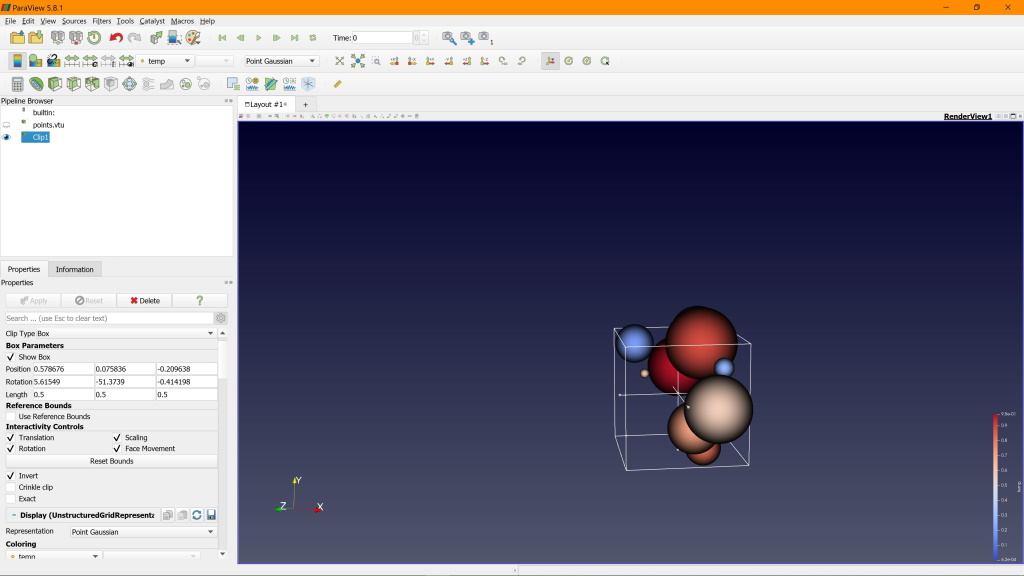
I had a similar issue when trying to clip away portions of a particle cloud that was rendered as “point gaussian”. I was expecting to cut pieces out from the rendered spheres, but the clip filter only removes the data points outside the clip region. So what you get is a smaller amount of the points, that you then can turn into “gaussian” rendered spheres again. See attached.
I would love to have clipping planes that apply to the rendering, but that seems specific to the render engine. The NVIDIA IndeX volume renderer supports this, for example.