# When using python script, screenshot records blank
**URL:** https://discourse.paraview.org/t/when-using-python-script-screenshot-records-blank/1915
**Category:** ParaView Support
**Tags:** python
**Created:** [May 23, 2019, 1:32pm UTC](https://discourse.paraview.org/t/when-using-python-script-screenshot-records-blank/1915 "2019-05-23T13:32:27Z")
**Posts on this page:** 7
**Page:** 1
### Author:  [@wl032](https://discourse.paraview.org/u/wl032)
#### Post date: [May 23, 2019, 1:32pm UTC](https://discourse.paraview.org/t/when-using-python-script-screenshot-records-blank/1915/1 "2019-05-23T13:32:27Z")
My purpose is to do some batch processing, and take screen shots.
Here is the script.
```python
#### import the simple module from the paraview
from paraview.simple import *
#### disable automatic camera reset on 'Show'
paraview.simple._DisableFirstRenderCameraReset()
# create a new 'Legacy VTK Reader'
filename = '/root/Documents/huiyi/odb/100-100-30-s-p/frame32-300.0.vtk'
vtk1 = LegacyVTKReader(FileNames=[filename])
renderView1 = GetActiveViewOrCreate('RenderView')
threshold = []
thresholdDisplay = []
n = 0
SetActiveSource(vtk1)
threshold.append(Threshold(Input=vtk1))
threshold[n].Scalars = ['CELLS', 'modePE']
threshold[n].ThresholdRange = [2.0, 2.0]
thresholdDisplay.append(Show(threshold[n], renderView1))
thresholdDisplay[n].Representation = 'Surface'
ColorBy(thresholdDisplay[n], ('CELLS', 'modePE'))
thresholdDisplay[n].RescaleTransferFunctionToDataRange(True, False)
thresholdDisplay[n].SetScalarBarVisibility(renderView1, True)
renderView1.Update()
modePELUT = GetColorTransferFunction('modePE')
modePELUT.RescaleTransferFunction(0.0, 26.0)
modePEPWF = GetOpacityTransferFunction('modePE')
modePEPWF.RescaleTransferFunction(0.0, 26.0)
renderView1.CameraPosition = [50.0, 50.0, 294.28455359756214]
renderView1.CameraFocalPoint = [50.0, 50.0, 15.0]
renderView1.CameraParallelScale = 72.2841614740048
SaveScreenshot('/root/Documents/huiyi/odb/100-100-30-s-p/demo.png', renderView1, ImageResolution=[716, 452],
OverrideColorPalette='PrintBackground',
TransparentBackground=1,
# PNG options
CompressionLevel='0')
```
With above codes, I can get what I want in the window but nothing in the .png file.
It’s also weird that after code finishing, the **Apply** button is highlighted and the **file --\> save screenshot** is deactivated.
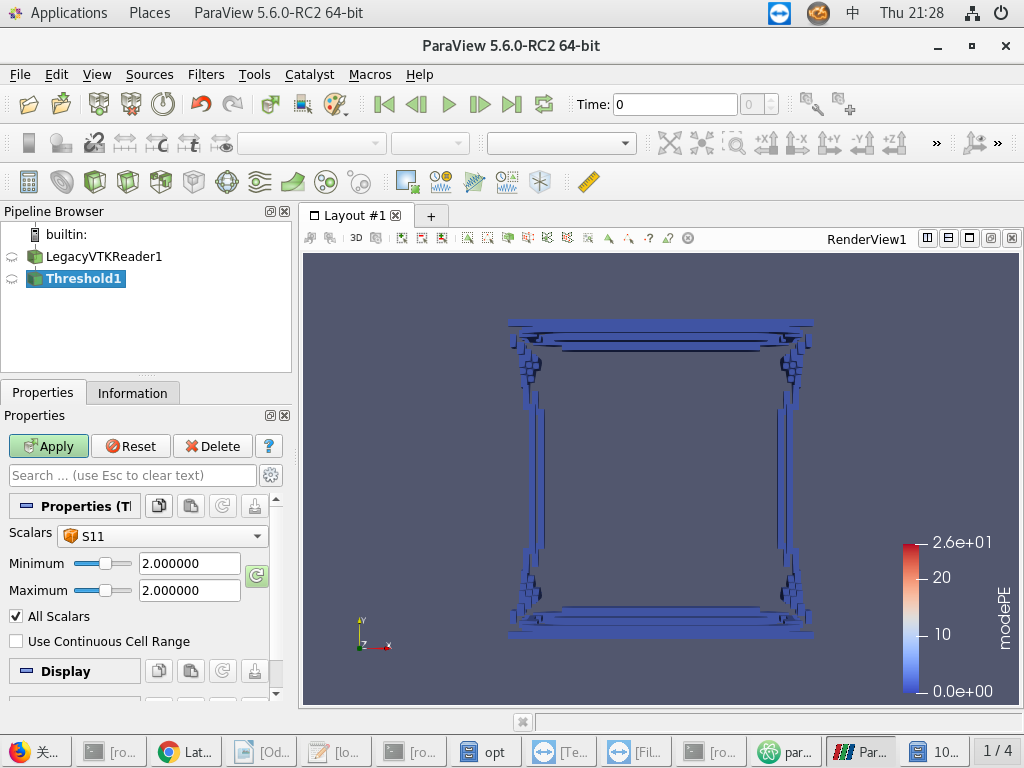
Below is the disappointing .png
I wonder how to fix it.
P.S.
By the way, I also wanna to know the PYTHONPATH setting of my version.
It seems that I can’t find any existing path like those in former answers.
My OS is Centos 7.
My Paraview is ParaView-5.6.0-RC2-Qt5-MPI-Linux-64bit.
---
### Author:  [@utkarsh.ayachit](https://discourse.paraview.org/u/utkarsh.ayachit)
#### Post date: [May 23, 2019, 2:05pm UTC](https://discourse.paraview.org/t/when-using-python-script-screenshot-records-blank/1915/2 "2019-05-23T14:05:49Z")
this sounds a lot like [issue](https://gitlab.kitware.com/paraview/paraview/issues/18945).
For 5.6, the only workaround, I’m afraid, is to either use `pvpython` to play back the script or capture the screenshot separately after playing back the script. This is fixed in upcoming 5.7 release.
---
### Author:  [@wl032](https://discourse.paraview.org/u/wl032)
#### Post date: [May 23, 2019, 3:32pm UTC](https://discourse.paraview.org/t/when-using-python-script-screenshot-records-blank/1915/3 "2019-05-23T15:32:03Z")
That means if I use elder versions, such as 5.5.
The problem also no longer exists, right?
---
### Author:  [@utkarsh.ayachit](https://discourse.paraview.org/u/utkarsh.ayachit)
#### Post date: [May 23, 2019, 3:56pm UTC](https://discourse.paraview.org/t/when-using-python-script-screenshot-records-blank/1915/4 "2019-05-23T15:56:03Z")
> [@wl032](#):
>
> That means if I use elder versions, such as 5.5.
That I do not know; worth a shot.
---
### Author:  [@wl032](https://discourse.paraview.org/u/wl032)
#### Post date: [May 24, 2019, 2:15am UTC](https://discourse.paraview.org/t/when-using-python-script-screenshot-records-blank/1915/5 "2019-05-24T02:15:41Z")
Okay, the 5.5.2 works well.
Thank you!
---
### Author:  [@utkarsh.ayachit](https://discourse.paraview.org/u/utkarsh.ayachit)
#### Post date: [May 29, 2019, 3:29pm UTC](https://discourse.paraview.org/t/when-using-python-script-screenshot-records-blank/1915/6 "2019-05-29T15:29:52Z")
> [@wl032](#):
>
> The problem also no longer exists, right?
that is correct. the problem has been fixed in `master` and will be included in upcoming 5.7 release.
---
### Author:  [@wl032](https://discourse.paraview.org/u/wl032)
#### Post date: [May 31, 2019, 4:04pm UTC](https://discourse.paraview.org/t/when-using-python-script-screenshot-records-blank/1915/8 "2019-05-31T16:04:13Z")
Another problem bothers me.
Here are two pics.
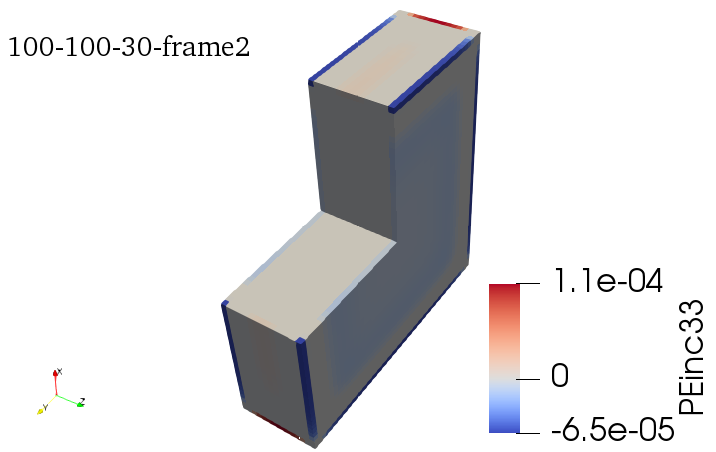
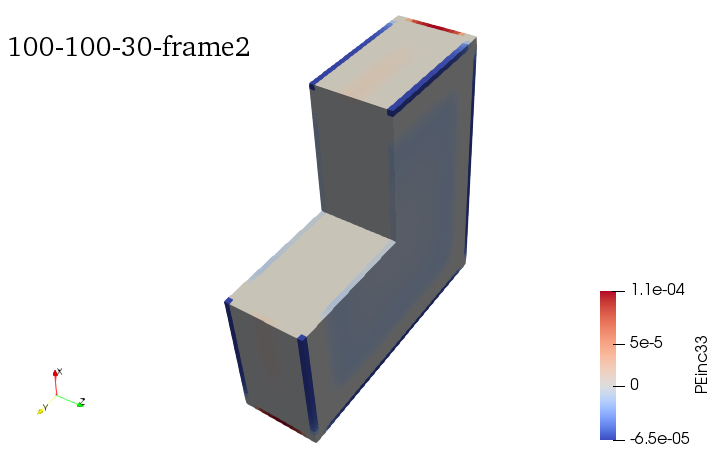
I took shot with the same script, but the color bar is different.
I can only shot color bars like the first one, of which the color bar is too big.
How can I fix it?