# Xdfm file with mixed element topology
**URL:** https://discourse.paraview.org/t/xdfm-file-with-mixed-element-topology/15118
**Category:** ParaView Support
**Created:** [July 25, 2024, 8:59am UTC](https://discourse.paraview.org/t/xdfm-file-with-mixed-element-topology/15118 "2024-07-25T08:59:39Z")
**Posts on this page:** 1
**Page:** 1
### Author:  [@chemakm](https://discourse.paraview.org/u/chemakm)
#### Post date: [July 25, 2024, 8:59am UTC](https://discourse.paraview.org/t/xdfm-file-with-mixed-element-topology/15118/1 "2024-07-25T08:59:39Z")
Hi,
I have a question about opening mixed topology saved in Xdmf format in Paraview.
I am writing the the attribues in HDF files (.h5) and the I genetrate also the .xmf file. As I have a grid with different types of elements, I used the TopologyType=“Mixed”. Here’s a simple example with 2 elements, one triangle and one quad, written in XML format:
```auto
4 0 1 4
5 0 1 5 3
```
It works fine when the elements are written in XML Format, but I have more than 100,000 elements which results in huge .xmf files. I want to store these elements also in HDF format with Variable Length arrays (see below), but Paraview craches when it opens the file.
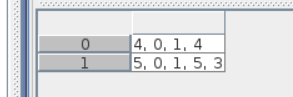
Is there any way to efficiently store girds with mixed topologies in Xdmf format ?
Thanks.