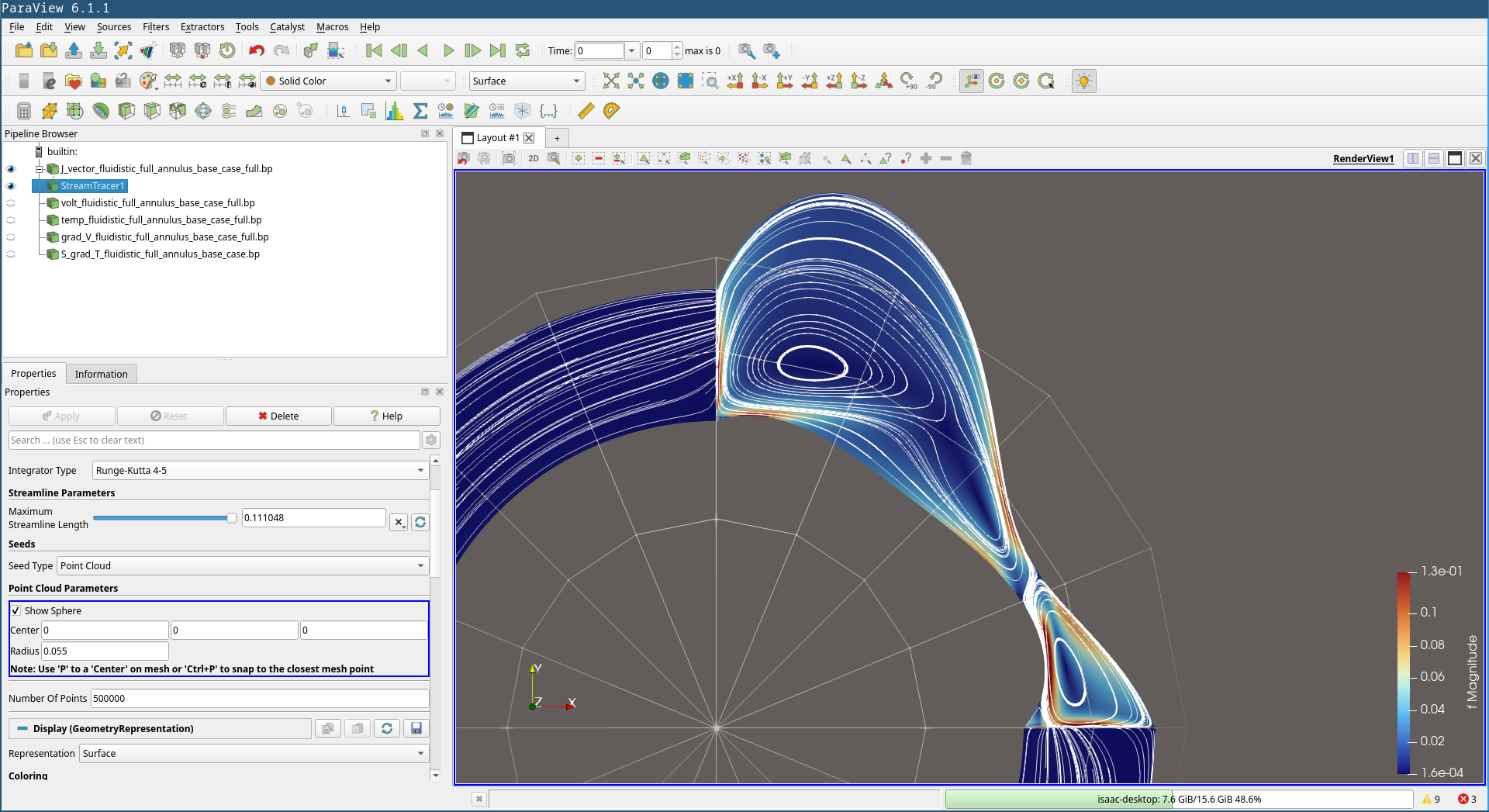
I have a vector field, and when I create a StreamTracer cloud point filter, I face an annoying bug. I take time to specify the center of the ball that seeds the streamlines, I take time to pick a number of seed points and it works “fine”, I have a finished picture:
However when I click back elsewhere, for example on the vector field’s data, many streamlines are suddenly removed!
I can go back to the StreamTracer picture again, but if I disable the Show Sphere option (because I indeed do not want to see it), then many stream lines disappear, exactly as if I had clicked on some other field!
To me this looks like your streamlines are “behind” the surface making them invisible.
Adding some slight opacity toy our surface shoudl fix this, I hope.
Thanks, that seems to be the case, indeed. I do not appreciate, however, a partially transparent scalar field. Is there a way I can generate the streamlines on top of the 2d scalar field? I tried with both a negative and positive z offset for the center of the seed but I get a similar result in both cases.
An opacity os 0.99 should work though.
Alternatively you can use the Geometry Mapper options to displace slightly lines in front of surface.
In Edit → Settings → RenderView.
Unfortunately not. I tried an opacity of 0.99 and this made 0 visible difference to me. It starts to make a slight difference around opacity of 0.9 which is already unacceptable, and the lines that were hidden are still fainter than the clearly visible ones, so I would have to go around opacity 0.5-0.75 to have all streamlines clearly visible, I think.
I also tried the offset option in RenderView. Unfortunately this does not fix anything. At best, all streamlines are visible (just like in the picture I pasted above), but they still disappear when I click on other fields.
I have found a workaround: Instead of using Point Cloud generated streamlines, simply use a Line as seed type. This doesn’t suffer from this bug.