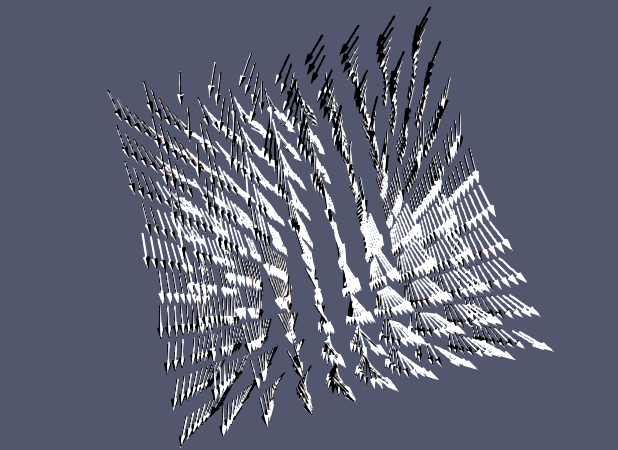
Since I updated to version 5.11.0, I have the following problem: If applying the glyph filter, everything looks fine when zoomed out far away. But if I then zoom in, all of a sudden the coloring breaks down and it’s all black and white. Can somebody help me?
mwestphal
(Mathieu Westphal (Kitware))
September 21, 2022, 1:33pm
2
HI @davidzehner ,
Please share the content of Help → About
Best,
Hi, thanks for the quick reply!
Client Information:
Version: 5.11.0-RC1
VTK Version: 9.2.20220823
Qt Version: 5.15.2
vtkIdType size: 64bits
Embedded Python: On
Python Library Path: /home/david/programs/ParaView/lib/python3.9
Python Library Version: 3.9.13 (main, Aug 28 2022, 04:26:48) [GCC 7.3.1 20180303 (Red Hat 7.3.1-5)]
Python Numpy Support: On
Python Numpy Path: /home/david/programs/ParaView/lib/python3.9/site-packages/numpy
Python Numpy Version: 1.21.1
Python Matplotlib Support: On
Python Matplotlib Path: /home/david/programs/ParaView/lib/python3.9/site-packages/matplotlib
Python Matplotlib Version: 3.2.1
Python Testing: Off
MPI Enabled: On
ParaView Build ID: superbuild 5d77dcfd71ab85235799c921f55ebb69e8b72630 (!1015)
Disable Registry: Off
Test Directory:
Data Directory:
SMP Backend: TBB
SMP Max Number of Threads: 4
OpenGL Vendor: Intel
OpenGL Version: 4.2 (Core Profile) Mesa 22.0.5
OpenGL Renderer: Mesa Intel(R) HD Graphics 4000 (IVB GT2)
Accelerated filters overrides available: No
Connection Information:
Remote Connection: No
mwestphal
(Mathieu Westphal (Kitware))
September 21, 2022, 1:36pm
4
Dav Zeh:
HD Graphics 4000
Your GPU is a 10 years old chipset, you do not have an actual GPU in your computer ?
Yeah, my laptop is really old, but it has worked fine until now. I just noticed that it works with lighting deactivated, but which makes it more difficult to inspect the data, though.
mwestphal
(Mathieu Westphal (Kitware))
September 21, 2022, 1:44pm
6
I’m afraid you are hitting the limit in terms of hardware support by ParaView.
Ok alright, thanks for the help!