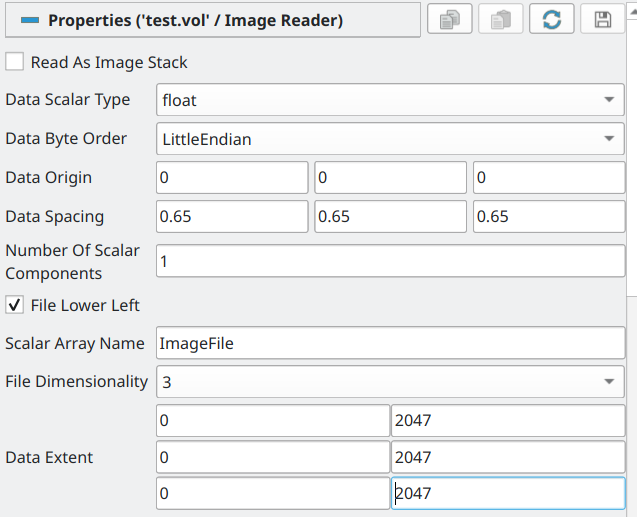
So, the issue comes from clip transforming the image (uniform rectilinear grid) ie., vtkImageData to unstructured grid ie., vtkUnstructuredGrid this provokes a spike of memory (3 times the original ram consomed by the source image) where all the original data is converted before doing the cliping, reason why even if the clip is really small, my ram was not enought.
a solution is to use the Crop filter (by default it is not exposed in the paraview interface) by:
Crop(Input=sourceFilterOfImage, OutputWholeExtent=[vXMin, vXMax, vYMin, vYMax, vZMin, vZMax])
with the vXMin, vXMax, vYMin, vYMax, vZMin, vZMax being the voxels where one will cut the image.
this will give back still a image (uniform rectilinear grid) but this time cutted by a box of the sizes mentionned.
I created a little function to still use clip without the ram consomtion, by simply using as middle men the Crop filter and then the clip one.
def clipBoxOnImage(filter=[], typeOfClip='Box', Length = [20.0, 20.0, 20.0], Position = [1.0, 0.0, 0.0], Normal = [2.0, 0.0, 0.0], Origin = [], Invert = 0):
    if filter==[]:
        filter= GetActiveSource()
    if filter.GetDataInformation().GetDataSetTypeAsString()=='vtkImageData':
        #get the voxel size
        oneVoxel=Crop(Input=filter,OutputWholeExtent = [0, 1, 0, 1, 0, 1])
        [xMin,yMin,zMin,xMax,yMax,zMax]=getBoundingBox(filter=oneVoxel , alignOfAxis=False)
        voxelSize=[xMax-xMin,yMax-yMin,zMax-zMin]
        if typeOfClip=='Box':
            if Origin:
                positionInVoxels=[math.ceil(Origin[i]/voxelSize[i]) for i in range(3)]
            else:
                positionInVoxels=[math.ceil(Position[i]/voxelSize[i]) for i in range(3)]
            LengthInVoxelsHalfs=[math.ceil(Length[i]/(2*voxelSize[i]))+2 for i in range(3)]
            inputForClip=Crop(Input=filter, OutputWholeExtent=[positionInVoxels[0]-LengthInVoxelsHalfs[0],    positionInVoxels[0]+LengthInVoxelsHalfs[0],    positionInVoxels[1]-LengthInVoxelsHalfs[1],    positionInVoxels[1]+LengthInVoxelsHalfs[1],positionInVoxels[2]-LengthInVoxelsHalfs[2],positionInVoxels[2]+LengthInVoxelsHalfs[2]])

        if typeOfClip=='Plane':
            if Normal.count(0)!=2:
                print('only supported for axis aligned planes')
                return
            OriginInVoxels=[math.ceil(Origin[i]/voxelSize[i]) for i in range(3)]
            Normal=[abs(i) for i in Normal]
            voxelBounds=filter.GetInformation().bounds
            maxVoxelBounds=[voxelBounds[1],voxelBounds[3],voxelBounds[5]]
            LengthInVoxelsHalfs=[OriginInVoxels[i] if Normal[i]!=0 else maxVoxelBounds[i] for i in range(3)]
            if Invert:
                inputForClip=Crop(Input=filter, OutputWholeExtent=[0, LengthInVoxelsHalfs[0],    0,   LengthInVoxelsHalfs[1], 0, LengthInVoxelsHalfs[2]])
            else:
                inputForClip=Crop(Input=filter, OutputWholeExtent=[LengthInVoxelsHalfs[0],    maxVoxelBounds[0],    LengthInVoxelsHalfs[1],    maxVoxelBounds[1] ,LengthInVoxelsHalfs[2], maxVoxelBounds[2]])
    else:
        inputForClip=filter
        print('this function should be used only in vtkImageData, getting same result as default behavior of simply clipping the data directly')
    if typeOfClip=='Box':
        if Origin!=[]:
            Position=[Origin[i]-Length[i]/2 for i in range(3)]
        clip1 = Clip(Input=inputForClip,ClipType = 'Box')
        clip1.ClipType.Set(
        Position=Position,
        Length=Length,)
    elif typeOfClip=='Plane':
        clip1 = Clip(Input=inputForClip)
        clip1.ClipType.Set(
        Origin=Origin,
        Normal=Normal,
        Invert=Invert)
    return clip1
        LengthInVoxelsHalfs=[math.ceil(Length[i]/(2*voxelSize[i]))+2 for i in range(3)]
        inputForClip=Crop(Input=filter, OutputWholeExtent=[positionInVoxels[0]-LengthInVoxelsHalfs[0],    positionInVoxels[0]+LengthInVoxelsHalfs[0],    positionInVoxels[1]-LengthInVoxelsHalfs[1],    positionInVoxels[1]+LengthInVoxelsHalfs[1],positionInVoxels[2]-LengthInVoxelsHalfs[2],positionInVoxels[2]+LengthInVoxelsHalfs[2]])
    else:
        inputForClip=filter
        print('this function should be used only in vtkImageData')
    clip1 = Clip(Input=inputForClip,ClipType = 'Box')
    clip1.ClipType.Set(
    Position=Position,
    Length=Length,)
    return clip1
also, it worth noticing that the Crop filter is NOT shown by default in paraview, but usable only in python, if one wants to apear in like Ctr+space bar/ crop one needs to download this file and go in paraview tools/manage plugings/load new… and select the xlm file. then there will be a new pluging called ‘filters_imagingcore’ and if one clicks over it, one can set to auto load to have access each time one uses paraview.