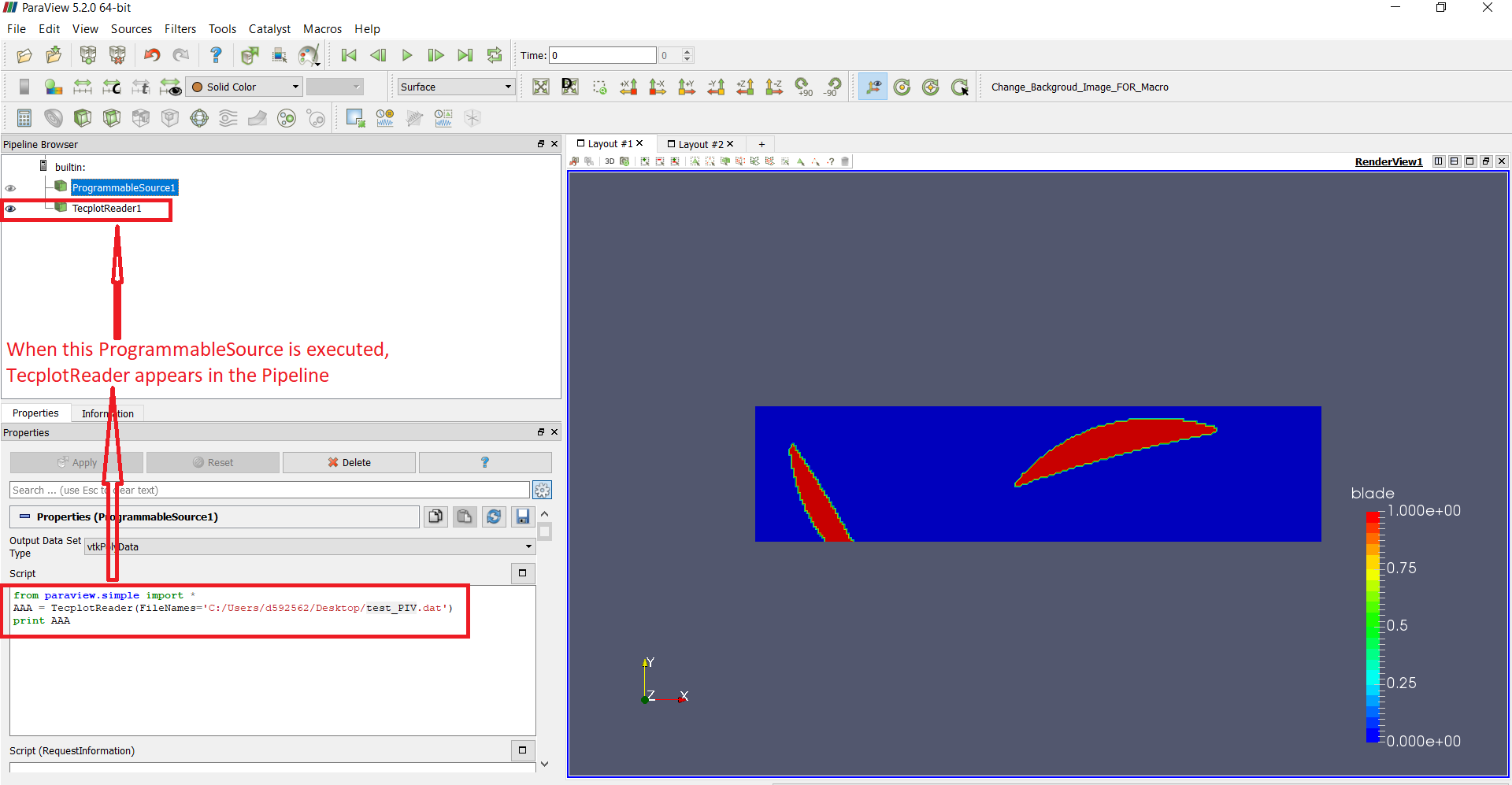
I’m trying to open a Tecplot dat file within a Programmable Source. My objective is to open the file, keep doing some operations with the arrays and then send everything to the output (i.e., the original arrays + the new calculated arrays).
However, i’m struggling with the reader because it creates another element in the Pipeline instead of having acces to the file arrays inside the ProgrammableSource (See image for clarity)
Do you have an idea of how to solve the issue ? (just in case: open the Tecplot data and then apply a programmable filer is not an option for this application).
Thanks in advance!
Miguel
ps: in order to replicate this problem, please find in the attached file a Tecplot dat file example. The code i’m using for the ProgremmableSource is:
from paraview.simple import *
AAA = TecplotReader(FileNames=‘PathToTheFIle/…/test_PIV.dat’)
print AAA
I tried this proven approach for reading some different type of Tecplot files into a programmable source but it does not work (ParaView crashes). These new Tecplot files can be opened with the ParaView GUI but ONLY using the VISIT TECPLOT READER. I assume then that this file is not compatible with vtkTecplotReader. So, is there a way to open those Tecplot files in a programmable source?