Setup: I have a Cell Data velocity vector u (3 components) on a Structured/Curvilinear Grid. I apply a Transform filter (rotation), then a Python Calculator on top with the expression u/20.15.
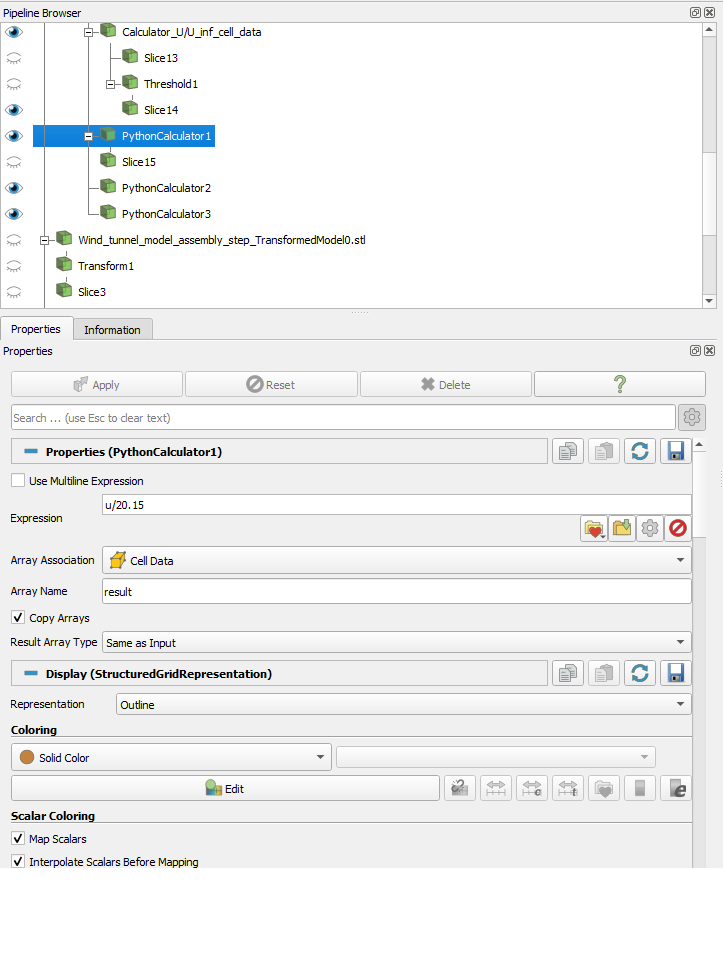
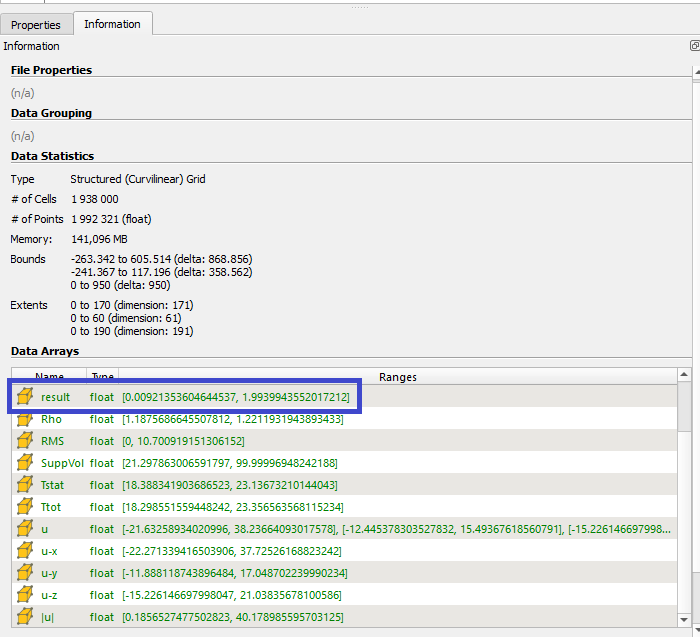
Problem: After the Transform filter, the Python Calculator treats u as a single scalar value instead of a 3-component vector, so I lose the ability to select X/Y/Z components in the output.
What works:
Applying the same Python Calculator expression before the Transform filter (directly on the original data) works fine — u is correctly treated as a vector.
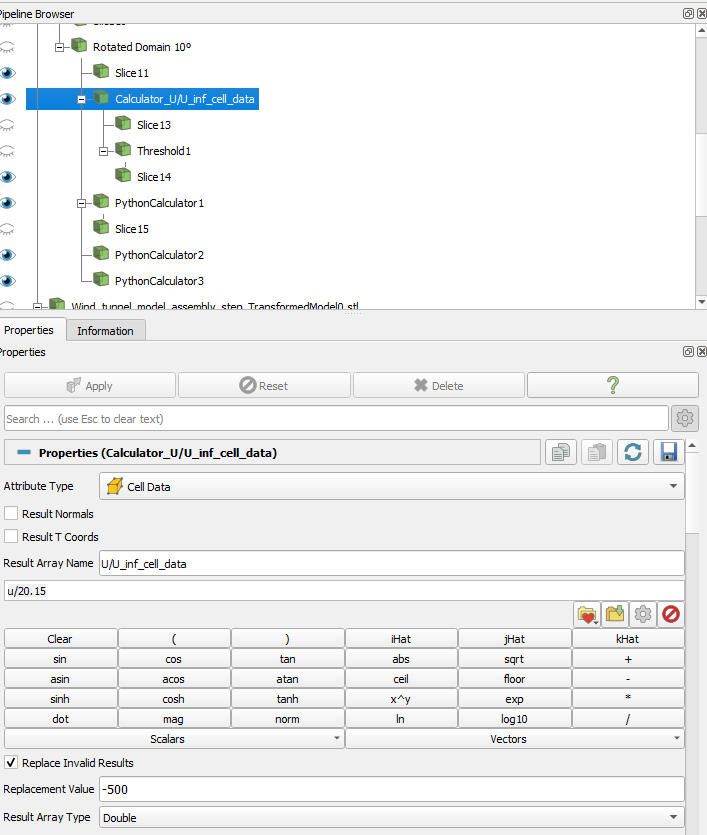
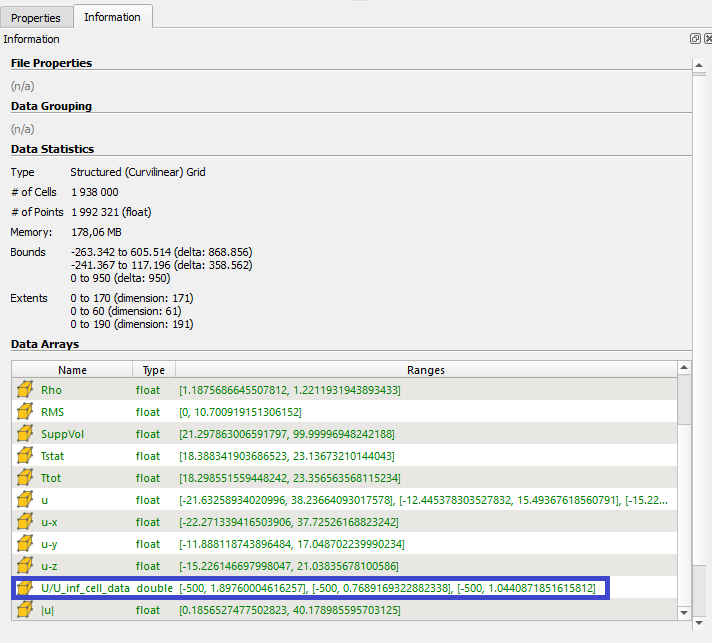
The regular (non-Python) Calculator filter still works correctly even after the Transform filter, and it keeps u as a proper vector with the Magnitude/X/Y/Z selector.
So the issue seems specific to the Python Calculator when it’s placed after a Transform filter.
Question: Why does this happen, and is there a way to keep the vector shape intact when using the Python Calculator after a Transform filter?
I tried to reproduce your problem in ParaView 5.11,2, 5.13, and 6.2.0-RC1 (my 5.12 installation wasn’t working) on macOS using this pipeline:
FastUniformGrid → Point Data to Cell Data → Transform → Python Calculator with expression “Swirl/20.15”.
Both the “Swirl” cell data array produced by the Transform filter and the “result” array computed by the Python Calculator have three components, so I was unable to reproduce.
I also tried renaming “Swirl” to “u” in case there was anything special about the name “u” (there shouldn’t be), but that still worked fine.
Are you able to share sample data that is showing you this bug?
Yes, of course I can share the data. What is the best way to do it? (I can share anything you need).
I’m also uploading screenshots of both calculator’s Properties and Information windows, where you can see that for the normal calculator the output is a vector, but the same does not happen for the Python calculator.
Btw, I’m using the Python calculator because when I use the normal calculator filter, there in no way for the replacement value to be NaN, which is what I need. And if I unselect the “Replace Invalid Results” option, an error occurs.
Thanks for sharing the dataset. The culprit is with the array “|u|”. That is a scalar array and what is happening is that when the array name is converted to a valid Python array name, the pipes “|” get removed and you end up with another array named “u”. That’s a gotcha with using the Python Calculator - you can end up with name collisions like this. ParaView should really warn about this happening…
So why the difference when you have applied a Transform filter or not? I expect it is a difference in the ordering of the arrays in the dataset produced by the reader and the one produced by the filter. If the true “u” is evaluated last, you get the vector array. If “|u|” is evaluated last, you get a scalar “version” of “u”.
The solution: make sure you are dealing unambiguosly with the array you want by using the syntax inputs[0].CellData['u'] instead of just u. It makes for a longer expression, but ensures you get the array you want unambiguously.
Thanks once again for looking into this. I will try your solution later today!
Just a small question: in this case, if I needed to use the array “|u|”, how would I access it? Would it be inputs[0].CellData[‘|u|’]?
Another thing: is there any way to not have to turn on the “Replace Invalid Results” option in the calculator in my case. So that the points/cells of the domain where no measurements were taken, remain like that (with a NaN value). Basically, a way for those points/cells to be treated the same way they are with the Python Calculator?
I think when this feature was initially implemented (20 years ago!) NaN results were assumed to be the result of dividing by zero or some other operation that went awry - NaN as input to indicate a property of a point/cell was likely not considered.
 ParaView should really warn about this happening…