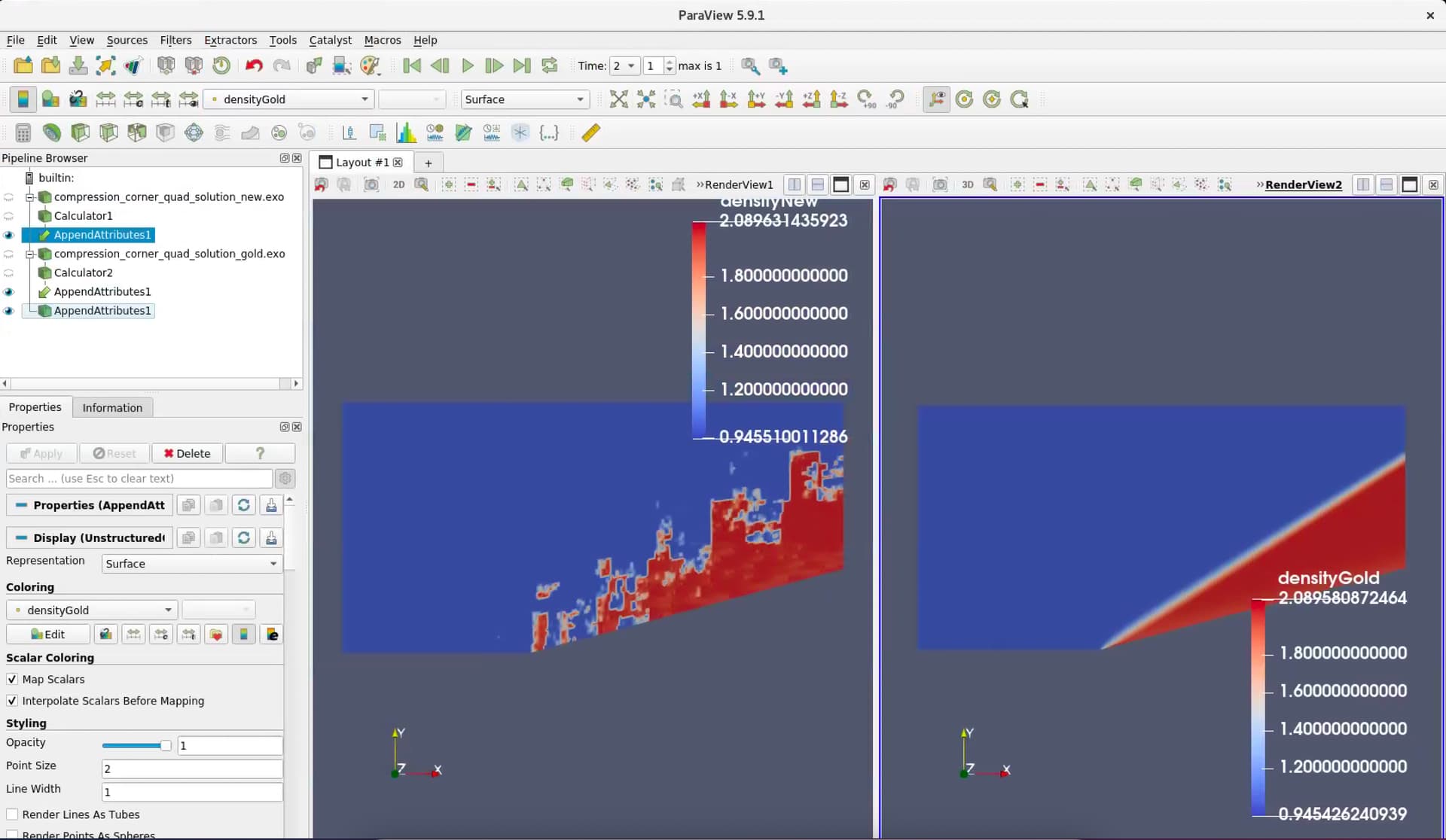
I am trying to compute the difference between two variables that are stored in two different solution files. The mesh and geometry are identical between the two files. After reading the documentation, I tried to use the AppendAttribute filter but see weird behavior. Before merging the two solution, I renamed the density variable to be densityNew and densityGold using a calculator filter.
I attached a screen shot showing the profiles of the two variables. The densityNew variable is not properly appended. I am not sure what is happening here. It looks like the ordering of the coordinates does not properly propagate when the AppenAttributes filter is used in this case.
I cannot reproduce this observed behavior in ParaView version 5.11.1 or 5.11.0-RC2. So if upgrading is an option, I recommend that. There may have been a bug fixed since 5.9.1.
I am still experiencing this problem in v6.1.0, but not for all files. When the problem does occur, however, it unfortunately makes the filter essentially useless
Precisely as was described by the original post, when appending two datasets together into a new dataset the data from the second set becomes corrupted with patches and irregular boundary patterns. Interestingly, the data values themselves appear to all be of the right magnitude, they are all just out of order. Whatever the issue here is it is very robust, I have been able to recreate it in multiple versions of Paraview both in Windows and in Linux, and on multiple datasets. The ability to combine data from multiple files is critical, for example, when trying to estimate local heat transfer coefficients by combining data from adiabatic and isothermal CFD simulations.
The problem does not appear to occur when appending Paraview’s internally-generated datasets. My issue occurs when loading TecPlot ASCII data (.dat format). There are two error messages which occur when attempting the append operation: “Tecplot zone record parameter “STRANDID” is currently unsupported” and “Tecplot zone record parameter “SOLUTIONTIME” is currently unsupported”. However, these messages are also displayed even for datasets on which the Append Attributes filter actually works properly. There appears to be no rhyme or reason as to which files the filter works for and which it doesn’t.