Hello,
I was looking to calculate the total volume of a surface mesh, from my previous knowledge and what i have found on the forum Compute volume of polygonal mesh (volume enclosed by the surface) - #2 by Christos_Tsolakis a volumetric mesh should be created and then the total volume can be easily calculated from integrate variables filter. from my knowledge, the only possibility in paraview to create a 3D mesh is 3D Delaunay?
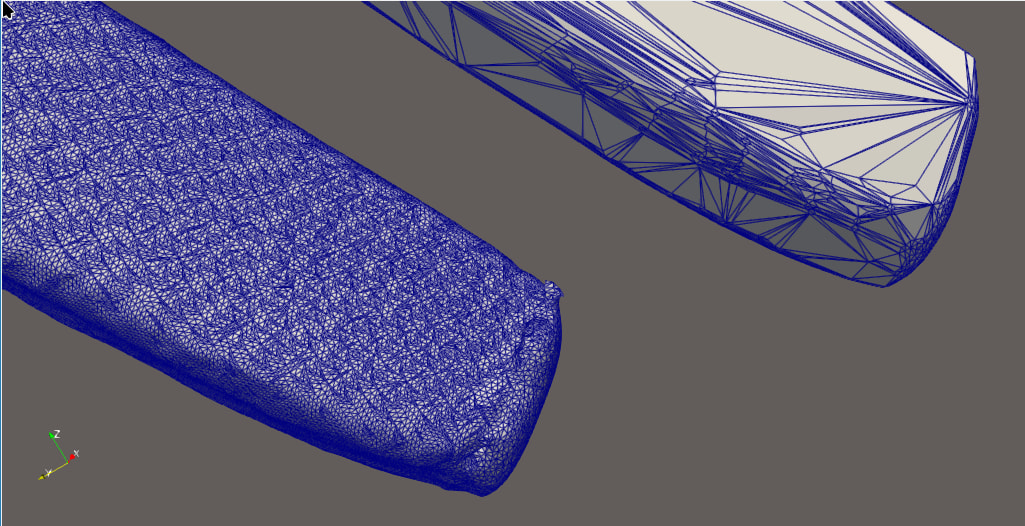
I am asking as it is giving me quite strange results (left stl right result of Delaunay3D filter):
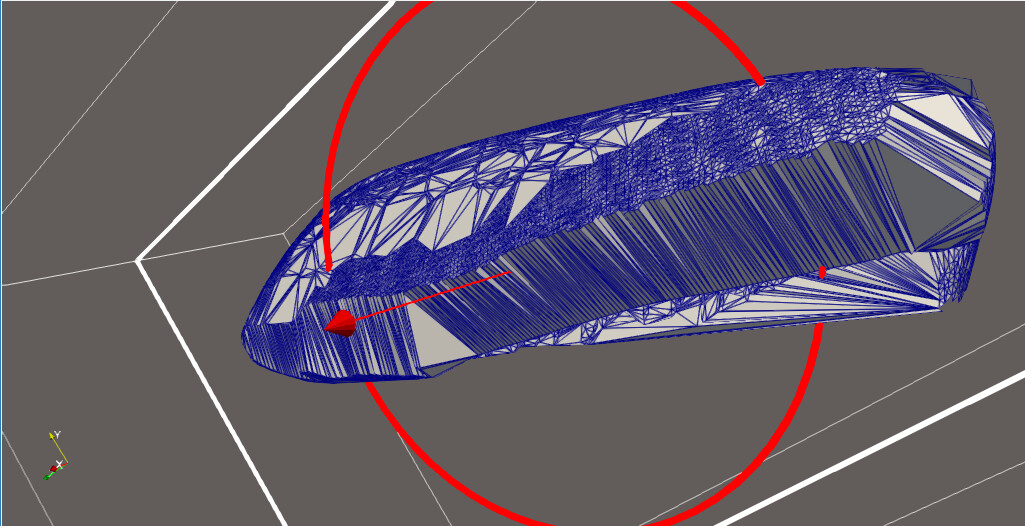
also here is the clip view, i see ‘internal’ small elements where there is a layer of external coarse elements? (the only thing showing is the clip of the delaunay3D there is not the surface mesh in this renderviewer)
is there a cleaner way to do it in paraview without having to pass thought external meshers? or should i go necessarily go to an outside mesher and bring back the mesh to keep working on paraview? I really dont care about the mesh itself, so a classic advancing front approach with bad quality mesh elements would be more than enough but after some digging not sure this kind of thing is possible in paraview itself.
nop, still same issue on nightly I also tested in 6.0.1 (oldest verison i have) same behavior. is see ‘mini elements’ of similar size as the stl when cliping but really large elements outside. worth noticing that in nightly (or 6.2 also) i get a warning (that in 6.0.1 even though same looking result and way slower i was not getting):
Warning: In vtkDelaunay3D.cxx, line 958
vtkDelaunay3D (0x79399d894fb0): 2221 degenerate triangles encountered, mesh quality suspect
here is the model in case you want to play with (not sure if it is a bug or not): model.stl (3.3 MB)
Delaunay 3D tetrahedralizes the convex hull of the points and doesn’t respect the surface, so for a non-convex STL you get a hull full of tets outside the model and degenerate cells like the ones in your warning. That would explain the coarse outer layer you see in the clip. For a closed, watertight surface you can skip the volume mesh entirely: run Triangulate (and Clean if needed) and then compute the volume with vtkMassProperties in a Programmable Filter (Filter → Python), e.g. mp = vtk.vtkMassProperties(); mp.SetInputData(inputs[0]); mp.Update(); print(mp.GetVolume()). It gives the enclosed volume directly, as long as the mesh is closed and has consistent normals. Could you check with Feature Edges (boundary edges) that the STL has no open boundaries?
hello,
thanks for your answer! i knew about the convex limitation but i thought this was for ‘large convexity’ and not for something like my geometry which it is refined enough to have small difference in normal.
yes it is closed (i run alpha wrapper beforehand from VESPA (CGAL pluging)) for paraview.
i got it working with the following script in a programmable filter for a generic mesh:
just one issue with this approach, how can i extract this data from the programmable filter itself?
i mean for example it printed Mesh volume: 30.2. how can one get the 30.2 float value in python itself? one could create a single cell with a field of that specific value and fetch the data, but this is at minimum hackysh as hell, is there any ‘clean way to do it’?
In any case, for anyone that is looking for a solution and comes across this post:
from paraview import servermanager
from paraview.vtk.numpy_interface import dataset_adapter as dsa

#ensure that the filter is vtkPolyData type
if filter.GetDataInformation().GetDataSetTypeAsString()!='vtkPolyData':
    filterToUse=ExtractSurface(Input=filter)
else:
    filterToUse=filter

programmableFilter1 = ProgrammableFilter(registrationName='ProgrammableFilter1', Input=filter,OutputDataSetType='vtkPolyData',)
programmableFilter1.Script="""
import vtk
mesh = self.GetInputDataObject(0, 0)
surface = vtk.vtkDataSetSurfaceFilter()
surface.SetInputData(mesh)
surface.Update()
triangulate = vtk.vtkTriangleFilter()
triangulate.SetInputConnection(surface.GetOutputPort())
triangulate.Update()
mp = vtk.vtkMassProperties()
mp.SetInputConnection(triangulate.GetOutputPort())
mp.Update()
volume = mp.GetVolume()
area = mp.GetSurfaceArea()
# Create output: one point and one vertex cell
output.Initialize()
points = vtk.vtkPoints()
points.InsertNextPoint(0.0, 0.0, 0.0)
output.SetPoints(points)
vertices = vtk.vtkCellArray()
vertices.InsertNextCell(1)
vertices.InsertCellPoint(0)
output.SetVerts(vertices)
# Check boundary edges
boundaryEdges = vtk.vtkFeatureEdges()
boundaryEdges.SetInputConnection(triangulate.GetOutputPort())
boundaryEdges.BoundaryEdgesOn()
boundaryEdges.FeatureEdgesOff()
boundaryEdges.NonManifoldEdgesOff()
boundaryEdges.ManifoldEdgesOff()
boundaryEdges.Update()
nBoundary = boundaryEdges.GetOutput().GetNumberOfCells()
# Check non-manifold edges
nonManifoldEdges = vtk.vtkFeatureEdges()
nonManifoldEdges.SetInputConnection(triangulate.GetOutputPort())
nonManifoldEdges.BoundaryEdgesOff()
nonManifoldEdges.FeatureEdgesOff()
nonManifoldEdges.NonManifoldEdgesOn()
nonManifoldEdges.ManifoldEdgesOff()
nonManifoldEdges.Update()
nNonManifold = nonManifoldEdges.GetOutput().GetNumberOfCells()
isClosed = nBoundary == 0 and nNonManifold == 0
if not isClosed:
    print("Mesh is not closed!")
    volume=0
for name, value in [("Volume", volume), ("Area", area)]:
    array = vtk.vtkDoubleArray()
    array.SetName(name)
    array.InsertNextValue(value)
    output.GetCellData().AddArray(array)
print("Mesh area:", area)
print("Mesh volume:", volume)"""
data=dsa.WrapDataObject(servermanager.Fetch(programmableFilter1))
volume=data.CellData['Volume']
area=data.CellData['Area']
if the volume is still ==0 (meaning it is not manifold) one can use VESPA pluging with fill holes (or worst case scenario alpha wrapping) to create a new manifold watertight mesh in paraview itself, and extract the volume and area using the same ProgrammableFilter