I am trying to visualize a Janus particle using Sphere-Surface-Glyph in ParaView. My goal is to create a hemisphere/sphere glyph whose symmetry axis is aligned with the Z-axis. I noticed that ParaView Glyph orientation assumes the default orientation of the source geometry along the X-axis (as also mentioned in previous discussions). Therefore, my custom hemisphere glyph was initially oriented with its symmetry axis along X.
To make the glyph physically match my particle coordinate system, I applied a Transform filter and rotated the glyph source by 90 degrees around the Y-axis, so that the symmetry axis became aligned with Z.
The geometry orientation is now correct, and the Glyph Orientation vector works as expected. However, I face an issue with lighting: when the particle rotates, the shading/highlight pattern changes as if the light is rotating together with the object. Even when I use a fixed light source (Scene/Headlight), the illumination appearance changes with the glyph rotation.
My understanding is that the Transform rotates the geometry and therefore also rotates the surface normals used for lighting calculations. And I could confirm this by skipping Transformation, and getting expected lighting. I would like to let the glyph rotate without affecting the apparent illumination. Is there a recommended workflow for this?
Now, load the files and use dir for orientation in glyph.
I used a Arrow glyph first to see if arrow points in z and -y axes as specified in files - and it works.
Simplest way to reproduce, make a sphere glyph with the same data, and set Glyph Transform -Rotate to 0,90,0 - it orients the sphere in same direction as vector.
Now, try moving between frames, and you can see lighting changes. Remove Glyph rotation transform, and it will be gone.
For better visualization, or when I faced this problem: make two sphere glyphs, both rotated 90degree about Y-axis (0,90,0) but set Phi for firs one from 0 to 90, where as for second one set it from 90 to 180. And color them differently.
I have tried changing lighting with options camera, scene, headlight, ambient and all of them looks similar.
Hi, I only meant to say about the difference that can be seen.
Attached is the state file, and two configurations. Let me know if this is enough, I am new to this. Lighting_issue.pvsm (486.5 KB) config1.vtk (189 Bytes) config2.vtk (190 Bytes)
I didn’t have to set two hemispheres, rotating just one sphere Glyph could reproduce the same.
p.s: at the same time, I have noticed this transform is not required if I use ‘Flat’ as interpolation. Problem was with ‘Gouraud’ - does that make sense?
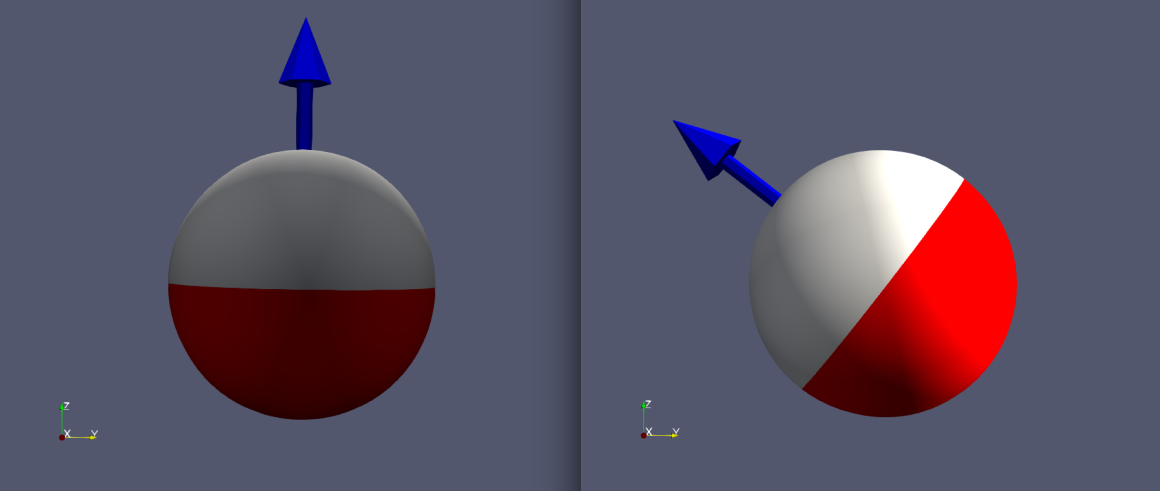
 .
.